
矩形模板与探究问题:动态四边形性质演示
几何画板及绘图内容加载中,请稍等……
所属专题
Congruence (CO) Cluster
Congruence (Vol 2)
CCSS High School: Geometry (Congruence) Volume 2
CCSS High School: Geometry (Congruence) Volume 2
CCSS High School: Geometry (Congruence) Volume 2
Geometry (Congruence) Volume 2
CCSS High School: Geometry (Congruence) Volume 2
CCSS High School: Geometry (Congruence) Volume 2
CCSS High School: Geometry (Congruence) Volume 2
CCSS High School: Geometry (Congruence) Volume 2
CCSS High School: Geometry (Congruence) Volume 2
CCSS High School: Geometry (Congruence) Volume 2
Gail LeBlancCCSS High School: Geometry (Congruence) Volume 2
CCSS High School: Geometry (Congruence) Volume 2
CCSS High School: Geometry (Congruence) Volume 2
Unit 7: Polygons and Quadrilaterals
Quadrilaterals
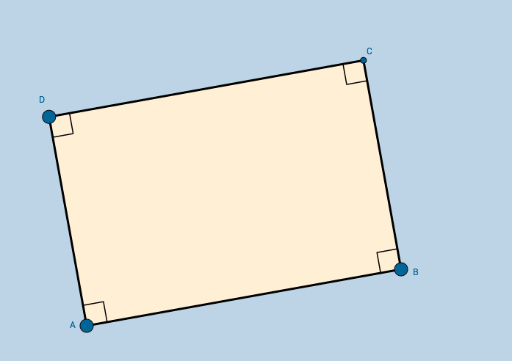
本范例演示了一个可动态修改但始终保持矩形性质的四边形。核心数学概念涵盖矩形的定义、内角和、对称性及几何约束。作图要点基于 GeoGebra 命令,包括线段、垂线、点、交点、角度测量及多边形绘制,确保形状约束。适合初中至高中学生进行几何探究、课堂演示或作为基础模板使用,帮助学生直观理解矩形特征。
GeoGebra 命令及参数
Segment(A, B) → aOrthogonalLine(A, a) → bOrthogonalLine(B, a) → cPoint(b) → DOrthogonalLine(D, b) → dIntersect(c, d) → CSegment(D, A) → eSegment(D, C) → fSegment(C, B) → gAngle(C, B, A) → αAngle(B, A, D) → βAngle(A, D, C) → γAngle(D, C, B) → δPolygon(A, B, C, D) → poly1, a_1, b_1, c_1, d_1
AI 绘图提示语参考
绘制一个动态矩形,由四个顶点构成。先画一条水平底边,从底边两端分别向上作垂线,在左侧垂线上任取一点作为左上顶点,再过该点作水平线,与右侧垂线相交得到右上顶点。连接四个顶点形成矩形,并标出四个内角,每个角都显示为直角。矩形可调整,但始终保持矩形形状,用于探索矩形性质、角度与对称性。
以上提示语为根据原始绘图命令整理而来,仅供参考。