
有理函数图像绘制器
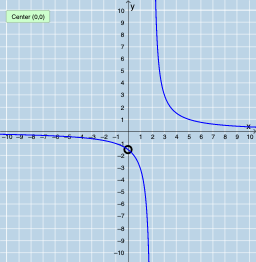
几何画板及绘图内容加载中,请稍等……
这个范例演示了有理函数的图像绘制。涉及的核心数学概念包括函数、极限、部分分式等。通过使用GeoGebra命令如Root、Intersection、Length等,可以绘制出有理函数的图像,并观察其根、渐近线等特性。适合高中数学教学和学习使用。
GeoGebra 命令及参数
Root(Denominator[r]) → A, B, CIntersection(rootsd, rootsm) → commonrootsLength(commonroots) → numberofholesSequence(x = x(Element[commonroots, i]), i, 1, numberofholes, 1) → linesSequence(x(Element[commonroots, i]), i, 1, numberofholes, 1) → xvals, {0}Sequence((Element[xvals, i], r(Element[xvals, i])), i, 1, numberofholes, 1) → holesSequence(Limit[r, Element[xvals, i]], i, 1, numberofholes, 1) → list1Sequence((Element[xvals, i], Element[list1, i]), i, 1, numberofholes, 1) → list2Limit(r, Infinity) → aLimit(r, -Infinity) → bTextfield(f) → InputBox1Textfield(g) → InputBox2PartialFractions(r) → p
AI 绘图提示语参考
画一个有理函数的图像,显示其根和渐近线,并标出所有孔洞。首先,找到分母的根,然后计算根与分子根的交点以确定孔洞位置。接着,在孔洞位置绘制小圆圈,并计算无穷大和负无穷大的极限值以确定水平渐近线。最后,将所有部分组合起来,展示函数的整体图像。
以上提示语为根据原始绘图命令整理而来,仅供参考。