
无字证明:a²-b²
几何画板及绘图内容加载中,请稍等……
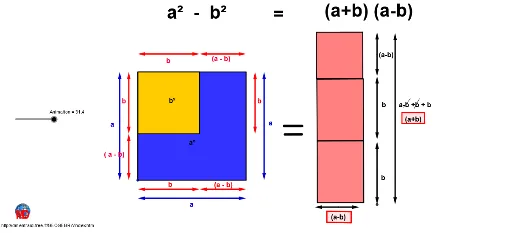
①本范例通过动态图形演示了差平方公式 a²-b² 的几何意义;②涉及核心数学概念包括代数、几何对称性、向量运算;③构造要点:运用了 Circle(圆)、Line(线)、Intersect(交点)、Polygon(多边形)、Midpoint(中点)、Vector(向量)、Rotate(旋转)、Segment(线段)、Tangent(切线)、Point(点)等 GeoGebra 命令与对象;④适合高中数学教学,用于直观理解代数恒等式的几何背景。
GeoGebra 命令及参数
Circle(A, a) → cLine(A, xAxis) → dIntersect(c, d) → B, CCircle(C, a) → eLine(C, yAxis) → fIntersect(e, f) → D, ELine(D, d) → gIntersect(c, g) → F, GPolygon(F, D, C, A) → poly1, f_1, d_1, c_1, a_1Intersect(g, f_1) → HCircle(F, b) → hIntersect(h, g) → I, JLine(J, f) → iIntersect(h, a_1) → K,Line(K, g) → jIntersect(i, j) → LPolygon(F, J, L, K) → poly2, f_2, j_1, l, kCircle(F, a / 6) → pCircle(D, a / 6) → qCircle(C, a / 6) → rCircle(A, a / 6) → sIntersect(p, g) → M, NIntersect(r, d) → Q, RIntersect(q, g) → S, TIntersect(q, f) → U, VIntersect(r, f) → W, ZLine(T, yAxis) → mLine(U, j) → nLine(M, i) → t_2Line(Z, d) → a1Intersect(p, n) → A1, B1Intersect(s, a1) → C1, D1Intersect(j, t_2) → E1Intersect(j, m) → F1Intersect(i, n) → G1Midpoint(G1, A1) → H1Midpoint(G1, U) → I1Midpoint(T, R) → J1Midpoint(C1, Z) → K1Midpoint(F, M) → L1Midpoint(K, E1) → M1Vector(J1, T) → uIntersect(r, m, 1) → P1Vector(J1, R) → vVector(I1, U) → wVector(I1, G1) → zVector(H1, G1) → u1Vector(H1, A1) → v1Midpoint(L1, M1) → Q1Vector(Q1, L1) → w1Vector(Q1, M1) → z1Vector(K1, Z) → d1Vector(K1, C1) → e1Midpoint(J, K) → S1Intersect(j, d_1) → U1Intersect(i, d) → V1Midpoint(A, C1) → W1Intersect(i, a1) → Z1Midpoint(V1, Z1) → A2Midpoint(C, Z) → B2Midpoint(W1, A2) → C2Midpoint(A2, B2) → D2Midpoint(D, T) → E2Midpoint(U1, F1) → F2Midpoint(E2, F2) → G2Vector(G2, E2) → h1Vector(G2, F2) → i1Vector(C2, A2) → j1Vector(C2, W1) → k1Vector(D2, A2) → l1Vector(D2, B2) → m1Polygon(J, D, U1, L) → poly3, j_2, d_2, u1_1, l_1Rotate(J, ((-Animation)) / 10, I2) → J'Rotate(D, ((-Animation)) / 10, I2) → D'Rotate(U1, ((-Animation)) / 10, I2) → U1'Rotate(L, ((-Animation)) / 10, I2) → L'Polygon(J', D', U1', L') → poly3', j', d', u1', l'Line(U1', yAxis) → q1Rotate(L, ((-Animation)) / 10, O) → PLine(L, yAxis) → c1Rotate(L, ((-Animation)) / 10, O) → H2Rotate(K, ((-Animation)) / 10, N1) → O1Segment(O1, H2) → b1Circle(H2, b) → f1Intersect(f1, b1) → J2,Circle(J2, a - b) → g1Tangent(J2, f1) → n1, p1Line(H2, n1) → r1Intersect(g1, n1) → K2, L2Line(K2, b1) → s1Intersect(r1, s1) → M2Polygon(K2, J2, H2, M2) → poly4, k2, j2, h2, m2Rotate(U1, ((-Animation)) / 10, R1) → N2Polygon(L, U1, C, V1) → poly5, l_2, u1_2, c_2, v1_1Rotate(C, ((-Animation)) / 10, R1) → O2Segment(O2, N2) → t1Circle(N2, a - b) → c2Tangent(O2, c2) → a2, b2Line(N2, a2) → d2Circle(O2, a - b) → e2Intersect(e2, a2) → P2, Q2Line(Q2, t1) → f2Intersect(d2, f2) → R2Polygon(O2, N2, R2, Q2) → poly6, o2, n2, r2, q2Circle(A, a / 6) → g2Line(L1, M1) → i2Line(A, V1) → l2Intersect(i2, l2) → S2Midpoint(M1, S2) → U2Intersect(g2, l2) → V2, W2Vector(E1, M) → u2Vector(E1, V2) → v2Vector(U2, M1) → w2Vector(U2, S2) → z2Polygon(F, J, L, K) → poly7, f_3, j_3, l_3, k_1Polygon(F, D, C, A, K) → poly8, f_4, d_3, c_3, a_2, k_2Polygon(U1', H2, J', D') → poly9, u1'_1, h2_1, j'_1, d'_1Polygon(K2, J2, P, M2) → poly10, k2_1, j2_1, p_1, m2_1Polygon(O2, Q2, R2, N2) → poly11, o2_1, q2_1, r2_1, n2_1Line(Z2, yAxis) → s2Point(s2) → B3Point(s2) → C3Vector(Z2, B3) → p2Point(s2) → A3Vector(Z2, A3) → t2Line(D3, xAxis) → a3Point(a3) → E3Point(a3) → F3Vector(D3, F3) → u3Vector(D3, E3) → v3Line(B3, xAxis) → b3Circle(B3, a / 6) → c3Intersect(c3, b3) → G3, H3Line(G3, p2) → d3Point(d3) → I3Point(d3) → J3Point(d3) → K3Midpoint(I3, G3) → L3Midpoint(I3, J3) → M3Midpoint(J3, K3) → N3Vector(L3, G3) → w3Point(d3) → O3Vector(L3, O3) → z3Vector(M3, I3) → e3Vector(M3, J3) → f3Vector(N3, J3) → g3Vector(N3, K3) → h3Polygon(P3, Q3, R3, S3) → poly12, p3, q3, r3, s3Polygon(U3, V3, W3, Z3) → poly13, u3_1, v3_1, w3_1, z3_1Segment(A4, B4) → i3Segment(C4, D4) → j3Segment(E4, F4) → k3Segment(G4, H4) → l3
AI 绘图提示语参考
绘制一个几何图形,用于直观展示平方差公式。先画一个大圆,圆心在原点,与横轴交于两点。以右侧交点为圆心,画等半径圆,与纵轴交于两点。连接这些点形成一个大正方形。在大正方形内部,以左下顶点为圆心,画一个半径较小的圆,与底边交于两点。从右侧交点作竖线,从小圆与竖线的交点作横线,与另一条线相交,形成一个小正方形。最后,在大正方形的四个顶点处各画一个小圆,并添加若干辅助线和中点,用箭头表示向量,以展示面积关系。
以上提示语为根据原始绘图命令整理而来,仅供参考。