
正方体的投影
几何画板及绘图内容加载中,请稍等……
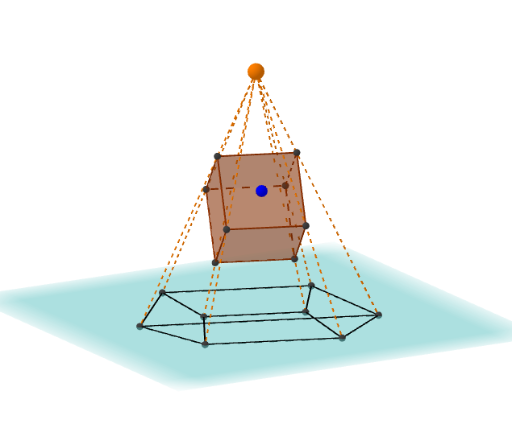
这个范例演示了正方体的投影。它涉及立体几何中的核心概念,如投影和平面。通过使用GeoGebra命令如Sphere、PointIn、Vector等,可以动态展示正方体在不同平面的投影效果。适合高中几何课程使用。
GeoGebra 命令及参数
Sphere((0, 0, 0), r) → sPointIn(s) → PVector(P) → uOrthogonalPlane(P, u) → aAngle(Vector[Z], Vector[P]) → φAngle(Vector[X], Vector[(x(P), y(P), 0)]) → θAngle(Vector[X], Vector[(x(P), y(P), 0)]) → θ'If(y(P) ≥ 0, (((r * sin(φ + π / 2)) * cos(θ)), ((r * sin(φ + π / 2)) * sin(θ)), (r * cos(φ + π / 2))), (((r * sin(φ + π / 2)) * cos(θ')), ((r * sin(φ + π / 2)) * sin(θ')), (r * cos(φ + π / 2)))) → QVector(Q) → vOrthogonalPlane(Q, v) → bIntersectPath(a, b) → jLine(O, d) → fIntersect(f, s) → A, RVector(R) → wOrthogonalPlane(R, w) → cIntersectPath(a, c) → kIntersect(j, k) → BIntersectPath(b, c) → gCube(C, B, D) → e, E, face5, face6, edge1, edge2, edge3, edge4, edge5, edge6, edge7, edge8, G, edge9, edge10, edge11, edge12, H, I, J, face1, face2, face3, face4Segment(C', G') → hSegment(G', H') → iSegment(C', B') → lSegment(B', H') → mSegment(B', D') → nSegment(C', E') → pSegment(E', D') → qSegment(G', J') → tSegment(J', E') → f_1Segment(I', H') → g_1Segment(J', I') → h_1Intersect(F, Line[S, B]) → B''Intersect(F, Line[S, C]) → C''Intersect(F, Line[S, D]) → D''Intersect(F, Line[S, E]) → E''Intersect(F, Line[S, G]) → G''Intersect(F, Line[S, H]) → H''Intersect(F, Line[S, I]) → I''Intersect(F, Line[S, J]) → J''Segment(C'', G'') → i_1Segment(G'', H'') → j_1Segment(C'', B'') → k_1Segment(B'', H'') → l_1Segment(E'', D'') → m_1Segment(E'', J'') → n_1Segment(J'', I'') → p_1Segment(I'', D'') → q_1Segment(C'', E'') → r_1Segment(D'', B'') → s_1Segment(J'', G'') → t_1Segment(I'', H'') → a_1Segment(S, B'') → b_1Segment(S, C'') → c_1Segment(S, D'') → d_1Segment(S, E'') → e_1Segment(S, H'') → f_2Segment(S, G'') → g_2Segment(S, J'') → h_2Segment(S, E'') → i_2Segment(S, I'') → j_2
AI 绘图提示语参考
画一个立方体,并展示其向不同平面的投影。首先绘制一个球体,然后在球体上取一点,通过该点绘制一个向量,并基于此向量创建一个正交平面。接着计算与坐标轴的夹角,根据这些角度计算投影点的坐标,并绘制投影路径。最后,将立方体与投影路径结合,展示其在不同平面上的投影效果。
以上提示语为根据原始绘图命令整理而来,仅供参考。