
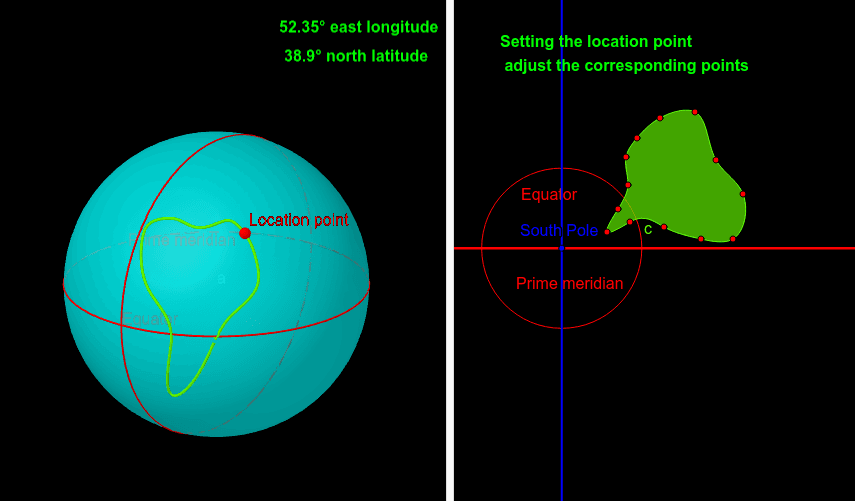
绘制你的国家轮廓
几何画板及绘图内容加载中,请稍等……
所属专题
On Sphere
这个范例通过绘制国家的轮廓来展示解析几何和多边形的概念。它使用了Spline、Intersect、Point、Sphere等GeoGebra命令,通过点和线段的构造来模拟国家的边界。适合高中学生和数学爱好者学习和探索几何作图。
GeoGebra 命令及参数
Spline({R, S, T, V, Z, A_1, B_1, C_1, D_1, E_1, F_1, G_1, H_1, R}, 3) → cIntersect(zAxis, xAxis) → APoint(zAxis) → BSphere(A, B) → aPoint(c) → CPoint(yAxis) → FPoint(yAxis) → OLocus(D, C) → loc1IntersectPath(xOyPlane, a) → eRotate(e, π / 2, xAxis) → e'PointIn(a) → A1Plane(A1, xOyPlane) → dIntersectPath(d, a) → fPlane(A1, (0, 0, 1), (0, 0, -1)) → gIntersectPath(g, a) → hIntersectIntersect(e, h) → E, U, ,IntersectIntersect(e, e') → W, I_1, ,Segment(E, (0, 0, 0)) → iSegment(W, (0, 0, 0)) → jSegment(A1, (0, 0, 0)) → kAngle(j, i) → αAngle(i, k) → βIntersect(xAxis, yAxis) → J_1Point(xAxis) → K_1Line(J_1, K_1) → lPoint(yAxis) → L_1Point(l) → M_1Line(L_1, M_1) → m