
Numbers分类与几何图形作图
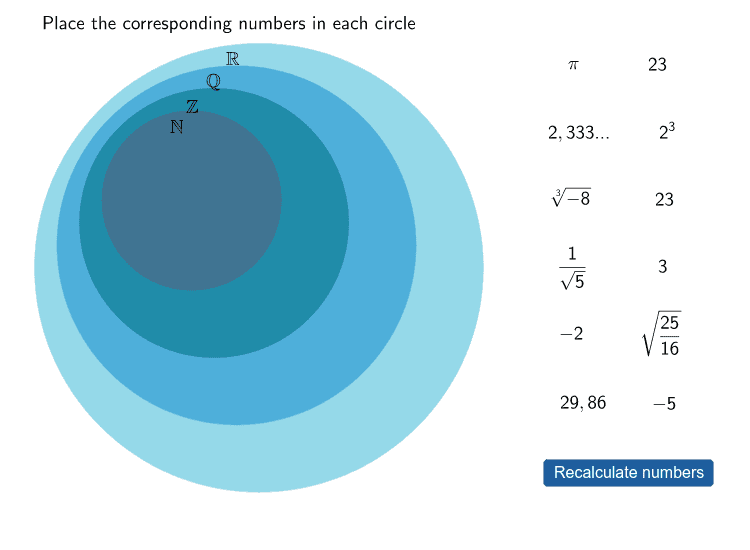
几何画板及绘图内容加载中,请稍等……
本范例通过GeoGebra演示Numbers分类与几何图形的关系。核心数学概念包括几何作图、坐标几何和函数图像。作图要点涉及使用Sequence、Random、Element等命令构造图形,并利用I_2、G_2等对象进行操作。适合初中生学习几何基础和函数图像绘制。
GeoGebra 命令及参数
Sequence(Sample[{1, 2, 3, 4, 5, 6, 7, 8, 9, 10}, 10, false], i, 1, 10) → matriu1Random(1, 10) → fElement(matriu1, f, 1) → nn1Element(matriu1, f, 2) → nn2Element(matriu1, f, 3) → zz1Element(matriu1, f, 4) → zz2Element(matriu1, f, 5) → qq1Element(matriu1, f, 6) → qq2Element(matriu1, f, 7) → rr1Element(matriu1, f, 8) → rr2Element(matriu1, f, 9) → ii1Element(matriu1, f, 10) → ii2Circle(Z, D) → c_1Circle(Q, F) → d_1Circle(R, H) → e_1Element(matriu1, f, 1) → B1Element(matriu1, f, 2) → B2Element(matriu1, f, 3) → B3Element(matriu1, f, 4) → B4Element(matriu1, f, 5) → B5Element(matriu1, f, 6) → B6Element(matriu1, f, 7) → B7Element(matriu1, f, 8) → B8Element(matriu1, f, 9) → B9Element(matriu1, f, 10) → B10Circle(I, J) → f_1If(Distance[Element[punts, B1], Z] < 2, true, false) → C1If(Distance[Element[punts, B2], Z] < 2, true, false) → C2If((Distance[Element[punts, B3], Q] < 3) ∧ (Distance[Element[punts, B3], Z] > 2), true, false) → C3If((Distance[Element[punts, B4], Q] < 3) ∧ (Distance[Element[punts, B4], Z] > 2), true, false) → C4If((Distance[Element[punts, B5], R] < 4) ∧ (Distance[Element[punts, B5], Q] > 3), true, false) → C5If((Distance[Element[punts, B6], R] < 4) ∧ (Distance[Element[punts, B6], Q] > 3), true, false) → C6If((Distance[Element[punts, B7], I] < 5) ∧ (Distance[Element[punts, B7], R] > 4), true, false) → C7If((Distance[Element[punts, B8], I] < 5) ∧ (Distance[Element[punts, B8], R] > 4), true, false) → C8If(Distance[Element[punts, B9], Z] < 2, true, false) → C9If(Distance[Element[punts, B10], Z] < 2, true, false) → C10Polygon(A, C, E, G) → Polígon1, a, c_2, e_2, g_1Polygon(M1 + (0.5, 0.5), M1 + (0.5, (-0.5)), M1 + ((-0.5), (-0.5)), M1 + ((-0.5), 0.5)) → Polígon2, b, i, j, lPolygon(K, L, M, O) → Polígon3, k, l_1, m, oPolygon(P, S, T, U) → Polígon4, p, s, t_1, uPolygon(V, W, A_1, B_1) → Polígon5, v, w, a_1, b_1Polygon(C_1, D_1, E_1, F_1) → Polígon6, c_3, d_2, e_3, f_2Polygon(G_1, H_1, I_1, J_1) → Polígon7, g_2, h_1, i_1, j_1Polygon(K_1, L_1, M_1, N_1) → Polígon8, k_1, l_2, m_1, n_1Polygon(O_1, P_1, Q_1, R_1) → Polígon9, o_1, p_1, q_1, r_1Polygon(S_1, T_1, U_1, V_1) → Polígon10, s_1, t_2, u_1, v_1Polygon(W_1, Z_1, A_2, B_2) → Polígon11, w_1, z_1, a_2, b_2If(Distance[Element[punts, B1], I] < 5, true, false) → D1If(Distance[Element[punts, B2], I] < 5, true, false) → D2If(Distance[Element[punts, B3], I] < 5, true, false) → D3If(Distance[Element[punts, B4], I] < 5, true, false) → D4If(Distance[Element[punts, B5], I] < 5, true, false) → D5If(Distance[Element[punts, B6], I] < 5, true, false) → D6If(Distance[Element[punts, B7], I] < 5, true, false) → D7If(Distance[Element[punts, B8], I] < 5, true, false) → D8If(Distance[Element[punts, B9], I] < 5, true, false) → D9If(Distance[Element[punts, B10], I] < 5, true, false) → D10Polygon(C_2, D_2, E_2, F_2) → Polígon12, c_4, d_3, e_4, f_3Polygon(G_2, H_2, I_2, J_2) → Polígon13, g_3, h_2, i_2, j_2If((Distance[Element[punts, B11], I] < 4) ∧ (Distance[Element[punts, B11], R] > 3), true, false) → C11If(Distance[Element[punts, B11], I] < 5, true, false) → D11If(Distance[Element[punts, B12], I] < 5, true, false) → D12If((Distance[Element[punts, 12], Q] < 3) ∧ (Distance[Element[punts, 12], Z] > 2), true, false) → C12
AI 绘图提示语参考
画一个包含三个不同圆心和半径的圆,再添加一个额外的圆;在画布上绘制十一组四边形,每组由四个顶点构成,顶点按规则排列形成类似网格的排列;同时根据点到各圆心的距离将十个随机点分类,靠近第一个圆心的标记为一类,位于第二个圆与第一个圆之间的为另一类,位于第三个圆与第二个圆之间的为第三类,位于第四个圆与第三个圆之间的为第四类,其余归入第一类。整体展示数字分类与几何图形的对应关系。
以上提示语为根据原始绘图命令整理而来,仅供参考。