
数分类活动
几何画板及绘图内容加载中,请稍等……
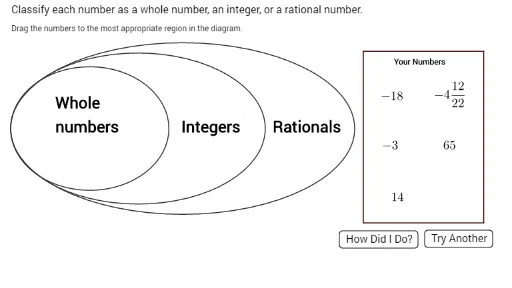
①本范例演示如何将数字分类为整数、有理数或自然数;②涉及核心数学概念包括数轴、分类、集合;③作图要点:使用Segment、Circle、Random、Sum、Text、Polygon等命令和对象进行可视化分类;④适合初中数学教学,用于帮助学生理解和掌握数的分类方法。
GeoGebra 命令及参数
Segment(center, point1) → SegRad1Circle(center, CircRad3) → circle3Circle(center, CircRad2) → circle2Circle(center, CircRad1) → circle1Random(0, 99) → RandNum1Random(0, 99) → RandNum2Random(1, 3) → diceroll1Circle(point1, 1) → HidePoint1Random(1, 9) → RandNum3Random(1, 2) → dicerollnegativeCircle(point2, 1) → HidePoint2Sum({count1, count2, count3, count4, count5}) → HelperFunction1Random(1, 3) → diceroll2Random(1, 3) → diceroll3Random(1, 3) → diceroll4Random(1, 3) → diceroll5Segment(center, point2) → SegRad2Segment(center, point3) → SegRad3Segment(center, point4) → SegRad4Segment(center, point5) → SegRad5Circle(point3, 1) → HidePoint3Circle(point4, 1) → HidePoint4Circle(point5, 1) → HidePoint5Circle(center, CircRad1) → circleshade1Circle(center, CircRad2) → circleshade2Circle(center, CircRad3) → circleshade3Circle((16, 2), 1.2) → startcircle2Circle((16, -1), 1.2) → startcircle3Circle((16, -4), 1.2) → startcircle4Circle((19, 2), 1.2) → startcircle1Circle((19, -1), 1.2) → startcircle5Text("Drag the numbers to the most appropriate region in the diagram.") → InstText("Your Numbers") → text4Polygon(A, B, C, D) → poly1, a, b, c, dText("Classify each number as a whole number, an integer, or a rational number.") → GenInstructions