
幂的乘积法则探索(NS1-02-XT1)
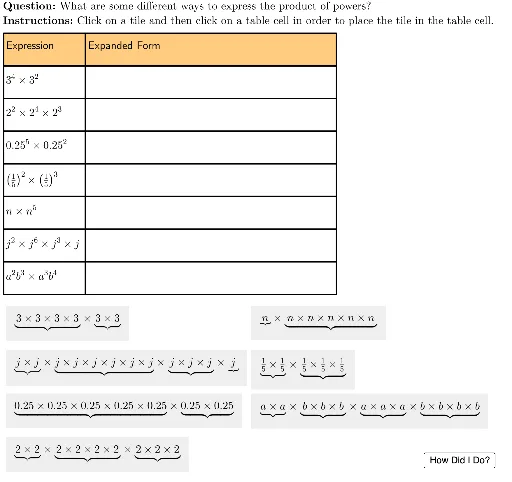
几何画板及绘图内容加载中,请稍等……
本范例通过交互式表格和动态反馈,直观演示同底数幂相乘时指数相加的运算法则。核心数学概念是指数运算中的乘积法则(Product of Powers),即a^m × a^n = a^(m+n)。作图要点包括:使用Sequence和Element生成指数形式的起始位置,通过UnicodeToLetter和LaTeX将指数转换为上标显示;利用多个对象(如O2、O8、G8等)构建指数形式与展开形式的对照表格,并通过按钮(TryAnother)和复选框(isChecked)实现随机出题与即时正误判断;表格布局由tableAnchor、rowHeight、col1Width等参数控制,确保界面清晰。适合初中或高中阶段学习指数运算的学生,用于课堂探究或自主练习,帮助理解幂运算的规律而非机械记忆。
GeoGebra 命令及参数
Sequence(Polygon[tableAnchor + (col1Width, 0 - (rowHeight * i)), tableAnchor + (col1Width + col2Width, 0 - (rowHeight * i)), tableAnchor + (col1Width + col2Width, 0 - (rowHeight * i) - rowHeight), tableAnchor + (col1Width, ((-rowHeight) * i) - rowHeight)], i, 0, lastRow - 1) → tableCol2Element(tableCol2, 2) → E2UnicodeToLetter(10003) → cmarkUnicodeToLetter(10007) → xmarkSequence(Polygon[tableAnchor + (0, 0 - (rowHeight * i)), tableAnchor + (col1Width, 0 - (rowHeight * i)), tableAnchor + (col1Width, 0 - (rowHeight * i) - rowHeight), tableAnchor + (0, ((-rowHeight) * i) - rowHeight)], i, 0, lastRow - 1) → tableCol1Element(tableCol1, 1) → B1Element(tableCol1, 2) → B2Element(tableCol1, 3) → B3Element(tableCol1, 4) → B4Element(tableCol1, 5) → B5Element(tableCol1, 6) → B6Element(tableCol2, 1) → E1Element(tableCol2, 3) → E3Element(tableCol2, 4) → E4Element(tableCol2, 5) → E5Element(tableCol2, 6) → E6Sequence(Polygon[tableAnchor + (col1Width + col2Width, 0 - (rowHeight * i)), tableAnchor + (col1Width + col2Width + col3Width, 0 - (rowHeight * i)), tableAnchor + (col1Width + col2Width + col3Width, 0 - (rowHeight * i) - rowHeight), tableAnchor + (col1Width + col2Width, ((-rowHeight) * i) - rowHeight)], i, 0, lastRow - 1) → tableCol3Element(tableCol3, 1) → M1Element(tableCol3, 2) → M2Element(tableCol3, 3) → M3Element(tableCol3, 4) → M4Element(tableCol3, 5) → M5Element(tableCol3, 6) → M6LaTeX("\text{Expression}") → A1LaTeX("3^4 \times 3^2") → A2LaTeX("2^2 \times 2^4 \times 2^3") → A3LaTeX("0.25^5 \times 0.25^2") → A4LaTeX("\left(\tfrac{1}{5}\right)^2 \times \left(\tfrac{1}{5}\right)^3") → A5LaTeX("n \times n^5") → A6LaTeX("j^2 \times j^6 \times j^3 \times j") → A7LaTeX("a^2b^3 \times a^3b^4") → A8Element(tableCol1, 7) → B7Element(tableCol1, 8) → B8LaTeX("\text{Expanded Form}") → C1Element(tableCol2, 7) → E7Element(tableCol2, 8) → E8LaTeX("\text{Exponential Form}") → K1Element(tableCol3, 7) → M7Element(tableCol3, 8) → M8LaTeX("\text{\textbf{Question: }What are some different ways to express the product of powers?\\\textbf{Instructions: }Click on a tile and then click on a table cell in order to place the tile in the table cell.}") → TEXTLaTeX("\text{You expanded and simplified the product of powers.}") → feedbackFinal
AI 绘图提示语参考
绘制一个用于练习指数乘法法则的交互式表格。表格分为三列,第一列显示指数表达式,如3的4次方乘以3的2次方、2的2次方乘以2的4次方乘以2的3次方等,第二列显示展开形式,第三列显示指数形式。表格上方有标题“Expression”、“Expanded Form”、“Exponential Form”,并包含一个说明文字,提示用户点击方块并放入表格单元格。表格下方有反馈文字,表示用户已正确展开并简化乘积。整体布局整齐,行高和列宽固定,适合学生自测。
以上提示语为根据原始绘图命令整理而来,仅供参考。