
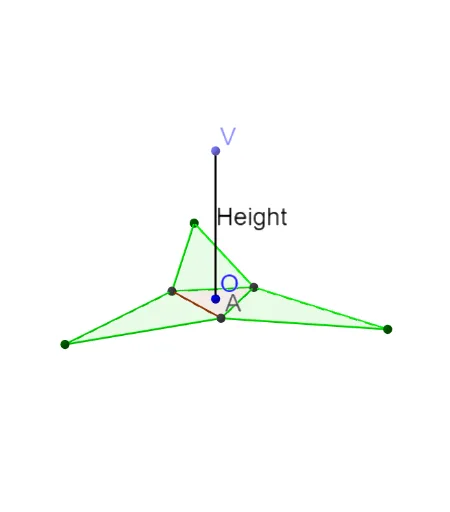
棱锥展开图
几何画板及绘图内容加载中,请稍等……
这个范例演示了棱锥的展开图。核心数学概念包括立体几何中的棱锥结构。通过使用GeoGebra命令如Sequence, Polygon, Line等,可以构造棱锥的展开图。适合初中及以上学生学习立体几何。
GeoGebra 命令及参数
Sequence(Rotate[A, ((360 * ° / n) * k), O], k, 0, n - 1, 1) → VerticesPolygon(Vertices) → PolygonLine(O, zAxis) → aPoint(a) → VSegment(O, V) → HeightSegment(A, V) → SlantEdgeVector((0, 0, 1)) → ZLineBisector(Element[Vertices, 1], Element[Vertices, 2]) → ReferencePerpendicularBisectorIntersect(ReferencePerpendicularBisector, Line[Element[Vertices, 1], Element[Vertices, 2]]) → ReferenceIntersectionPointVector(O, ReferenceIntersectionPoint) → ReferenceVectorUnitVector(ReferenceVector) → ReferenceUnitVectorSequence(Vector[Rotate[ReferenceUnitVector, ((360 * ° / n) * k), O]], k, 0, n - 1, 1) → ReferenceAllUnitVectorCircle(Element[Vertices, 1], SlantEdge) → cCircle(Element[Vertices, 2], SlantEdge) → dIntersect(c, d) → B, C, ,Segment(O, C) → FlattenLengthSequence(O + ((FlattenLength * cos(angle)) * Element[ReferenceAllUnitVector, k]) + ((Height * sin(angle)) * Z), k, 1, n, 1) → AllVerticesPolygon(Element[Vertices, 1], Element[AllVertices, 1], Element[Vertices, 2]) → poly1, b, e, fPolygon(Element[Vertices, 2], Element[AllVertices, 2], Element[Vertices, 3]) → poly2, g, h, iSequence(Polygon[Element[Vertices, k], Element[AllVertices, k], Element[Vertices, k + 1]], k, 1, n - 1, 1) → AllTrianglesPolygon(Element[Vertices, n], Element[AllVertices, n], Element[Vertices, 1]) → FinalTriangle, j, k, l