
蒙德里安艺术分数:颜色面积比例与分数求和
几何画板及绘图内容加载中,请稍等……
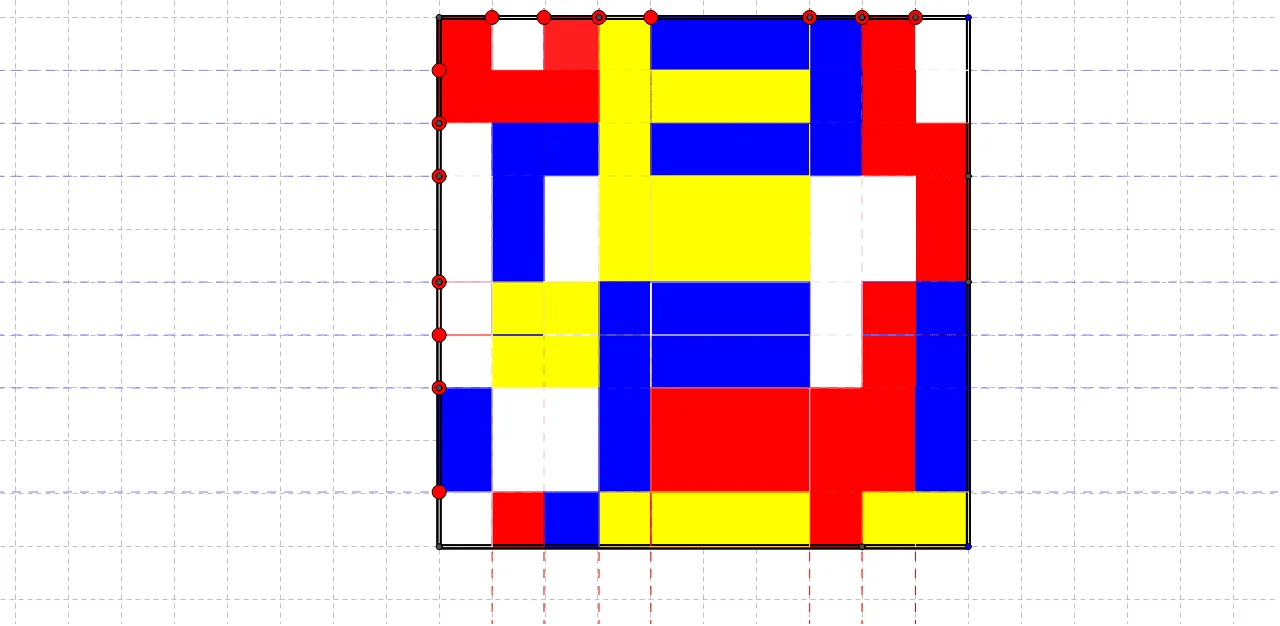
本范例通过蒙德里安风格的分割多边形,交互调整红、白、蓝、黄四种颜色所占面积比例,观察它们的总体分数如何计算与验证。核心数学概念包括分数与百分比的对应、面积占比/比例求和、以及在分割结构中进行几何交点定位以保证各部分面积一致性。作图要点:依据“构造摘要”中使用的 GeoGebra 命令 Polygon 与 Point 生成分割外轮廓与关键顶点,使用 Line 建立分割直线,再通过 Intersect 求出线段相交产生的交点,最后由这些点与多边形形成各颜色区域(对象如 A、B、poly1、C、D、E 及其后缀版本用于不同状态/分割层)。适合中学阶段开展分数建模、图形面积与比例关系的直观教学,也适合作为课堂互动探究或作业延伸,用滑块改变比例并引导学生完成“总和为多少分数、某颜色如何被另一颜色吸收”的思考。
GeoGebra 命令及参数
Polygon(A, B, 4) → poly1, a, b, c, d, C, DPoint(c) → ELine(E, b) → ePolygon(A_1, B_1, 4) → poly1_1, a_1, b_1, c_1, d_1, C_1, D_1Point(c) → FLine(F, e) → fPoint(c) → GLine(G, b) → gPoint(c) → HLine(H, b) → hPoint(c) → ILine(I, b) → iPoint(c) → JLine(J, b) → jPoint(c) → KLine(K, b) → kPoint(b) → LLine(L, c) → lPoint(b) → MLine(M, c) → mPoint(b) → NLine(N, c) → nPoint(b) → OLine(O, c) → pPoint(b) → PLine(P, c) → qPoint(b) → QLine(Q, a) → rPoint(b) → RLine(R, a) → sIntersect(j, l) → SIntersect(j, m) → TIntersect(j, n) → UIntersect(j, p) → VIntersect(j, q) → WIntersect(r, j) → ZIntersect(s, j) → F_1Intersect(s, poly1) → G_1, H_1Intersect(h, s) → I_1Intersect(r, h) → J_1Intersect(h, q) → K_1Intersect(h, poly1) → L_1, M_1Intersect(p, h) → N_1Intersect(h, n) → O_1Intersect(h, m) → P_1Intersect(h, l) → Q_1Intersect(e, l) → R_1Intersect(e, m) → S_1Intersect(e, n) → T_1Intersect(e, p) → U_1Intersect(e, q) → V_1Intersect(e, r) → W_1Intersect(e, s) → Z_1Intersect(s, g) → A_2Intersect(r, g) → B_2Intersect(g, q) → C_2Intersect(p, g) → D_2Intersect(n, g) → E_2Intersect(g, m) → F_2Intersect(g, l) → G_2Intersect(f, l) → H_2Intersect(f, poly1) → I_2, J_2Intersect(m, f) → K_2Intersect(f, n) → L_2Intersect(p, poly1) → M_2, N_2Intersect(p, f) → O_2Intersect(f, poly1) → P_2, Q_2Intersect(q, f) → R_2Intersect(r, f) → S_2Intersect(s, f) → T_2Intersect(s, i) → U_2Intersect(r, i) → V_2Intersect(q, i) → W_2Intersect(p, i) → Z_2Intersect(n, poly1) → A_3, B_3Intersect(i, poly1) → C_3, D_3Intersect(n, i) → E_3Intersect(i, m) → F_3Intersect(i, l) → G_3Intersect(l, k) → H_3Intersect(m, k) → I_3Intersect(n, k) → J_3Intersect(p, k) → K_3Intersect(q, k) → L_3Intersect(r, poly1) → M_3, N_3Intersect(r, poly1) → O_3, P_3Intersect(k, r) → Q_3Intersect(k, s) → R_3Intersect(m, d) → S_3Intersect(l, d) → T_3Intersect(q, d) → U_3Intersect(e, a) → V_3Intersect(j, a) → W_3Intersect(e, poly1) → Z_3, A_4Intersect(g, a) → B_4Intersect(k, a) → C_4Polygon(C, L, S, J) → poly2, c_2, l_1, s_1, j_1Polygon(L, M, T, S) → poly3, l_2, m_1, t, s_2Polygon(M, N, U, T) → poly4, m_2, n_1, u, t_1Polygon(N, O, V, U) → poly5, n_2, o, v, u_1Polygon(O, P, W, V) → poly6, o_1, p_1, w, v_1Polygon(P, Q, Z, W) → poly7, p_2, q_1, z, w_1Polygon(Q, R, F_1, Z) → poly8, q_2, r_1, f_1, z_1Polygon(R, B, W_3, F_1) → poly9, r_2, b_2, w_3, f_2Polygon(W_3, F_1, I_1, L_1) → poly10, w_2, f_3, i_1, l_3Polygon(F_1, Z, J_1, I_1) → poly11, f_4, z_2, j_2, i_2Polygon(W, Z, J_1, K_1) → poly12, w_4, z_3, j_3, k_1Polygon(W, K_1, N_1, V) → poly13, w_5, k_2, n_3, v_2Polygon(V, U, O_1, N_1) → poly14, v_3, u_2, o_2, n_4Polygon(U, T, P_1, O_1) → poly15, u_3, t_2, p_3, o_3Polygon(T, S, Q_1, P_1) → poly16, t_3, s_3, q_3, p_4Polygon(S, J, H, Q_1) → poly17, s_4, j_4, h_1, q_4Polygon(Q_1, R_1, E, H) → poly18, q_5, r_3, e_2, h_2Polygon(Q_1, P_1, S_1, R_1) → poly19, q_6, p_5, s_5, r_4Polygon(P_1, O_1, T_1, S_1) → poly20, p_6, o_4, t_4, s_6Polygon(O_1, N_1, U_1, T_1) → poly21, o_5, n_5, u_4, t_5Polygon(N_1, K_1, V_1, U_1) → poly22, n_6, k_3, v_4, u_5Polygon(K_1, J_1, W_1, V_1) → poly23, k_4, j_5, w_6, v_5Polygon(J_1, I_1, Z_1, W_1) → poly24, j_6, i_3, z_4, w_7Polygon(I_1, L_1, V_3, Z_1) → poly25, i_4, l_4, v_6, z_5Polygon(V_3, B_4, A_2, Z_1) → poly26, v_7, b_4, a_2, z_6Polygon(Z_1, W_1, B_2, A_2) → poly27, z_7, w_8, b_3, a_3Polygon(W_1, V_1, C_2, B_2) → poly28, w_9, v_8, c_3, b_5Polygon(V_1, C_2, D_2, U_1) → poly29, v_9, c_4, d_2, u_6Polygon(U_1, T_1, E_2, D_2) → poly30, u_7, t_6, e_3, d_3Polygon(T_1, S_1, F_2, E_2) → poly31, t_7, s_7, f_5, e_4Polygon(S_1, R_1, G_2, F_2) → poly32, s_8, r_5, g_2, f_6Polygon(R_1, E, G, G_2) → poly33, r_6, e_5, g_1, g_3Polygon(G_2, H_2, F, G) → poly34, g_4, h_3, f_7, g_5Polygon(G_2, F_2, K_2, H_2) → poly35, g_6, f_8, k_5, h_4Polygon(F_2, E_2, L_2, K_2) → poly36, f_9, e_6, l_5, k_6Polygon(E_2, D_2, O_2, L_2) → poly37, e_7, d_4, o_6, l_6Polygon(D_2, C_2, R_2, O_2) → poly38, d_5, c_5, r_7, o_7Polygon(C_2, B_2, S_2, R_2) → poly39, c_6, b_6, s_9, r_8Polygon(B_2, A_2, T_2, S_2) → poly40, b_7, a_4, t_8, s_{10}Polygon(A_2, B_4, I_2, T_2) → poly41, a_5, b_8, i_5, t_9Polygon(I_2, C_3, U_2, T_2) → poly42, i_6, c_7, u_8, t_{10}Polygon(T_2, S_2, V_2, U_2) → poly43, t_{11}, s_{11}, v_{10}, u_9Polygon(S_2, R_2, W_2, V_2) → poly44, s_{12}, r_9, w_{10}, v_{11}Polygon(R_2, O_2, Z_2, W_2) → poly45, r_{10}, o_8, z_8, w_{11}Polygon(O_2, L_2, E_3, Z_2) → poly46, o_9, l_7, e_8, z_9Polygon(L_2, E_3, F_3, K_2) → poly47, l_8, e_9, f_{10}, k_7Polygon(K_2, F_3, G_3, H_2) → poly48, k_8, f_{11}, g_7, h_5Polygon(H_2, G_3, I, F) → poly49, h_6, g_8, i_7, f_{12}Polygon(G_3, H_3, K, I) → poly50, g_9, h_7, k_9, i_8Polygon(G_3, F_3, I_3, H_3) → poly51, g_{10}, f_{13}, i_9, h_8Polygon(E_3, J_3, I_3, F_3) → poly52, e_{10}, j_7, i_{10}, f_{14}Polygon(E_3, Z_2, K_3, J_3) → poly53, e_{11}, z_{10}, k_{10}, j_8Polygon(Z_2, W_2, L_3, K_3) → poly54, z_{11}, w_{12}, l_9, k_{11}Polygon(W_2, V_2, Q_3, L_3) → poly55, w_{13}, v_{12}, q_7, l_{10}Polygon(V_2, U_2, R_3, Q_3) → poly56, v_{13}, u_{10}, r_{11}, q_8Polygon(U_2, C_3, C_4, R_3) → poly57, u_{11}, c_8, c_9, r_{12}Polygon(C_4, R_3, G_1, A) → poly58, c_{10}, r_{13}, g_{11}, a_6Polygon(R_3, Q_3, M_3, G_1) → poly59, r_{14}, q_9, m_3, g_{12}Polygon(Q_3, M_3, U_3, L_3) → poly60, q_{10}, m_4, u_{12}, l_{11}Polygon(L_3, K_3, N_2, U_3) → poly61, l_{12}, k_{12}, n_7, u_{13}Polygon(K_3, J_3, B_3, N_2) → poly62, k_{13}, j_9, b_9, n_8Polygon(J_3, I_3, S_3, B_3) → poly63, j_{10}, i_{11}, s_{13}, b_{10}Polygon(I_3, H_3, T_3, S_3) → poly64, i_{12}, h_9, t_{12}, s_{14}Polygon(H_3, K, D, T_3) → poly65, h_{10}, k_{14}, d_6, t_{13}
AI 绘图提示语参考
画一个以多边形为外框的“蒙德里安”分割图,用折线网格把外形切成若干相邻区域,并让这些区域的面积比例可用于讨论分数与百分比。先给出外接多边形顶点并形成外边界;在外框内部选择若干关键方向的分割线,通常通过同一条基准边与多个通过特定点的直线来确定切割位置;再计算分割线两两交点,用交点作为新边界的端点,从而得到各个彩色区域的边界折线。最后得到由多组相交线共同限定的多块区域,适合比较不同颜色面积占总面积的分数和相对大小。
以上提示语为根据原始绘图命令整理而来,仅供参考。