
最大体积的盒子
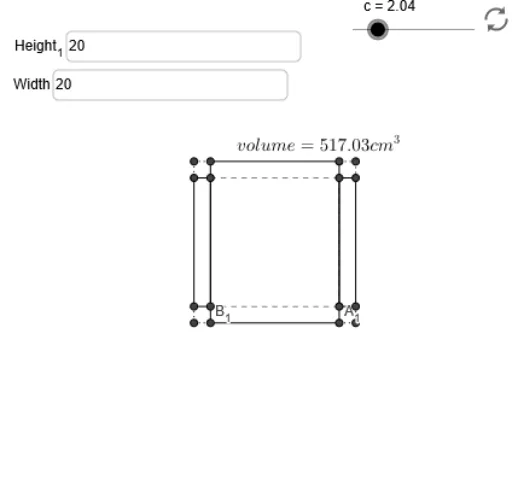
几何画板及绘图内容加载中,请稍等……
①本范例演示如何通过改变矩形的长宽比例,在给定周长的情况下构造一个体积最大的无盖盒子;②涉及的核心数学概念包括函数、微积分中的最值优化、解析几何;③作图要点——从下方『构造摘要』提炼用到了哪些 GeoGebra 命令/对象:Intersect(交点)、Textfield(文本框)、Segment(线段)、Max(最大值);④适合的学段或用途:高中数学,用于教授微积分应用和优化问题解决。
GeoGebra 命令及参数
Intersect(xAxis, yAxis) → ATextfield(w) → inputBox1Textfield(h) → Height_1Intersect(y = y(C_2), x = x(C_1)) → C_3Intersect(y = y(D_2), x = x(D_1)) → D_3Intersect(y = y(B_2), x = x(B_1)) → B_3Intersect(y = y(A_2), x = x(A_1)) → A_3Segment(D_1, C_1) → aSegment(C_3, C_2) → dSegment(C_2, A_2) → eSegment(A_3, A_2) → fSegment(A_1, B_1) → iSegment(B_2, B_3) → kSegment(D_2, B_2) → lSegment(D_2, D_3) → mSegment(D, D_1) → pSegment(D, D_2) → qSegment(B_2, B) → rSegment(B, B_1) → sSegment(A_1, A) → tSegment(A_2, A) → a_1Segment(C_2, C) → b_1Segment(C, C_1) → c_1Segment(B_3, D_1) → jSegment(D_3, B_1) → nSegment(C_3, A_1) → bSegment(A_3, C_1) → gSegment(B_3, D_3) → d_1Segment(D_3, C_3) → e_1Segment(B_3, A_3) → f_1Segment(A_3, C_3) → g_1Max(h_1, 0, (0.5 * Max[h, w])) → y_m