
矩形和菱形对角线长度
几何画板及绘图内容加载中,请稍等……
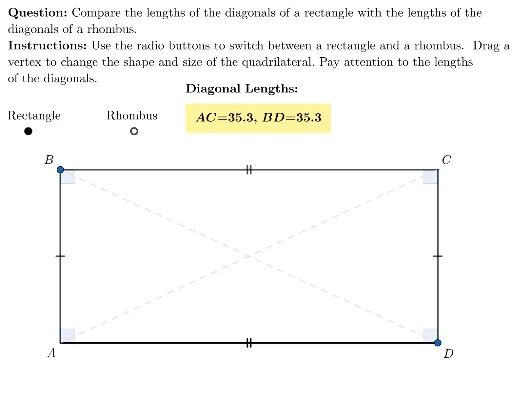
本范例演示矩形和菱形对角线长度的计算。核心数学概念包括几何作图、向量和最值优化。通过使用GeoGebra命令如Flatten、Circle、Polygon等,可以动态调整矩形和菱形的尺寸,观察对角线长度的变化。适合初中及以上学生学习几何和优化问题。
GeoGebra 命令及参数
Flatten(Sequence[Sequence[(i, j), i, left, right, 0.5], j, bottom, top, 1]) → gridSpaceCircle(Rcenter, 2) → RcenterCircPolygon({(left, bottom), (left, top), (-1, top), (-1, bottom)}) → R1RegionPointIn(R1Region) → R1UnitVector(Vector[R1, Rcenter]) → u1Polygon({(left, top), (left, bottom), (right, bottom), (right, top)}) → viewboxSegment(R1, R2) → diag1UnitOrthogonalVector(u1) → u2Min(Distance[Element[EndPoints, 1], Rcenter], Distance[Element[EndPoints, 2], Rcenter]) → maxLengthRLaTeX((((("\text{\textbf{Question: }" * QUESTION) * "\\\textbf{Instructions: }") * INSTRUCTIONS) * "}")) → allInstrucPointIn(viewbox) → A12PointIn(viewbox) → A13Intersect(Line[A13, v], Line[A12, u]) → A15Intersect(Line[A13, u], Line[A12, v]) → A14Segment(A12, A14) → B12Segment(A12, A15) → B14Segment(A13, A14) → B13Segment(A13, A15) → B15Segment(A12, A13) → D12Segment(A14, A15) → D13If(Angle[A14, A12, A15] ≟ 90°, Angle[A14, A12, A15], Angle[A15, A12, A14]) → C12If(Angle[A15, A13, A14] ≟ 90°, Angle[A15, A13, A14], Angle[A14, A13, A15]) → C13If(Angle[A13, A14, A12] ≟ 90°, Angle[A13, A14, A12], Angle[A12, A14, A13]) → C14If(Angle[A12, A15, A13] ≟ 90°, Angle[A12, A15, A13], Angle[A13, A15, A12]) → C15Element(radioButtonLocations, RECTANGLE) → rbRectangleElement(radioButtonLocations, RHOMBUS) → rbRhombusElement(radioButtonLocations, showObject) → highlightButtonSequence(Rcenter + (i * u2), i, 2, maxLengthR, 0.5) → R3RegionPoint(R3Region) → R3Mirror(R3, diag1) → R4Segment(R1, R3) → Rside1Segment(R3, R2) → Rside2Segment(R2, R4) → Rside3Segment(R4, R1) → Rside4Segment(R3, R4) → diag2Ray(Rcenter, u2) → rayRcenter