
两圆柱的交线 by Tomáš Vysloužil
几何画板及绘图内容加载中,请稍等……
所属专题
intersection: surface-surface, curve-curve
intersection: surface-surface, curve-curve
intersection: surface-surface, curve-curve
intersection: surface-surface, curve-curve
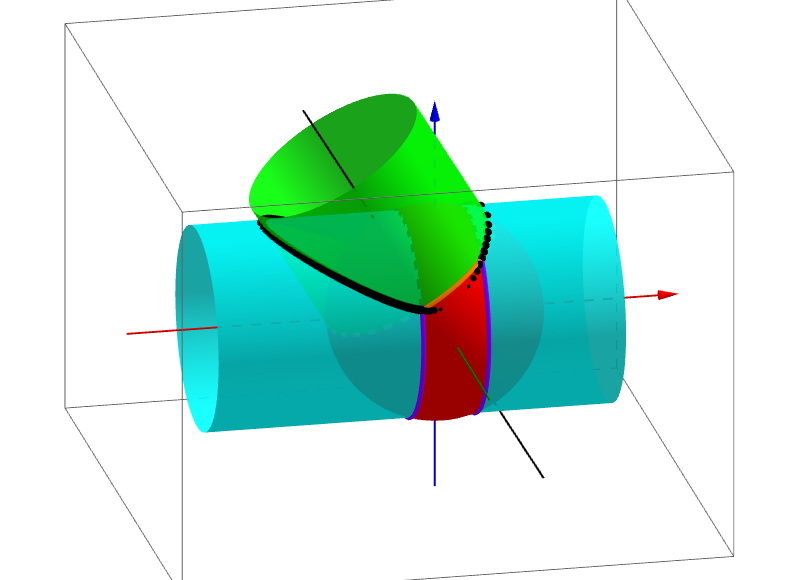
这个范例演示了两个圆柱的交线。涉及的核心数学概念包括立体几何中的圆柱和空间几何。作图要点包括使用Cylinder命令创建圆柱,使用IntersectPath命令找到交线。适合高中或大学的立体几何教学。
GeoGebra 命令及参数
Cylinder((0, 0, 0), (-3, 0, 5), r2) → e, f, g, hCylinder((5, 0, 0), (-7, 0, 0), r1) → a, c, d, bSphere((0, 0, 0), r) → iCircle(xAxis, ((-sqrt(r^(2) - 3^(2))), 0, (-3))) → kIntersectPath(j, e) → pCorner(p) → A, B, C, DIntersectPath(j, a) → qCorner(q) → E, F, G, HIntersectIntersect(p, q) → I, J, K, LLine((0, 0, 0), (-3, 0, 5)) → mIntersect(zAxis, xAxis) → MSegment(M, L) → lIntersect(xAxis, yAxis) → NSphere(M, vs) → nIntersect(m, n) → O, POrthogonalPlane(P, m) → oLine(B, L) → sIntersect(s, o) → QCircle(m, Q) → tIntersectIntersect(k, t) → R, S, ,Circle(xAxis, (sqrt(r^(2) - 3^(2)), 0, (-3))) → c_1IntersectIntersectIntersect(t, c_1) → T, U, ,
AI 绘图提示语参考
绘制两个相交的圆柱体,一个以原点为中心,另一个以(5,0,0)为中心。使用圆柱命令创建圆柱体,然后使用交路径命令找到它们的交线。接着绘制一个以原点为中心的球体,以及一个以x轴为底面的圆。通过交路径命令找到圆与交线的交点,构造交点的角点。最后,绘制交线与交点的线段,以及通过交点的垂直平面,找到垂直平面上的交点,构造最终的交线。
以上提示语为根据原始绘图命令整理而来,仅供参考。