
矩形面积互动练习:MT1-06-P2a-XT1
几何画板及绘图内容加载中,请稍等……
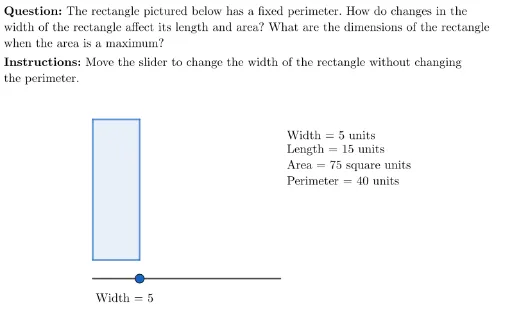
该范例演示了如何通过动态交互方式计算矩形的面积,并包含即时反馈与自测环节。核心数学概念是矩形面积公式(长×宽)以及周长与面积的关系,同时涉及变量滑块、条件判断和几何对象构建。作图要点包括使用GeoGebra的Segment、Point、Polygon命令绘制矩形,通过Length命令测量边长,利用Slider控制宽度变化,并借助If、UnicodeToLetter、LaTeX等命令实现动态显示与反馈机制。此外,还包含背景、按钮、正确/错误标记等交互元素,适合小学高年级或初中低年级学生进行面积概念的巩固练习,也可用于教师课堂演示或学生自主探索。
GeoGebra 命令及参数
Segment(E, E + (20, 0)) → mySliderPoint(mySlider) → SUnicodeToLetter(10007) → xmarkUnicodeToLetter(10003) → cmarkLaTeX("\text{\textbf{Instructions: }Move the slider to change the width of the rectangle without changing \\the perimeter.}") → SpecInstrucLength(Segment[E, S]) → widthLine(A, yAxis) → l_1Line(B, yAxis) → l_2Intersect(l_2, Line[C, xAxis]) → DPolygon(C, A, B, D) → q1, c, a_1, b, dLength(Segment[A, C]) → lengthPerimeter(q1) → perimLength(Segment[E, S]) → testIf(width ≟ 0, "width", If[length ≟ 0, "length", ""]) → zeroDimensionLaTeX((("\text{Recognize that when the " * zeroDimension) * " is zero units, no rectangle exists.}")) → msgNoRectangleLaTeX("\text{\textbf{Question: }The rectangle pictured below has a fixed perimeter. How do changes in the \\width of the rectangle affect its length and area? What are the dimensions of the rectangle \\when the area is a maximum?}") → MainInstrucLaTeX(((MainInstruc * "\\") * SpecInstruc)) → CompleteInstruc
AI 绘图提示语参考
画一个矩形图形,矩形的一边由一个滑块控制,滑块可以调整矩形的宽度。矩形的周长保持固定,当宽度改变时,长度和面积会随之变化。图形中包含一些反馈标记和问题文本,提示用户思考在固定周长下,宽度变化如何影响长度和面积,以及当面积最大时矩形的尺寸。构造顺序是先绘制矩形,再添加滑块,调整宽度,并动态显示反馈信息。
以上提示语为根据原始绘图命令整理而来,仅供参考。