
整数加法演示 by cemccourseware
几何画板及绘图内容加载中,请稍等……
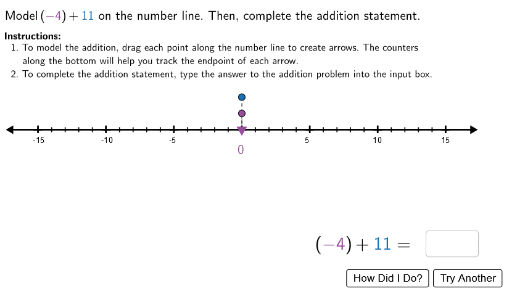
①本范例演示了整数加法的可视化过程,通过动态图形展示加法运算的几何意义;②涉及核心数学概念包括整数运算、数轴表示、向量合成;③构造要点运用了Segment、Vector、NumberLine、Point等GeoGebra命令与对象,实现数轴上整数点的定位与向量加法演示;④适合初中数学教学,用于帮助学生直观理解整数加法运算规则。
GeoGebra 命令及参数
Segment(StartPoint, EndPoint) → NumberLineTextfield(inputans) → InputBox1Random(3, 15) → posintRandom(-15, -1) → negintSegment(Origin, (0, -3)) → connect1LaTeX(Text["\checkmark"]) → RightCheckLaTeX(Text["×"]) → WrongCheckText(negint + posint) → correctansPoint(Num1Height) → Num1PointPoint(Num2Height) → Num2PointSegment(Num2Point, (x(Num2Point), 0)) → connect3LaTeX(Text["Model\ the\ sum\ on\ the\ number\ line.\ Then,\,complete\ the\ addition\ statement."]) → Instructions1Sequence((i, 0), i, -15, 15, 1) → SmallTicksSequence((i, 0), i, -15, 15, 5) → TicksVector((0, 1.2), Num1Point) → negvectorVector((x(Num1Point), 2.4), Num2Point) → posvectorLaTeX(Text[position1]) → Highlight1DisplayLaTeX(Text[position2]) → Highlight2DisplaySequence(Text[i, (i - 0.35, -1)], i, -15, 15, 5) → NumbersSegment(Num1Point, (x(Num1Point), 0)) → connect2Circle((i1, height), r) → C1Circle((i2, height), r) → C2Circle((i3, height), r) → C3Circle((i4, height), r) → C4Circle((i5, height), r) → C5Circle((i6, height), r) → C6Circle((i7, height), r) → C7Midpoint((0, 1.2), Num1Point) → Num1DisplayLocationMidpoint((x(Num1Point), 2.4), Num2Point) → Num2DisplayLocation
AI 绘图提示语参考
在坐标系中绘制一条水平数轴,标出正负整数点,并用向量表示两个整数的加法过程。先画出原点到负三点的线段,再标出两个随机整数的位置,用向量分别表示这两个整数,并在数轴上完成加法运算的演示,最后标注出计算结果和操作说明。
以上提示语为根据原始绘图命令整理而来,仅供参考。