
水平双曲线
几何画板及绘图内容加载中,请稍等……
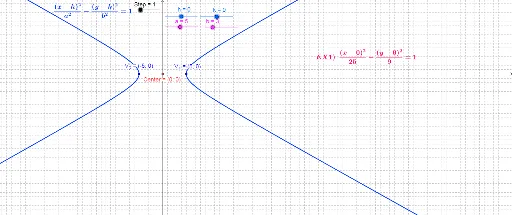
这个范例演示了水平双曲线的几何构造。涉及的核心数学概念包括双曲线的焦点、渐近线和顶点。通过使用GeoGebra命令如Focus、Point、Segment、Asymptote等,可以动态展示双曲线的性质。适合高中数学教学和学习。
GeoGebra 命令及参数
Focus(c_2) → F_2, F_1Point(c_2) → M_1Segment(F_1, M_1) → d_1Segment(F_2, M_1) → d_2Asymptote(c_2) → i, jIntersect(j, i) → FCenter(Hyperbola[F_2, F_1, b]) → CenterVertex(Hyperbola[F_2, F_1, a]) → V_2, V_1, ,OrthogonalLine(B, xAxis) → eOrthogonalLine(A, xAxis) → fLine(V_1, xAxis) → gLine(V_2, xAxis) → lIntersect(e, g) → CIntersect(f, g) → DIntersect(f, l) → EIntersect(e, l) → GSegment(Center, V_1) → a_1Circle(Center, F_1) → pPoint(p) → HSegment(Center, H) → mSegment(Center, H) → nPoint(c_2) → M_2Segment(F_1, M_2) → d_4Segment(M_2, F_2) → d_3Line(V_2, yAxis) → qLine(V_1, yAxis) → rLine(I, xAxis) → sLine(K, xAxis) → tIntersect(q, s) → LIntersect(r, s) → MIntersect(r, t) → NIntersect(q, t) → OPolygon(L, M, N, O) → poly2, l_1, b_2, n_1, oPoint(l_1) → JIntersect(r, s) → PSegment(V_1, P) → b_1Segment(Center, P) → c