
GoGeometry Action 134: Dynamic Circumcircle and Polygon Sequence
几何画板及绘图内容加载中,请稍等……
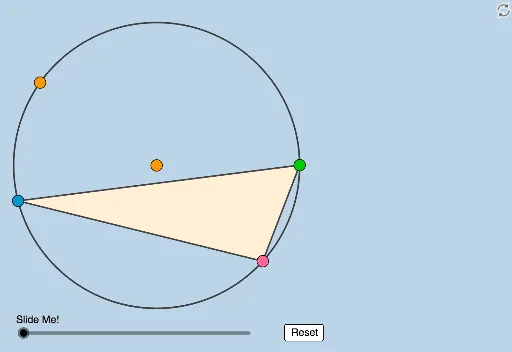
① This example dynamically illustrates a geometry problem posted by Antonio Gutierrez, involving a circumcircle, polygons, and a sequence of points. ② Core mathematical concepts include circumcircle, polygons, point sequences, distance ratios, sequences and series, and transformations such as rotation and dilation. ③ Construction highlights: from the summary, GeoGebra commands such as Circle, Point, Line, OrthogonalLine, Intersect, Ray, Dilate, Angle, Polygon, Segment, Distance, Rotate, and CircleArc are used to create multiple points (A, B, C, D, F, F', B_1, C_1, etc.), circles (c, c_1), lines (l, e, f, g, h), and polygons; distances like distanceB1C1 and distanceC1A1 are computed, and Dilate and Rotate enable dynamic transformations. ④ Suitable for high school and above, or geometry enthusiasts, to explore proportional relationships, sequence patterns, and dynamic geometry software applications.
GeoGebra 命令及参数
Circle(O, B_2) → cPoint(c) → APoint(c) → BLine(A, B) → lPoint(c) → CCircle(C, 3) → eLine(O, C) → fOrthogonalLine(C, f) → gIntersect(e, g, 2) → DRay(C, D) → hIntersect(l, h) → FDilate(F, If[1 < a ≤ 2, 2 - a, 0], C) → F'Circle(F, C) → pPoint(p) → PAngle(C, F, P) → βCircle(C, O) → dPolygon(C, B, A) → t1, g_1, c_1, f_1Segment(A, B) → iSegment(B, C) → jSegment(C, A) → kLine(A, P) → mLine(B, P) → nLine(C, P) → qIntersect(c, n, 2) → B_1Intersect(c, m, 2) → A_1Intersect(c, q) → E, C_1Distance(B_1, C_1) → distanceB1C1Distance(C_1, A_1) → distanceC1A1Dilate(B, If[0 < a ≤ 1, 1 - a, 0], F) → B'Segment(B, B') → rDilate(O, If[1 < a ≤ 2, 2 - a, 0], C) → O'Segment(O, O') → sSegment(F, F') → tAngle(F, C, O) → αRotate(C, If[2 < a ≤ 4, ((a - 2) * π), (2 * π)], F) → C'Rotate(F, If[2 < a ≤ 4, ((a - 2) * π), (2 * π)], F) → F'_1Rotate(C, If[2 < a ≤ 4, ((a - 2) * β / 2), β], F) → C'_1Segment(F, C'_1) → bCircleArc(F, C, C'_1) → d_1Rotate(P, If[4 < a ≤ 5, ((a - 4) * ((2 * π) - β)), (2 * π) - β], F) → P'Segment(F, P') → h_1CircleArc(F, P, P') → e_1Dilate(A, If[5 < a ≤ 6, 6 - a, 0], P) → A'Segment(A, A') → i_1Dilate(P, If[6 < a ≤ 7, 7 - a, 0], A_1) → P'_1Segment(P, P'_1) → j_1Dilate(B, If[7 < a ≤ 8, 8 - a, 0], P) → B'_1Segment(B, B'_1) → k_1Dilate(P, If[8 < a ≤ 9, 9 - a, 0], B_1) → P'_2Segment(P, P'_2) → l_1Dilate(C, If[9 < a ≤ 10, 10 - a, 0], P) → C'_2Segment(C, C'_2) → m_1Dilate(P, If[10 < a ≤ 11, 11 - a, 0], C_1) → P'_3Segment(P, P'_3) → n_1Angle(B_1, C_1, A_1) → γDilate(B_1, If[12 < a ≤ 13, 13 - a, 0], C_1) → GSegment(B_1, G) → p_1Dilate(A_1, If[13 < a ≤ 14, 14 - a, 0], C_1) → HSegment(A_1, H) → q_1Rotate(A_1, If[15 < a ≤ 16, ((-(a - 15)) * γ), (-γ)], C_1) → IRotate(H, If[15 < a ≤ 16, ((-(a - 15)) * γ), (-γ)], C_1) → H'Segment(I, H') → r_1
AI 绘图提示语参考
绘制一个圆,在其上取三个点构成三角形。从圆心向三角形的一个顶点作垂线,与以该顶点为圆心、半径为3的圆相交,得到一点,并作射线与三角形对边相交。根据参数变化,对交点进行缩放或旋转,生成动态点。连接三角形各顶点与圆上一点,与圆相交得到新点,并测量这些点之间的距离。随后,根据参数范围,对多个点进行缩放或旋转,并绘制相应的线段与圆弧,展示几何序列与比例关系。
以上提示语为根据原始绘图命令整理而来,仅供参考。