
垂直平分线方程的 GeoGebra 演示
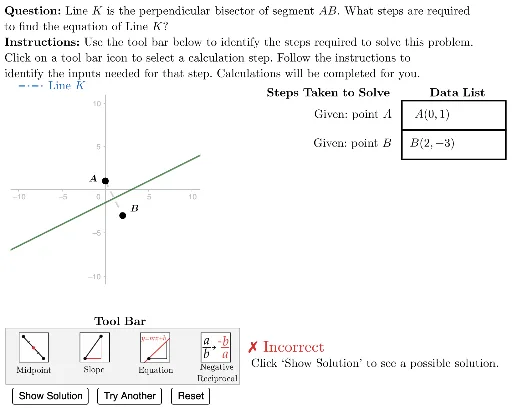
几何画板及绘图内容加载中,请稍等……
①本范例演示了如何通过 GeoGebra 绘制并计算线段的垂直平分线及其方程;②涉及的核心数学概念包括线段的中点、垂直关系、斜率计算及直线方程的求解;③作图要点提炼自构造摘要,使用了 Polygon, Length, Sequence, Element, UnitVector, Point, Zip, TableText, LineBisector, LaTeX, Segment, Vector 等命令和对象;④适合高中解析几何教学,帮助学生理解垂直平分线的性质和应用。
GeoGebra 命令及参数
Polygon({DataListFrameAnchor, DataListFrameAnchor + (12 * u), DataListFrameAnchor + (12 * u) - vHeight, DataListFrameAnchor - vHeight}) → ValueFrameTemplateLength(dTypes) → numStepsSequence((-10, -20) + ((3.5 * i) * u), i, 0, 9) → iconAnchorsSequence(Translate[ValueFrameTemplate, Vector[(-((vHeight * i)))]], i, 0, numSteps - 1) → ValueFramesSequence(Polygon[Element[iconAnchors, i], Element[iconAnchors, i + 1], 4], i, 1, (2 * Length[iconAnchors]), 2) → iconFramesPolygon({(left, bottom), (left, top), (right, top), (right, bottom)}) → viewboxElement(G3, caseNum) → A3Element(G4, caseNum) → A4Polygon({ToolAnchor - (2 * v) - u, ToolAnchor + (4.5 * v) - u, ToolAnchor + (4.5 * v) + (26 * u), ToolAnchor - (2 * v) + (26 * u)}) → toolBarUnitVector(Vector[A3, A4]) → uABElement(iconFrames, currentAction) → iconHighlighterPoint(studentAnswer) → lblStudentLineElement(ValueFrames, 1) → vFrame1Element(ValueFrames, 2) → vFrame2Element(ValueFrames, 3) → vFrame3Element(ValueFrames, 4) → vFrame4Element(ValueFrames, 5) → vFrame5Element(ValueFrames, 6) → vFrame6Element(ValueFrames, 7) → vFrame7Zip(Element[ValueFrames, A], A, selectedList) → highlightedItemsTableText({dDisplay}, "vc") → valueTblTableText({Join[{{"\phantom{find the equation of a line through (-1,-3) with slope -5}"}, dSteps}]}, "vr") → stepsTableLineBisector(A3, A4) → answerLineLaTeX((((("\text{\textbf{Question: }" * QUESTION) * "\\\textbf{Instructions: }") * INSTRUCTIONS) * "}")) → allInstrucSegment(A3, A4) → D3LineBisector(A3, A4) → questionLineVector((1, Slope[answerLine])) → testUnitVector(Vector[(1, Slope[answerLine])]) → uAnswerSegment((-10, 12), (-7, 12)) → legendLineK