
利用比例因子求相似图形面积
几何画板及绘图内容加载中,请稍等……
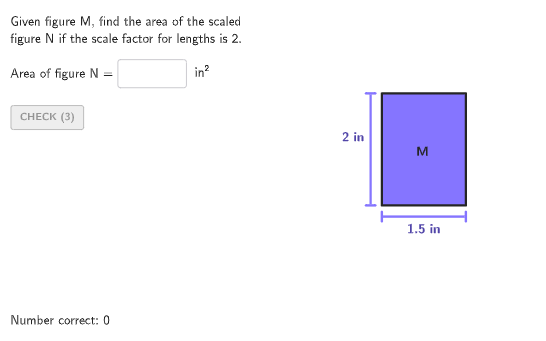
该范例通过交互式GeoGebra活动,演示如何根据相似图形边长的比例因子(scale factor)来计算对应面积。核心数学概念是相似图形的面积比等于边长比的平方,即若边长比为k,则面积比为k²。作图要点包括:使用Polygon命令构造多边形,通过Translate和Segment创建相似图形,利用Textfield和InputBox让用户输入答案,结合If、Shuffle、Element等命令随机生成题目,并通过validate、showanswer等按钮实现即时反馈与验证。适合6-8年级学生练习比例与面积关系,也可用于课堂演示或自主探究,帮助学生理解比例因子对面积的影响,并运用公式解决实际问题。
GeoGebra 命令及参数
Shuffle(Sequence[1.5, 4, 0.5]) → randomList1, {2, 2.5, 3.5, 3, 4, 1.5}Element(randomList1, Mod[countQuestion, Length[randomList1]] + 1) → randomNum1Shuffle(Sequence[1, 4, 0.5]) → randomList2, {2, 4, 3.5, 1, 3, 2.5, 1.5}If(IsInteger[randomNum1], Element[randomList2, Mod[countQuestion, Length[randomList2]] + 1], floor(Element[randomList2, Mod[countQuestion, Length[randomList2]] + 1])) → randomNum2Shuffle(Sequence[1, 4, 0.5]) → randomList3, {1.5, 3, 4, 2, 1, 2.5, 3.5}If(IsInteger[randomNum1] ∧ IsInteger[randomNum2], Element[randomList3, Mod[countQuestion, Length[randomList3]] + 1], floor(Element[randomList3, Mod[countQuestion, Length[randomList3]] + 1])) → randomNum3Shuffle(Flatten[Sequence[{3, 4}, ii, 1, 5]]) → randomList4, {4, 4, 3, 3, 4, 4, 3, 3, 4, 3}Element(randomList4, Mod[countQuestion, Length[randomList4]] + 1) → randomNum4Shuffle({1, 2, 3}) → randomList5, {1, 2, 3}Element(randomList5, Mod[countQuestion, Length[randomList5]] + 1) → randomNum5Textfield(input1) → InputBox1Polygon(Zip[PixelsToPoint[Corner[1], Corner[3], Corner[5], A], A, {(pixelsLeft, pixelsTop), (pixelsLeft, y(Corner[5]) - pixelsBottom), Corner[5] - (pixelsRight, pixelsBottom), (x(Corner[5]) - pixelsRight, pixelsTop)}]) → borderBoxCorner(5) → layoutAppSizePolygon(If[randomNum4 ≟ 4, {V1, V2, V4, V3}, {V1, V2, If[randomNum5 ≟ 1, V3, randomNum5 ≟ 2, V4, Midpoint[V3, V4]]}]) → q1Translate(V1, (0, -0.2)) → V1'Translate(V2, (0, -0.2)) → V2'Segment(V1', V2') → fTranslate(V1, (-0.2, 0)) → V1'_{1}Translate(V3, (-0.2, 0)) → V3'Segment(V1'_{1}, V3') → gTranslate(hGL, Vector[(Vector[Corner[4], Corner[1]] / 500 * 24)]) → hGL'Text("M", Vertex[q1, 1] + (0, 0.1), true, true, 1, 1) → text3Text((("\text{" * randomNum3) * " in}"), Midpoint[f], true, true, 0, -1) → labelBaseText((("\text{" * randomNum2) * " in}"), Midpoint[g], true, true, -1, 1) → labelHeight
AI 绘图提示语参考
画一个矩形作为基础框架。根据随机数生成两个相似的矩形,分别标注高度和宽度。构造顺序为:先绘制矩形,再根据随机数选择图形类型,最后添加标签说明尺寸。
以上提示语为根据原始绘图命令整理而来,仅供参考。