
因式分解 - 除数配对探索
几何画板及绘图内容加载中,请稍等……
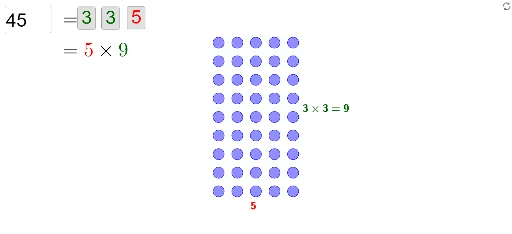
本范例通过输入一个整数,基于其质因数分解,探索生成该整数的不同除数配对方式。涉及的核心数学概念包括因式分解和除数。使用了GeoGebra命令如Factors、Join、Sequence等进行构造。适合初中及以上学生学习因式分解和数论相关知识。
GeoGebra 命令及参数
Factors(n) → fmJoin(Sequence[Sequence[Element[Element[fm, i], 1], j, 1, Element[Element[fm, i], 2]], i, 1, Length[fm]]) → factorsSequence(If[Element[bools, i] ∧ Length[factors] ≥ i, Element[factors, i], 1], i, 1, Length[bools]) → list1Sequence(((floor(i / prows) * d), (Mod[i, prows] * d)) + (ts * Vector[((floor(i / prows) * d), (Mod[i, prows] * d)), (((floor(i / rows) * d), Mod[i, rows]) * d)]), i, 0, n - 1) → pointsElement(points, n) → MXTextfield(n) → inputBox1Sequence(If[(¬Element[bools, i]) ∧ Length[factors] ≥ i, Element[factors, i], 1], i, 1, Length[bools]) → list2Min(Sequence[If[Element[bools, i], i, 10000], i, 1, Length[bools]]) → minTrueMin(Sequence[If[¬Element[bools, i], i, 10000], i, 1, Length[bools]]) → minFalseSequence(If[i ≤ Length[factors] ∧ Element[bools, i], If[i > minTrue, "\times", ""] + (Element[list1, i]), ""], i, 1, Length[bools]) → rtSequence(If[i ≤ Length[factors] ∧ (¬Element[bools, i]), If[i > minFalse, "\times", ""] + (Element[list2, i]), ""], i, 1, Length[bools]) → ctCorner(5) → GVMax(Sequence[If[¬Element[bools, i], i, 0], i, 1, Min[Length[bools], Length[factors]]]) → maxFalseMax(Sequence[If[Element[bools, i], i, 0], i, 1, Min[Length[bools], Length[factors]]]) → maxTrueSequence(Circle[Element[points, i], (0.3 * d)], i, 1, n) → list3If(MXratio > ratio, innerW / ratio, innerH) → finHIf(MXratio > ratio, innerW, (innerH * ratio)) → finWText(If[rows ≟ 1, "1", Element[rt, 1] + (Element[rt, 2]) + (Element[rt, 3]) + (Element[rt, 4]) + (Element[rt, 5]) + (Element[rt, 6]) + (Element[rt, 7]) + (If[minTrue ≟ maxTrue, "", "=" + rows])], RT, false, true) → text1Text(If[cols ≟ 1, "1", Element[ct, 1] + (Element[ct, 2]) + (Element[ct, 3]) + (Element[ct, 4]) + (Element[ct, 5]) + (Element[ct, 6]) + (Element[ct, 7]) + (If[minFalse ≟ maxFalse, "", "=" + cols])], CT, false, true) → text2Sequence(If[Element[bools, i], "darkgreen", "red"], i, 1, Length[bools]) → colors
AI 绘图提示语参考
绘制一个整数的质因数分解图。首先输入一个整数,然后展示它的所有质因数。接着,用这些质因数生成不同的因子对,并用点表示出来。最后,根据这些因子对生成两个乘积表达式,一个显示正确因子对的乘积,另一个显示错误因子对的乘积。
以上提示语为根据原始绘图命令整理而来,仅供参考。