
探索棱锥的截面
几何画板及绘图内容加载中,请稍等……
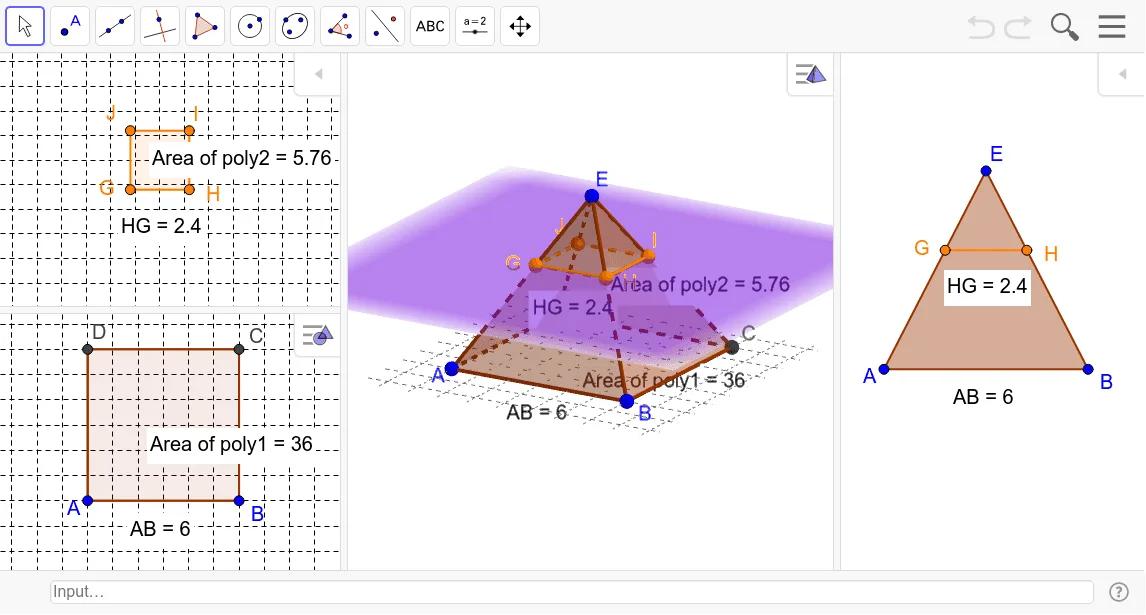
本范例演示了如何通过截取棱锥的不同平面来观察其截面形状。核心数学概念包括立体几何中的棱锥截面。通过使用GeoGebra命令如PointIn, Polygon, Translate, IntersectPath等,可以动态地展示棱锥的截面变化。适合高中数学教学和学习立体几何的学生。
GeoGebra 命令及参数
PointIn(xOyPlane) → BPointIn(xOyPlane) → APolygon(A, B, 4, xOyPlane) → poly1, a, b, c, d, C, DPyramid(poly1, E) → e, faceABE, faceBCE, faceCDE, faceADE, edgeAE, edgeBE, edgeCE, edgeDETranslate(xOyPlane, Vector[(0, 0, 3)]) → fIntersectPath(f, e) → poly2, poly3, g, h, i, j, k, l, m, n, G, H, I, J, K, L, M, NPointIn(poly2) → Pointpoly2PointIn(poly1) → Pointpoly1Distance(A, B) → distanceABDistance(H, G) → distanceHGPerimeter(faceABE) → perimeterfaceABE