
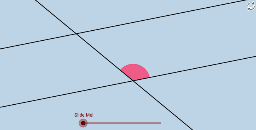
探索平行线内错角
几何画板及绘图内容加载中,请稍等……
所属专题
Congruence (CO) Cluster
Congruence (Vol 2)
CCSS High School: Geometry (Congruence) Volume 2
CCSS High School: Geometry (Congruence) Volume 2
CCSS High School: Geometry (Congruence) Volume 2
Geometry (Congruence) Volume 2
CCSS High School: Geometry (Congruence) Volume 2
CCSS High School: Geometry (Congruence) Volume 2
CCSS High School: Geometry (Congruence) Volume 2
CCSS High School: Geometry (Congruence) Volume 2
CCSS High School: Geometry (Congruence) Volume 2
CCSS High School: Geometry (Congruence) Volume 2
Gail LeBlancCCSS High School: Geometry (Congruence) Volume 2
CCSS High School: Geometry (Congruence) Volume 2
CCSS High School: Geometry (Congruence) Volume 2
Parallel Lines & Related Angles
Parallel Lines & Related Angles
Logic and Parallel Lines
Geometry: Parallel Lines & Related Angles
Year 9 Mathematics
Angle Congruence Intros
①本范例演示通过旋转角度180度,探究平行线内错角的相等关系;②涉及核心数学概念:平行线、内错角、旋转对称;③作图要点:使用GeoGebra命令如Point, Rotate, Angle, Line, Circle, Intersect, CircleSector, Dilate, Vector, Translate, CircleArc, Midpoint, Segment, Ray等构建图形;④适合初中及以上学生,用于理解平行线性质与几何变换。
GeoGebra 命令及参数
Point(a) → BRotate(B, α, A) → B'Angle(B, A, B') → βLine(A, B') → bCircle(A, 1) → eIntersect(b, d) → CCircle(C, 1) → fIntersect(e, a) → D, EIntersect(e, b) → F, GIntersect(f, b) → H, IIntersect(f, d) → J, KCircleSector(C, J, H) → kCircleSector(C, H, K) → pCircleSector(A, E, G) → qCircleSector(A, G, D) → rCircleSector(A, F, E) → tDilate(A, If[0 < i < 1, 1 - i], C) → A'Vector(A, A') → uTranslate(t, u) → t'CircleArc(A, E, G) → c_1CircleArc(A, G, D) → f_1CircleArc(C, J, H) → h_1Vector(A, C) → vMidpoint(C, A) → LRotate(q, (((-i) * 180))°, L) → q'Rotate(A, (((-i) * 180))°, L) → A'_1Segment(L, A'_1) → gSegment(C, L) → nSegment(L, A) → sPoint(b) → MPoint(b) → NRay(C, M) → a_1Ray(A, N) → b_1Rotate(E, (((-i) * 180))°, L) → E'Ray(A'_1, E') → d_1Circle(A'_1, Distance[L, A'_1]) → e_1Intersect(e_1, d_1, 1) → OSegment(A'_1, O) → g_1Rotate(r, ((i * 180))°, L) → r'_2Rotate(A, ((i * 180))°, L) → A'_2Rotate(D, ((i * 180))°, L) → D'Segment(L, A'_2) → hCircle(A'_2, L) → k_1Ray(A'_2, D') → i_1Intersect(k_1, i_1) → P,Segment(A'_2, P) → j_1
AI 绘图提示语参考
画两条平行线,并在线上取一点,旋转该点180度得到另一点,连接这两点形成一条直线。以第一条线上的点为圆心画圆,与第二条线相交于两点。分别以这两点为圆心画圆,与第一条线相交于四点。连接这些点形成多个扇形,并旋转其中一个扇形180度,观察其与原扇形的关系。再以圆心为基点,将扇形按比例缩放,并画出对应的射线和圆弧,展示平行线和旋转对称的性质。
以上提示语为根据原始绘图命令整理而来,仅供参考。