
使用数轴估算分数和带分数的和
几何画板及绘图内容加载中,请稍等……
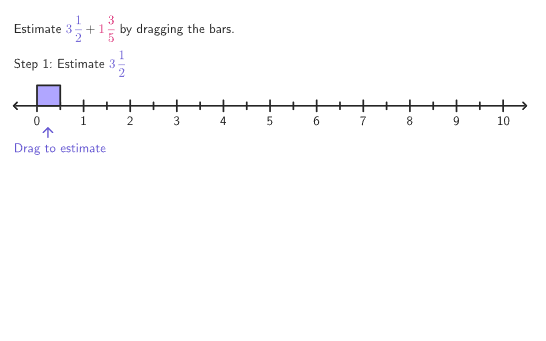
本范例通过调整数轴上的条形,帮助学生估算分数和带分数的和。学生需要分别估算每个条形的长度,从而找到一个估算的总和。该范例涉及的核心数学概念包括分数和带分数的加法。通过使用GeoGebra命令如Shuffle、PixelsToPoint、horizontalTwoPointBox等,学生可以直观地理解如何进行估算。适合4-5年级学生进行探索和学习。
GeoGebra 命令及参数
Shuffle({{1, 2}, {2, 1}, {1, 1}, {1, 2}, {3, 1}, {2, 3}, {1, 3}, {1, 1}, {2, 1}, {2, 2}}) → wholePairs, {{2, 1}, {3, 1}, {1, 3}, {2, 2}, {1, 1}, {1, 2}, {2, 3}, {1, 2}, {2, 1}, {1, 1}}Shuffle({{1 / 2, 3 / 4}, {1 / 2, 2 / 3}, {1 / 3, 1 / 2}, {1 / 4, 3 / 5}, {2 / 5, 1 / 3}, {2 / 3, 3 / 4}, {1 / 2, 3 / 5}, {2 / 5, 1 / 4}, {2 / 5, 1 / 5}, {1 / 3, 2 / 3}}) → fracPairs, {{0.5, 0.75}, {0.5, 0.6}, {0.3333333333333333, 0.5}, {0.4, 0.25}, {0.25, 0.6}, {0.5, 0.6666666666666666}, {0.4, 0.3333333333333333}, {0.6666666666666666, 0.75}, {0.4, 0.2}, {0.3333333333333333, 0.6666666666666666}}PixelsToPoint((xMin, yMin), (xMax, yMax), (PXwidth, PXheight), (20, 155)) → AnchorAhorizontalTwoPointBox((numB, y(Bar2a)), (numB, y(Bar2b))) → solnBar2horizontalTwoPointBox((numA, y(Bar1a)), (numA, y(Bar1b))) → solnBar1If((2 * countQuestion) + 9 < 45, (2 * countQuestion) + 1, 1) → startIndexmakeRegion(Bar1a, Bar1b) → bar1makeRegion(Bar2a, Bar2b) → bar2Polygon({(-10, -1), (-10, 5.5), (55, 5.5), (55, -1)}) → viewboxSegment(AnchorA, AnchorA2) → numberLine1Segment(AnchorB, AnchorB2) → numberLine2Segment(AnchorC, AnchorC2) → numberLine3Translate(bar1, AnchorB - AnchorA) → bar1TranslatedboxTool(x(Bar2b) - x(Bar2a), y(Bar2b) - y(Bar2a), (x(Bar1b), y(AnchorB))) → shadowBarboxTool(x(Bar2b) - x(Bar2a), y(Bar2b) - y(Bar2a), (x(Bar1b), y(AnchorB))) → shadowBarOutlinemakeRegion(Bar1a, Bar1b) → bar1DragIf(stage ≟ 1, {Vertex[bar1]}, {Vertex[bar2]}) → pulsingVerticesIf(stage ≟ 1, {101 / 255, 87 / 255, 210 / 255}, {218 / 255, 37 / 255, 112 / 255}) → pulseColorZip(Sequence[Segment[(x(AnchorA) + (B * unitWidth), (5 * (windowHeight) / PXheight) + y(A)), (x(AnchorA) + (B * unitWidth), (-5 * (windowHeight) / PXheight) + y(A))], B, 1, 10], A, Take[barAnchors, 1, stage]) → smallTicksZip(Sequence[Segment[(x(AnchorA) + unitWidth / 2 + (B * unitWidth), (8 * (windowHeight) / PXheight) + y(A)), (x(AnchorA) + unitWidth / 2 + (B * unitWidth), (-8 * (windowHeight) / PXheight) + y(A))], B, 0, 10], A, Take[barAnchors, 1, stage]) → bigTicksZip(Segment[solnPositions(B), (x(solnPositions(B)), y(barAnchors(2)))], B, {1, 3, 4}) → compareBarsmakeRegion(Bar2a, Bar2b) → bar2DragText("\text{Drag to estimate}", POnboardB + (0, (-5 * (windowHeight) / PXheight)), true, true, 0, 0) → onboardingTextBZip(Sequence[Text[("" * B), (x(A) + (unitWidth * (0.5 + B)), y(A) - (5 * (windowHeight) / PXheight)), true, true, 0, -1], B, 0, maxX], A, Take[barAnchors, 1, stage]) → numberLineTextmakeRegion(Bar1a, Bar1b) → bar1Outline
AI 绘图提示语参考
画一个数轴,上面有若干条形条,每个条形代表一个分数或混合数。条形的长度表示该分数或混合数的值。数轴上还有几个标记点,用于表示估计的总和。学生需要通过拖动条形来估计总和,并比较不同条形的长度。图形应清晰显示条形与数轴的关系,以及估计过程。
以上提示语为根据原始绘图命令整理而来,仅供参考。