
椭圆参数曲线与旋转变换示例
几何画板及绘图内容加载中,请稍等……
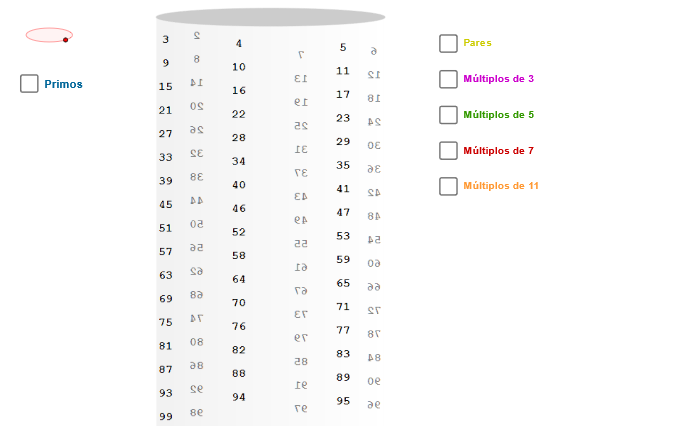
本示例演示在GeoGebra中绘制一条随角度旋转的椭圆参数曲线。核心数学概念包括:参数方程、椭圆的几何性质、三角函数在坐标变换中的应用、旋转与平移变换。作图要点:使用CurveCartesian命令定义椭圆参数曲线,通过Sequence和Element命令生成序列化的曲线点集,利用Segment命令绘制连接线段,并结合旋转角度zAngRot实现曲线的动态旋转变换。适合高中及以上学段学生学习参数方程、解析几何和图形变换相关内容,也可作为教师演示参数曲线与变换关系的教学素材。
GeoGebra 命令及参数
Ellipse((-6.62, 5), (-5.38, 5), 0.65) → zElipse1Point(zElipse1) → XYCurveCartesian(((3 * cos(t)) * sin(zAngRot)) + ((3 * sin(t)) * cos(zAngRot)), (tan(p / 30) * t) + 5, t, (-34 * p), 0) → h0Sequence(h0(((-i) * p / 3)), i, 0, 98) → LSequence(Circle[h0(((-i) * p / 3)) + (0.19, 0.1), h0(((-i) * p / 3))], i, 0, 98) → L1Element(L1, 2) → p01Element(L1, 3) → p02Element(L1, 5) → p03Element(L1, 7) → p04Element(L1, 11) → p05Element(L1, 13) → p06Element(L1, 17) → p07Element(L1, 19) → p08Element(L1, 23) → p09Element(L1, 29) → p10Element(L1, 31) → p11Element(L1, 37) → p12Element(L1, 41) → p13Element(L1, 43) → p14Element(L1, 47) → p15Element(L1, 53) → p16Element(L1, 59) → p17Element(L1, 61) → p18Element(L1, 67) → p19Element(L1, 71) → p20Element(L1, 73) → p21Element(L1, 79) → p22Element(L1, 83) → p23Element(L1, 89) → p24Element(L1, 97) → p25Element(L1, 10) → m502Element(L1, 15) → m503Element(L1, 20) → m504Element(L1, 25) → m505Element(L1, 30) → m506Element(L1, 35) → m507Element(L1, 40) → m508Element(L1, 45) → m509Element(L1, 50) → m510Element(L1, 55) → m511Element(L1, 60) → m512Element(L1, 65) → m513Element(L1, 70) → m514Element(L1, 75) → m515Element(L1, 80) → m516Element(L1, 85) → m517Element(L1, 90) → m518Element(L1, 95) → m519Element(L1, 14) → m702Element(L1, 21) → m703Element(L1, 28) → m704Element(L1, 35) → m705Element(L1, 42) → m706Element(L1, 49) → m707Element(L1, 56) → m708Element(L1, 63) → m709Element(L1, 70) → m710Element(L1, 77) → m711Element(L1, 84) → m712Element(L1, 91) → m713Element(L1, 98) → m714Element(L1, 22) → m112Element(L1, 33) → m113Element(L1, 44) → m114Element(L1, 55) → m115Element(L1, 66) → m116Element(L1, 77) → m117Element(L1, 88) → m118Element(L1, 99) → m119Segment(h0(((-p)) / 3) + (0.2, -0.12), h0((-97 * p / 3)) + (0.2, -1)) → s2aSegment(h0((-p)) + (0.2, 0.1), h0((-93 * p / 3)) + (0.2, -1)) → s2bSegment(h0((-5 * p / 3)) + (0.15, 0.1), h0((-95 * p / 3)) + (0.15, -1)) → s2cSegment(h0((-2 * p / 3)) + (0.2, -0.12), h0((-98 * p / 3)) + (0.2, -1)) → s3aSegment(h0((-5 * p / 3)) + (0.2, 0.1), h0((-95 * p / 3)) + (0.2, -1)) → s3bCurveCartesian(0.2 + ((3 * cos(t + p)) * sin(zAngRot)) + ((3 * sin(t)) * cos(zAngRot)), (tan(27.7°) * t) + 10.7, t, (-11 * p), (-11 * p / 3) - 0.1) → h5CurveCartesian(0.2 + ((3 * cos(t)) * sin(zAngRot)) + ((3 * sin(t)) * cos(zAngRot)), (tan(36.4°) * t) + 13.7, t, (-17 * p / 2), (-4 * p) - 0.1) → h7CurveCartesian(0.2 + ((3 * cos(t + p)) * sin(zAngRot)) + ((3 * sin(t)) * cos(zAngRot)), (tan(49°) * t) + 17.2, t, (-33 * p / 5), (-11 * p / 3) - 0.1) → h11Ellipse((-3, 5.5), (3.4, 5.5), 3.21) → base
AI 绘图提示语参考
画一个旋转的参数曲线椭圆,展示参数方程、三角函数和旋转变换。首先绘制一个椭圆,然后基于参数方程创建一条曲线,这条曲线随角度变化而旋转。使用序列生成曲线上的点,并用线段连接这些点,形成动态旋转的椭圆效果。
以上提示语为根据原始绘图命令整理而来,仅供参考。