
双重滑移反射镶嵌(埃舍尔风格)
几何画板及绘图内容加载中,请稍等……
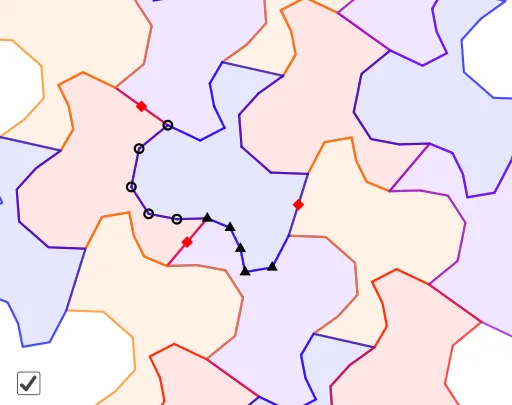
① 本范例演示了如何通过两次滑移反射(即平移与镜射的组合)生成埃舍尔风格的周期性镶嵌图案,将基础多边形铺满平面。② 核心数学概念包括平面镶嵌、滑移反射变换、平移向量、对称性与几何构造。③ 作图要点:从构造摘要可见,使用了GeoGebra的Vector(向量)、Point(点)、PointIn(内部点)、LineBisector(垂直平分线)、Translate(平移)、Polygon(多边形)等命令,通过定义向量u、v和点A、B等对象,利用垂直平分线构造反射轴,再对多边形poly1进行平移和反射,生成重复单元。④ 适合中学高年级或大学低年级学生学习几何变换与镶嵌艺术,也可用于数学与艺术跨学科教学,激发对对称性和图案设计的兴趣。
GeoGebra 命令及参数
Vector(A, B) → uPoint(Ray[A, A + OrthogonalVector[Segment[A, B]]]) → CPointIn(Polygon[D, B, (2 * A) - B, (2 * C) - D]) → EPointIn(Polygon[D, B, (2 * A) - B, (2 * C) - D]) → FPointIn(Polygon[D, B, (2 * A) - B, (2 * C) - D]) → GPointIn(Polygon[D, B, (2 * A) - B, (2 * C) - D]) → HPointIn(Polygon[D, B, (2 * A) - B, (2 * C) - D]) → ILineBisector(D, B) → fTranslate(Mirror[E, f], u) → JTranslate(Mirror[F, f], u) → KTranslate(Mirror[G, f], u) → LTranslate(Mirror[H, f], u) → MTranslate(Mirror[I, f], u) → NPointIn(Polygon[C, D, (2 * B) - D, (2 * A) - C]) → OTranslate(Mirror[O, f], u) → B_1PointIn(Polygon[C, D, (2 * B) - D, (2 * A) - C]) → PPointIn(Polygon[C, D, (2 * B) - D, (2 * A) - C]) → QPointIn(Polygon[C, D, (2 * B) - D, (2 * A) - C]) → RPointIn(Polygon[C, D, (2 * B) - D, (2 * A) - C]) → SLineBisector(C, D) → gVector(A, C) → vTranslate(Mirror[E, g], Vector[(-v)]) → A_1Translate(Mirror[O, g], v) → TTranslate(Mirror[P, g], v) → UTranslate(Mirror[Q, g], v) → VTranslate(Mirror[R, g], v) → WTranslate(Mirror[S, g], v) → ZPolygon(E, F, A_1, J, K, L, M, N, B_1, T, U, V, G, W, Z, H, I, O, P, Q, R, S) → poly1, h, r, s, t, a, b, c, d, e, f_1, g_1, i, h_1, i_1, j_1, j, k, l, m, n, p, qTranslate(Polygon[Mirror[E, g], Mirror[F, g], Mirror[G, g], Mirror[H, g], Mirror[I, g], Mirror[O, g], Mirror[P, g], Mirror[Q, g], Mirror[R, g], Mirror[S, g], Mirror[A_1, g], Mirror[J, g], Mirror[K, g], Mirror[L, g], Mirror[M, g], Mirror[N, g], Mirror[B_1, g], Mirror[T, g], Mirror[U, g], Mirror[V, g], Mirror[W, g], Mirror[Z, g]], v) → poly2Translate(Polygon[Mirror[E, g], Mirror[F, g], Mirror[G, g], Mirror[H, g], Mirror[I, g], Mirror[O, g], Mirror[P, g], Mirror[Q, g], Mirror[R, g], Mirror[S, g], Mirror[A_1, g], Mirror[J, g], Mirror[K, g], Mirror[L, g], Mirror[M, g], Mirror[N, g], Mirror[B_1, g], Mirror[T, g], Mirror[U, g], Mirror[V, g], Mirror[W, g], Mirror[Z, g]], Vector[(-v)]) → poly3Translate(Polygon[Mirror[E, f], Mirror[F, f], Mirror[G, f], Mirror[H, f], Mirror[I, f], Mirror[O, f], Mirror[P, f], Mirror[Q, f], Mirror[R, f], Mirror[S, f], Mirror[A_1, f], Mirror[J, f], Mirror[K, f], Mirror[L, f], Mirror[M, f], Mirror[N, f], Mirror[B_1, f], Mirror[T, f], Mirror[U, f], Mirror[V, f], Mirror[W, f], Mirror[Z, f]], Vector[(-u)]) → poly4Translate(Polygon[Mirror[E, f], Mirror[F, f], Mirror[G, f], Mirror[H, f], Mirror[I, f], Mirror[O, f], Mirror[P, f], Mirror[Q, f], Mirror[R, f], Mirror[S, f], Mirror[A_1, f], Mirror[J, f], Mirror[K, f], Mirror[L, f], Mirror[M, f], Mirror[N, f], Mirror[B_1, f], Mirror[T, f], Mirror[U, f], Mirror[V, f], Mirror[W, f], Mirror[Z, f]], u) → poly5Translate(Mirror[poly3, f], u) → poly6Translate(Mirror[poly2, f], u) → poly7Translate(poly7, Vector[(-2 * u)]) → poly7'Translate(poly6, Vector[(-2 * u)]) → poly6'Translate(Mirror[poly4, f], Vector[(-u)]) → poly8Translate(poly8, Vector[(4 * u)]) → poly8'Translate(poly3, Vector[(2 * u)]) → poly3'Translate(poly2, Vector[(2 * u)]) → poly2'Translate(poly4, Vector[(-2 * v)]) → poly4'Translate(Mirror[poly3, g], Vector[(-v)]) → poly9Translate(poly4', Vector[(2 * u)]) → poly4''Translate(poly4, Vector[(2 * v)]) → poly4'_1Translate(poly5, Vector[(2 * v)]) → poly5'Translate(Mirror[poly4', f], u) → poly10
AI 绘图提示语参考
绘制一个埃舍尔风格的周期性平面镶嵌图,通过应用两次滑移反射(平移和反射的组合)到一个基础多边形上,使图形无缝填充整个平面。首先创建一个多边形,然后定义两个向量作为平移框架,利用垂直平分线创建反射轴。对多边形进行平移和反射,生成重复的单元,再通过组合这些单元形成整个镶嵌图案。
以上提示语为根据原始绘图命令整理而来,仅供参考。