
出游目的地
几何画板及绘图内容加载中,请稍等……
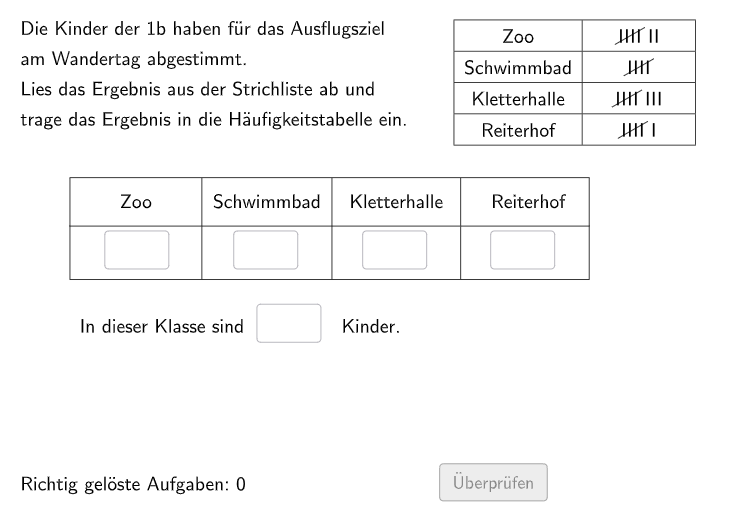
出游目的地是一种统计学概念,用于描述人们在特定时间段内进行的旅行或活动。这个 GeoGebra 范例演示了如何使用统计图表来展示出游目的地的分布情况。核心数学概念包括频率统计和数据可视化。作图要点包括使用 Shuffle、Sequence、Join 等 GeoGebra 命令来生成随机数据,并使用 Polygon、Element 等对象来绘制统计图表。适合的学段或用途包括初中和高中统计学课程。
GeoGebra 命令及参数
Shuffle(Shuffle[Sequence[i, i, 2, 10]]) → RowEis, {7, 5, 8, 6, 10, 3, 4, 2, 9}Sequence(RowEis(i), i, 1, 4) → ShowEis, {7, 5, 8, 6}Join({{"$\textsf{Wähle aus!}$"}, ListeEis}) → SelectIceSequence(Random[1, 4], i, 1, 100) → IndexList, {3, 4, 1, 4, 1, 1, 2, 1, 2, 3, 4, 4, 2, 1, 2, 3, 3, 2, 3, 4, 4, 4, 3, 2, 3, 1, 2, 3, 1, 2, 1, 4, 2, 4, 3, 1, 3, 4, 3, 3, 3, 2, 1, 3, 4, 1, 1, 4, 3, 1, 2, 1, 4, 2, 1, 4, 3, 1, 4, 4, 2, 3, 2, 2, 1, 4, 4, 1, 3, 4, 2, 1, 2, 4, 1, 4, 3, 3, 2, 3, 4, 2, 1, 1, 4, 3, 3, 2, 4, 3, 3, 2, 2, 2, 2, 2, 2, 4, 1, 3}Max(ShowEis) → H1Max(Remove[ShowEis, {H1}]) → H2Max(Remove[ShowEis, {H1, H2}]) → H3Max(Remove[ShowEis, {H1, H2, H3}]) → H4Max(Remove[ShowEis, {H1, H2, H3, H4}]) → H5If(Index ≟ 1, H1, Index ≟ 2, H2, Index ≟ 3, H3, Index ≟ 4, H5) → Sol1Textfield(aInput) → InputBox1Textfield(bInput) → InputBox2Polygon(PtopLeftCornerFeedback, PtopRightCornerFeedback, PbottomRightCornerFeedback, PbottomLeftCornerFeedback) → Feedback5, ptopleftcornerfeedback, ptoprightcornerfeedback, pbottomrightcornerfeedback, pbottomleftcornerfeedbackShuffle(Sequence[Random[0, 10], i, 1, 100]) → randomNosForX, {3, 3, 4, 10, 2, 9, 9, 5, 0, 8, 9, 9, 9, 10, 0, 5, 5, 6, 0, 7, 6, 0, 6, 8, 5, 2, 3, 0, 2, 6, 1, 0, 8, 0, 3, 8, 7, 3, 10, 8, 3, 3, 4, 7, 4, 2, 10, 3, 10, 3, 1, 7, 4, 3, 1, 0, 1, 8, 6, 8, 4, 6, 5, 4, 0, 5, 7, 10, 9, 7, 5, 8, 8, 7, 4, 10, 1, 6, 10, 6, 4, 2, 1, 2, 3, 3, 7, 7, 1, 5, 7, 10, 10, 1, 10, 9, 0, 2, 3, 1}Element(randomNosForX, Mod[questionCount, 100] + 1) → numXShuffle(Sequence[Random[0, 10], i, 1, 100]) → randomNosForY, {2, 2, 9, 4, 6, 4, 7, 5, 10, 4, 4, 4, 4, 4, 1, 4, 4, 1, 7, 3, 3, 9, 2, 7, 4, 0, 6, 8, 1, 9, 6, 9, 8, 5, 0, 0, 5, 8, 1, 8, 7, 10, 6, 7, 6, 3, 1, 4, 6, 4, 10, 5, 6, 3, 7, 8, 1, 4, 4, 9, 4, 7, 3, 8, 3, 8, 3, 0, 2, 3, 7, 10, 1, 1, 7, 6, 5, 9, 7, 8, 2, 9, 0, 7, 0, 2, 3, 5, 4, 8, 5, 9, 10, 5, 2, 5, 2, 7, 7, 9}Element(randomNosForY, Mod[questionCount, 100] + 1) → numYAppend(true, Sequence[If[randomNosForX(i) ≟ randomNosForX(i - 1), false, true], i, 2, 100]) → stayXAppend(true, Sequence[If[randomNosForY(i) ≟ randomNosForY(i - 1), false, true], i, 2, 100]) → stayYRemove(Sequence[If[stayX(i), randomNosForX(i), 0], i, 1, 100], Sequence[0, i, 1, 100]) → randomNosForXwithoutRepeatRemove(Sequence[If[stayY(i), randomNosForY(i), 0], i, 1, 100], Sequence[0, i, 1, 100]) → randomNosForYwithoutRepeatElement(randomNosForXwithoutRepeat, Mod[questionCount, Length[randomNosForXwithoutRepeat]] + 1) → numXwithoutRepeatElement(randomNosForYwithoutRepeat, Mod[questionCount, Length[randomNosForYwithoutRepeat]] + 1) → numYwithoutRepeatSequence(Random[30, 45], i, 1, 30) → l1, {32, 31, 32, 40, 35, 30, 41, 43, 30, 44, 30, 43, 42, 37, 35, 34, 34, 36, 38, 34, 38, 38, 31, 39, 32, 38, 43, 30, 39, 34}Polygon(A, B, C, D) → v1, a, b, c, dDefined(((((aInput * bInput) * cInput) * dInput) * eInput)) → fixedTextfield(cInput) → InputBox3Textfield(dInput) → InputBox4Textfield(eInput) → InputBox5Sequence(Pos1 + (i * (dx, 0)), i, 0, 3) → InputPosPolygon(CornerFeedback, CornerFeedback + (length, 0), CornerFeedback + (length, height), CornerFeedback + (0, height)) → Feedback1, cornerfeedback, g, h, iTranslate(Feedback1, (dx, 0)) → Feedback2Translate(Feedback2, (dx, 0)) → Feedback3Translate(Feedback3, (dx, 0)) → Feedback4
AI 绘图提示语参考
绘制一个统计图表,展示目的地的分布情况。首先生成一组随机数据,然后根据这组数据绘制一个柱状图,显示每个目的地的频率。使用随机数生成器和数据处理命令,确保每个目的地的频率统计准确。最后,根据生成的数据绘制柱状图,每个柱子的高度代表一个目的地的频率。
以上提示语为根据原始绘图命令整理而来,仅供参考。