
圆柱体的截面探究:动态几何演示
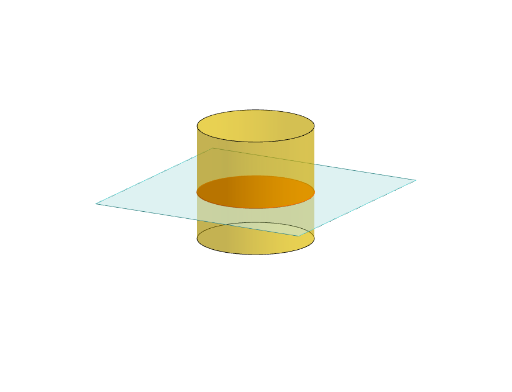
几何画板及绘图内容加载中,请稍等……
① 本范例通过GeoGebra动态展示圆柱体被不同平面截切后产生的截面形状,直观呈现圆形、椭圆、矩形等截面随平面角度变化的规律。② 核心数学概念包括立体几何中的圆柱体、截面、平面与曲面相交,以及旋转、平移等几何变换,涉及空间想象与解析几何基础。③ 作图要点:利用Polygon构造底面多边形,通过Translate和Rotate生成圆柱体,使用Plane定义截平面,IntersectPath命令计算截面交线,OrthogonalLine构造垂线,并配合多个文本对象(text1至text9)标注关键点与测量值,整体交互性强。④ 适合中学高年级至大学低年级学生,用于立体几何教学、空间思维训练或数学实验课,也可作为教师演示工具,帮助学生理解截面形状与平面方向的关系。
GeoGebra 命令及参数
Polygon(B + (-2, -2), B + (2, -2), B + (2, 2), B + (-2, 2)) → poly3, e, f, g, iPointIn(poly3) → CTranslate((0, 0, 0), Vector[B, C]) → APolygon(A + (-4, -4), A + (4, -4), A + (4, 4), A + (-4, 4)) → poly1, a, b, c, dRotate(Rotate[Translate[poly1, Vector[A, A + (0, 0, h)]], (90° * s), A + (0, 0, h), yAxis], (90° * t), A, zAxis) → poly2Rotate(D, 120°, (0, 0, 0)) → EPolygon(D, E, 3, xOyPlane) → poly4, j, k, l, FCylinder((0, 0, 0), (0, 0, 4), 2) → m, e_1, f_1, oPointIn(poly2) → GPointIn(poly2) → HPointIn(poly2) → IPlane(G, I, H) → nIntersectPath(n, m) → poly6OrthogonalLine(A, n) → d_1Ends(m) → g_1, g_1_1