
制作抛物线
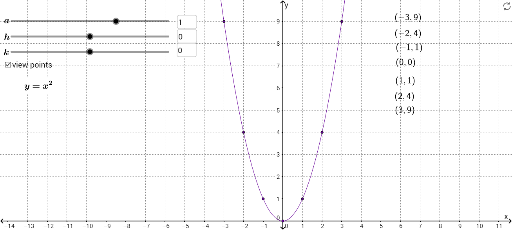
几何画板及绘图内容加载中,请稍等……
①本范例演示如何通过动态调整参数绘制抛物线;②涉及核心数学概念包括抛物线、标准差、勾股定理、多项式函数、曲面、割线;③作图要点使用了If、Textfield、LaTeX命令,以及a、h、k等对象进行参数化控制;④适合高中及以上数学教学或自学,用于理解抛物线方程及其几何性质。
GeoGebra 命令及参数
If(c > 0, "-", "+") → text5If(a ≟ 1, "", text8) → text7If(d < 0, "-", "+") → text6If(c ≟ 0, "", text9) → text11If(d ≟ 0, "", text10) → text12If(c ≟ 0, "", "(") → text13Textfield(a) → InputBox1Textfield(c) → InputBox2Textfield(d) → InputBox3LaTeX(I1, true, false) → text14LaTeX(I2, true, false) → text15LaTeX(I3, true, false) → text16LaTeX(I4, true, false) → text17LaTeX(I5, true, false) → text18LaTeX(I6, true, false) → text19LaTeX(I7, true, false) → text20