
分数转换为有限小数
几何画板及绘图内容加载中,请稍等……
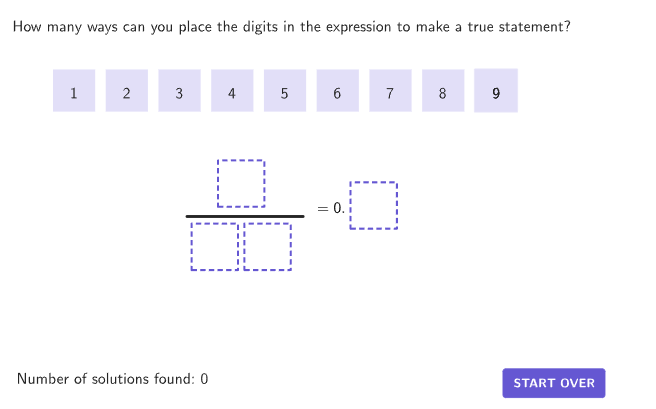
本范例演示如何将分数转换为有限小数。通过创建分数及其对应的有限小数,学生可以探索分数与小数之间的关系。本活动涉及的 GeoGebra 命令包括 centerBox, Zip, If, Element, Corner, Sequence, Segment, IndexOf, Flatten, Text 等。适合初中6-8年级学生进行数学概念的理解与应用。
GeoGebra 命令及参数
centerBox((1.1 * boxWidth), (1.1 * boxHeight), SolnAnchor) → solnBoxZip(IsInRegion[A, solnBox], A, allPoints) → countRegion4centerBox((1.1 * boxWidth), (1.1 * boxHeight), DenomAnchor1) → boxDenom1Zip(IsInRegion[A, boxDenom1], A, allPoints) → countRegion3centerBox((1.1 * boxWidth), (1.1 * boxHeight), DenomAnchor10) → boxDenom10Zip(IsInRegion[A, boxDenom10], A, allPoints) → countRegion2centerBox((1.1 * boxWidth), (1.1 * boxHeight), NumerAnchor) → boxNumerZip(IsInRegion[A, boxNumer], A, allPoints) → countRegion1If(countEntries ≟ {1, 1, 1, 1}, (10 * IndexOf[true, countRegion2]) + IndexOf[true, countRegion3], NaN) → studentDenomIf(countEntries ≟ {1, 1, 1, 1}, IndexOf[true, countRegion4] / 10, NaN) → studentQuotientIf(countEntries ≟ {1, 1, 1, 1}, IndexOf[true, countRegion1], NaN) → studentNumerElement({P1, P2, P3, P4, P5, P6, P7, P8, P9}, movingIndex) → PMovecenterBox(boxWidth, boxHeight, P9) → box9centerBox(boxWidth, boxHeight, P8) → box8centerBox(boxWidth, boxHeight, P7) → box7centerBox(boxWidth, boxHeight, P6) → box6centerBox(boxWidth, boxHeight, P5) → box5centerBox(boxWidth, boxHeight, P4) → box4centerBox(boxWidth, boxHeight, P3) → box3centerBox(boxWidth, boxHeight, P2) → box2centerBox(boxWidth, boxHeight, P1) → box1Corner(5) → DimsSequence(HomeAnchor + ((A * (boxWidth + spacer)), 0), A, 0, 8) → homeLocationsSegment(LinePos + (-1, 0), LinePos + (-12, 0)) → divisionLineIndexOf({studentNumer, studentDenom}, studentAnswers) → studentAnsIndexZip(makeBox[A, boxWidth, boxHeight], A, homeLocations) → boxPlaceHoldersFlatten(RemoveUndefined[Zip[If[IsInRegion[PMove, Element[{box1, box2, box3, box4, box5, box6, box7, box8, box9}, A]] ∧ A ≠ movingIndex, {B, A}], A, destinationOrder, B, {1, 2, 3, 4, 5, 6, 7, 8, 9}]]) → overlapInfoZip(Text[("" * A), B, true, true, 0, 0], A, {1, 2, 3, 4, 5, 6, 7, 8, 9}, B, {P1, P2, P3, P4, P5, P6, P7, P8, P9}) → digitTextcenterBox(boxWidth, boxHeight, PMove) → highlightBoxText(("" * movingIndex), PMove, true, true, 0, 0) → highlightLblText(("" * movingIndex), PMove, true, true, 0, 0) → highlightLabelIndexOf(true, Zip[IsInRegion[PMove, A], A, {boxNumer, boxDenom10, boxDenom1, solnBox}]) → locationPMoveElement({boxNumer, boxDenom10, boxDenom1, solnBox}, locationPMove) → highlightFrameSequence(Zip[Length[destinationAnchors(A) - B] < 0.1, B, {P1, P2, P3, P4, P5, P6, P7, P8, P9}], A, 1, 4) → findPlacedPoints
AI 绘图提示语参考
该图形由多个矩形框组成,分别代表分母、分子和最终解框。框内标注数字,框外有对应点标记。图形包含一条水平线段和文本标签,用于显示分数与小数的对应关系。构造顺序为:先绘制各框,再放置点标记,接着添加线段和文本,最后调整位置以确保对应关系清晰。
以上提示语为根据原始绘图命令整理而来,仅供参考。