
用滑块构建圆柱并探索体积计算
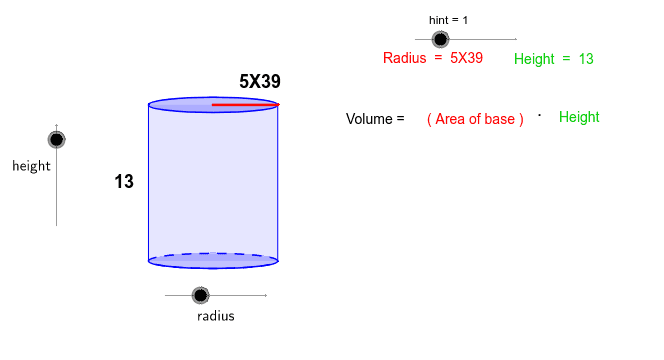
几何画板及绘图内容加载中,请稍等……
所属专题
Surface Area and Volume
Surface Area and Volume
Surface Area and Volume
Visual Geometry for Grade 9
Area, perimeter and volume of shapes
Area, Perimeter and Volume of shapes
Circumference, Area, and Volume
Surface Area and Volume of basic figures
Surface Area and Volume of basic figures
Surface Area and Volume of basic figures
本示例通过交互式滑块让学生动态构建一个圆柱体,并探索圆柱体积的计算方法。涉及的数学概念包括圆柱的几何性质、底面积与高度的关系,以及体积公式 V = πr²h。通过 GeoGebra 命令,如 Intersect、Vector、Translate、Segment、Arc、Polygon、Root、Midpoint,以及多个辅助对象(如半径、控制点等),实现圆柱的动态生成,并实时显示计算结果。适合高中及以上学生学习立体几何与应用数学,亦可用于课堂演示、习题讲解及自主探究活动。
GeoGebra 命令及参数
Intersect(c, xAxis, 1) → AIntersect(c, xAxis, 2) → BVector((-17, 0), (-1 * 17, b)) → uTranslate(c, u) → dTranslate(A, u) → CTranslate(B, u) → DSegment(A, C) → eSegment(B, D) → fArc(c, A, B) → gPolygon(C, D, B, A) → P, c_1, d_1, b_1, a_1Intersect(xAxis, yAxis) → ESegment(E, B) → hTranslate(E, u) → E'Translate(B, u) → B'Segment(E', B') → iRoot(32) → FMidpoint(i) → GMidpoint(e) → H
AI 绘图提示语参考
绘制一个圆柱体,使用滑块调整底面半径和高。首先画一个圆作为底面,然后通过平移生成另一个底面,接着画两个平行的直线段作为圆柱的侧面,再画两个弧线连接两个底面,形成圆柱的侧面。最后,通过滑块动态调整圆柱的尺寸,观察体积变化。
以上提示语为根据原始绘图命令整理而来,仅供参考。