
全等三角形判定练习(第7题)
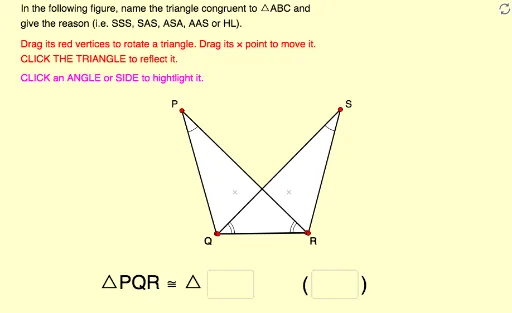
几何画板及绘图内容加载中,请稍等……
本范例演示了如何通过移动、旋转和反射三角形来识别并命名全等三角形,并给出判定理由。核心数学概念是全等三角形的判定条件(如SSS、SAS、ASA等)以及对应顶点、边和角的对应关系。作图要点包括使用GeoGebra的Polygon、Vector、Angle、Intersect、Textfield、Segment、Midpoint、Rotate、Vertex等命令构建可交互的三角形对,并利用文本输入框让学生填写答案。适合中学几何课堂或自学练习,帮助学生直观理解全等三角形的性质与判定方法。
GeoGebra 命令及参数
Polygon(A, B, C) → poly1, c, a, bVector(P, A) → uVector(P, B) → vVector(P, C) → wPolygon(A_1, B_1, C_1) → poly1_1, c_1, a_1, b_1Vector(P_1, A_1) → u_1Vector(P_1, B_1) → v_1Vector(P_1, C_1) → w_1Angle(B, A, C) → αAngle(A, C, B) → βAngle(A_1, C_1, B_1) → γAngle(B_1, A_1, C_1) → δIntersect(Line[X_0, Rotate[Y_0, Ang_A, X_0]], Line[Y_0, Rotate[X_0, (-(180° - Ang_C - Ang_A)), Y_0]]) → Z_0Polygon(X_0, Y_0, Z_0) → poly2, z_0, x_0, y_0Textfield(text13) → Ans1Textfield(text14) → Ans2Segment(D, E) → rMidpoint(Segment[Intersect[Circle[A, r], b], Intersect[Circle[A, r], c]]) → FMidpoint(Segment[Intersect[Circle[C, r], a], Intersect[Circle[C, r], b]]) → GMidpoint(Segment[Intersect[Circle[A_1, r], b_1], Intersect[Circle[A_1, r], c_1]]) → HMidpoint(Segment[Intersect[Circle[C_1, r], a_1], Intersect[Circle[C_1, r], b_1]]) → IAngle(A_1, B_1, C_1) → εAngle(C, B, A) → ζMidpoint(Segment[Intersect[Circle[B, r], a], Intersect[Circle[B, r], c]]) → JMidpoint(Segment[Intersect[Circle[B_1, r], a_1], Intersect[Circle[B_1, r], c_1]]) → KRotate(Polygon[Mirror[X_0, x = 0], Mirror[Y_0, x = 0], Mirror[Z_0, x = 0]], 225°, (2, 0)) → poly3Vertex(poly3, 1) → X_1Vertex(poly3, 2) → Y_1Vertex(poly3, 3) → Z_1
AI 绘图提示语参考
绘制两个可移动的三角形,其中一个通过平移向量与另一个对应,并显示对应顶点连线。再构造第三个三角形,使其与第一个三角形全等但经过旋转和镜像,并标注对应角。添加两个文本输入框用于填写全等理由。在三角形各边上取点,构造中点并连接,以显示对应边中点关系。整体图形用于练习判断三角形全等并写出正确的顶点对应顺序。
以上提示语为根据原始绘图命令整理而来,仅供参考。