
复数共形映射:探究复平面上的保角变换
几何画板及绘图内容加载中,请稍等……
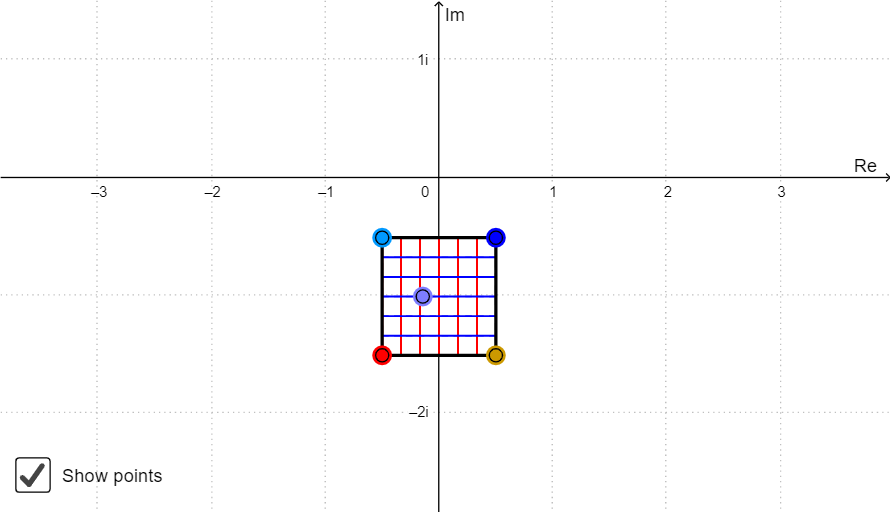
本范例演示复数共形映射的保角性质,通过将简单图形(如多边形、点列)映射到复平面上,观察角度和形状的保持关系。核心数学概念包括复数的实部虚部分离(FuncRe/FuncIm)、共形映射函数、轨迹绘制(Locus)和多边形构造(Polygon)。制作过程中使用Sequence生成点列,Point定义关键点,Centroid计算多边形重心,Join连接点,If实现条件逻辑,LaTeX显示数学公式。适合高等数学、复变函数课程教学,可帮助学生直观理解保角变换的几何意义与代数表示。
GeoGebra 命令及参数
Sequence(Segment[A + (i * (B - A) / a), C + (i * (D - C) / a)], i, 0, a) → list1Sequence(Segment[A + (i * (C - A) / a), B + (i * (D - B) / a)], i, 0, a) → list2Point(Element[list1, A1]) → B1Point(Element[list1, A2]) → B2Point(Element[list1, A3]) → B3Point(Element[list1, A4]) → B4Point(Element[list1, A5]) → B5Point(Element[list1, A6]) → B6Point(Element[list1, A7]) → B7Point(Element[list1, A8]) → B8Point(Element[list1, A9]) → B9Point(Element[list1, A10]) → B10Point(Element[list2, A1]) → C1Point(Element[list2, A2]) → C2Point(Element[list2, A3]) → C3Point(Element[list2, A4]) → C4Point(Element[list2, A5]) → C5Point(Element[list2, A6]) → C6Point(Element[list2, A7]) → C7Point(Element[list2, A8]) → C8Point(Element[list2, A9]) → C9Point(Element[list2, A10]) → C10Locus(D1, B1) → F1Locus(D2, B2) → F2Locus(D3, B3) → F3Locus(D4, B4) → F4Locus(D5, B5) → F5Locus(D6, B6) → F6Locus(D7, B7) → F7Locus(D8, B8) → F8Locus(D9, B9) → F9Locus(D10, B10) → F10Locus(E1, C1) → G1Locus(E2, C2) → G2Locus(E3, C3) → G3Locus(E4, C4) → G4Locus(E5, C5) → G5Locus(E6, C6) → G6Locus(E7, C7) → G7Locus(E8, C8) → G8Locus(E9, C9) → G9Locus(E10, C10) → G10Polygon(A, B, D, C) → poly1, a_1, b, d, cPoint(poly1) → ZLocus(Z', Z) → loc1Centroid(poly1) → OJoin({list1, list2}) → list3Point(list3) → EIf(4 ≤ Indexnames ≤ 6, unites, unitother) → ChooseunitLaTeX(Indexnames, true, true) → text3LaTeX(xmax, true, true) → text4LaTeX(xmin, true, true) → text5LaTeX(ymax, true, true) → text6LaTeX(ymin, true, true) → text7
AI 绘图提示语参考
绘制一个四边形区域,其四条边分别被等分为十份,用线段连接对边上的对应等分点,形成两组交叉的网格线。在网格线的交点处放置点,并让这些点沿特定轨迹移动,生成两组曲线族,分别对应两个方向的映射结果。在四边形内部取一个动点,使其在映射下产生一条轨迹曲线。最后标出四边形的中心点,并显示整个网格与曲线族的叠加效果,以展示角度保持的共形映射特性。
以上提示语为根据原始绘图命令整理而来,仅供参考。