
金字塔体积与表面积计算
几何画板及绘图内容加载中,请稍等……
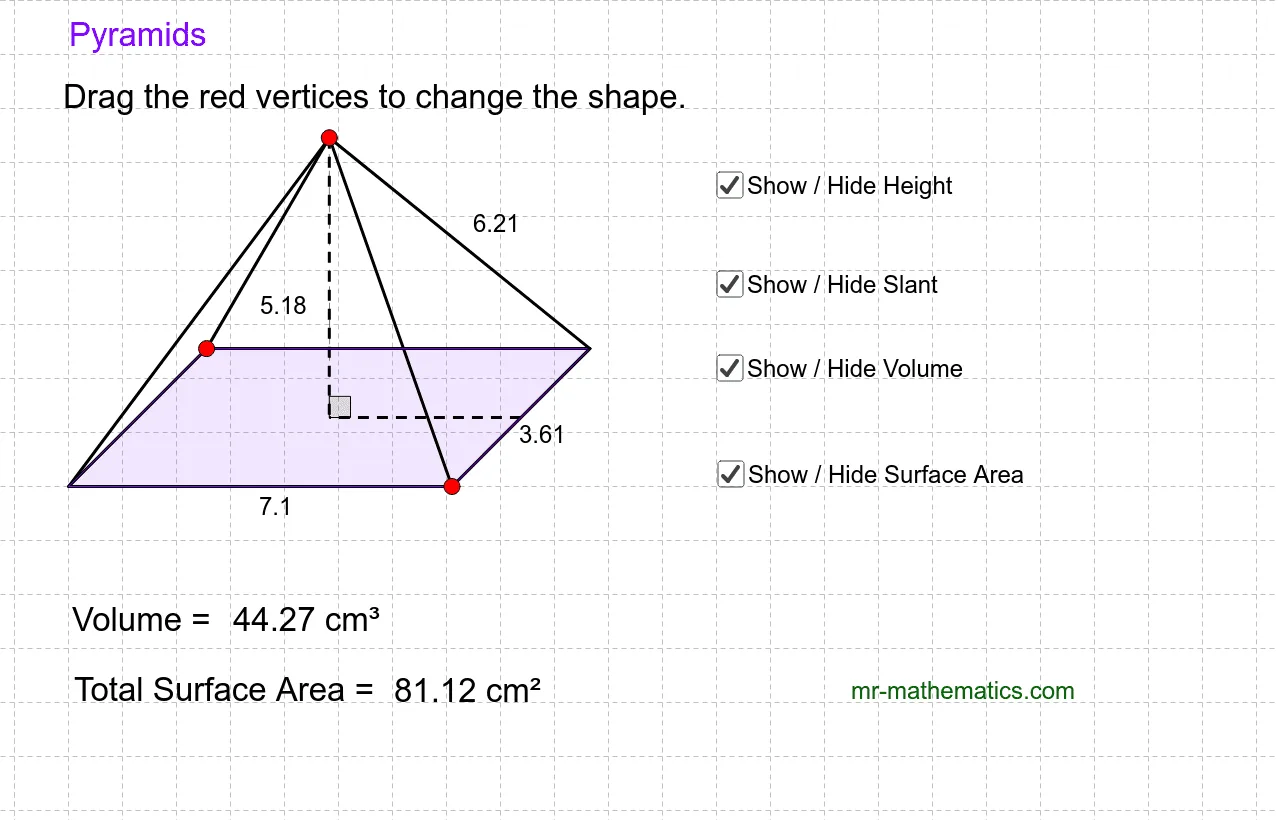
本范例通过改变金字塔的尺寸,演示如何计算其体积和表面积。核心数学概念包括立体几何中的体积和表面积公式。使用GeoGebra命令如Line, Point, Intersect, Segment, Midpoint, Rotate, Angle, Polygon等进行几何作图。适合高中数学教学或学习立体几何的学生。
GeoGebra 命令及参数
Line(A, B) → aLine(A, C) → bPoint(b) → EPoint(a) → FLine(E, a) → cLine(F, b) → dIntersect(c, d) → GSegment(A, F) → eSegment(F, G) → fSegment(G, E) → gSegment(E, A) → hMidpoint(e) → HMidpoint(f) → ILine(I, e) → iLine(H, h) → jIntersect(i, j) → JRotate(I, 90*°, J) → I'Angle(I, J, I') → αLine(J, I') → kSegment(I, J) → lPoint(k) → KSegment(K, J) → mSegment(K, G) → nSegment(F, K) → pSegment(A, K) → qSegment(E, K) → rPolygon(A, F, G, E) → poly1, a_1, f_1, g_1, e_1Intersect(f, g) → LLine(A_1, B_1) → a_2Line(A_1, C_1) → b_1Point(b_1) → E_1Point(a_2) → F_1Line(E_1, a_2) → c_1Line(F_1, b_1) → d_1Intersect(c_1, d_1) → G_1Segment(A_1, F_1) → e_2Segment(F_1, G_1) → f_2Segment(G_1, E_1) → g_2Segment(E_1, A_1) → h_1Midpoint(e_2) → H_1Midpoint(f_2) → I_1Line(I_1, e_2) → i_1Line(H_1, h_1) → j_1Intersect(i_1, j_1) → J_1Rotate(I_1, 90*°, J_1) → I'_1Angle(I_1, J_1, I'_1) → α_1Line(J_1, I'_1) → k_1Segment(I_1, J_1) → l_1Point(k_1) → K_1Segment(K_1, J_1) → m_1Segment(K_1, G_1) → n_1Segment(F_1, K_1) → p_1Segment(A_1, K_1) → q_1Segment(E_1, K_1) → r_1Polygon(A_1, F_1, G_1, E_1) → poly1_1, a_3, f_3, g_3, e_3Line(A_2, B_2) → a_4Line(A_2, C_2) → b_2Point(b_2) → E_2Point(a_4) → F_2Line(E_2, a_4) → c_2Line(F_2, b_2) → d_2Intersect(c_2, d_2) → G_2Segment(A_2, F_2) → e_4Segment(F_2, G_2) → f_4Segment(G_2, E_2) → g_4Segment(E_2, A_2) → h_2Midpoint(e_4) → H_2Midpoint(f_4) → I_2Line(I_2, e_4) → i_2Line(H_2, h_2) → j_2Intersect(i_2, j_2) → J_2Rotate(I_2, 90*°, J_2) → I'_2Angle(I_2, J_2, I'_2) → α_2Line(J_2, I'_2) → k_2Segment(I_2, J_2) → l_2Point(k_2) → K_2Segment(K_2, J_2) → m_2Segment(K_2, G_2) → n_2Segment(F_2, K_2) → p_2Segment(A_2, K_2) → q_2Segment(E_2, K_2) → r_2Polygon(A_2, F_2, G_2, E_2) → poly1_2, a_5, f_5, g_5, e_5Segment(K, L) → s_1Point(l) → OSegment(K, O) → t_1
AI 绘图提示语参考
绘制一个金字塔,包括底面和侧面。首先,画出底面的两条边AB和AC,然后在边AB上取点E,在边AC上取点F。接着,分别过点E和F画底面的垂线,交于点G。连接点A和F,点F和G,点G和E,点E和A,得到金字塔的侧面。接着找到线段AF的中点H和线段FG的中点I,过点I画线段AF的平行线,过点H画线段AE的平行线,两线交于点J。旋转点I 90度得到点I',计算∠IJI'。最后,画出顶点K,连接顶点K和底面各边的中点,形成金字塔的侧面。
以上提示语为根据原始绘图命令整理而来,仅供参考。