
天秤遊戲
几何画板及绘图内容加载中,请稍等……
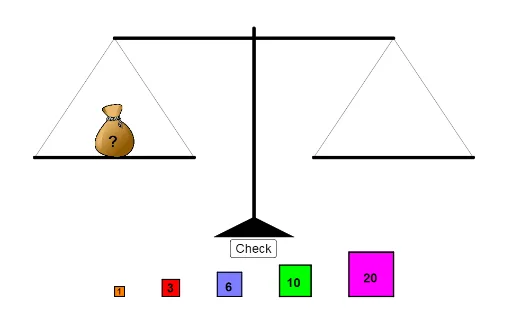
①本范例通过动态演示天秤平衡的力学原理,直观展示杠杆原理与力矩平衡;②涉及核心数学概念包括向量、几何作图、解析几何、概率统计(如期望值);③构造中运用了Join, RandomElement, Random, Point, Polygon, Segment, If, Textfield等GeoGebra命令与对象,实现动态平衡点的计算与显示;④适合高中物理与数学教学,用于理解力矩、向量运算及概率模型。
GeoGebra 命令及参数
Join({Sequence[Point[{i, 8}], i, -22, -10], Sequence[Point[{i, 8}], i, 6, 18]}) → startingPointRandomElement(startingPoint) → K_1anchorRandom(1, 40) → weightPoint({(-14 * cos((-tipper))), (14 * sin((-tipper))) + 20}) → leftPointPolygon(C_1 + (-2, 2), C_1 + (-2, -2), C_1 + (16, -2), C_1 + (16, 2)) → leftZone, t_1, a_1, b_1, c_1Polygon(A, B, 4) → poly1, f, g, h, i, K, LPolygon(C, D, 4) → poly2, j, k, l, m, M, NPolygon(E, F, 4) → poly3, n, p, q, r, O, PPolygon(G, H, 4) → poly4, s, t, a, b, Q, RPolygon(I, J, 4) → poly5, c, d, e, f_1, S, TPoint(xAxis) → UPoint(xAxis) → VPoint(yAxis) → WPolygon(U, V, W) → poly6, w, u, vSegment(W, Z) → g_1Point(g_1) → A_1Point({(14 * cos(tipper)), (14 * sin(tipper)) + 20}) → rightPointSegment(leftPoint, rightPoint) → h_1Segment(C_1, D_1) → i_1Segment(F_1, E_1) → j_1Segment(leftPoint, D_1) → k_1Segment(C_1, leftPoint) → l_1Segment(E_1, rightPoint) → n_1Segment(rightPoint, F_1) → m_1Polygon(F_1 + (-2, 2), F_1 + (-2, -2), F_1 + (16, -2), F_1 + (16, 2)) → rightZone, p_1, q_1, r_1, s_1If(abs(tipper) ≟ π / 6, true, false) → tippedTextfield(answerText) → InputBox1RandomElement({-1, 1}) → starterIf(Max[rightTotal, leftTotal] ≟ Min[rightTotal, leftTotal], 0, (1 / 3 * (Max[rightTotal, leftTotal] - Min[rightTotal, leftTotal])) + 4 / 3) → speed
AI 绘图提示语参考
画一个动态平衡的天平,展示杠杆原理和力矩平衡。天平有左右两个支点,通过向量运算和几何构造,随机生成不同重量的物体放置在左右两侧区域,用线段连接支点和物体,根据重量计算平衡点,并用文字显示动态平衡状态和概率统计信息。
以上提示语为根据原始绘图命令整理而来,仅供参考。