
轴对称图形
几何画板及绘图内容加载中,请稍等……
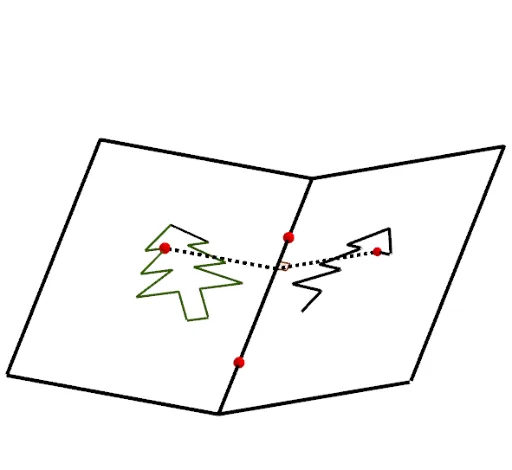
这个范例展示了轴对称图形的构造过程。它涉及轴对称、几何作图等核心数学概念。通过使用GeoGebra命令如PolyLine、Mirror、Segment等,可以构造出轴对称图形。适合初中及以上学生学习轴对称性质和几何作图技巧。
GeoGebra 命令及参数
PolyLine(O_1, P_1, A_2, O_1, Q_1, R_1, S_1, T_1, U_1, V_1, W_1, Z_1) → q_1Point(q_1) → P_3PolyLine(I, H, N, M, L, K, J, I, G, F, E, D, C, B, A, O) → tPoint(t) → P1Polygon(W, Z, C_1, D_1, E_1, F_1, A_1, B_1, V) → poly2, w, z, c_1, d_1, e_1, f_1, a_1, b_1, vPoint(v) → G_1Point(v) → H_1PolyLine(A_1, F_1, B_1, A_1, E_1, D_1, C_1, Z, W, H_1, G_1, V) → p_1Point(p_1) → P2PolyLine(B_2, C_2, L_2, M_2, B_2, D_2, E_2, F_2, G_2, H_2, I_2, J_2, K_2) → r_1Point(r_1) → P4Polygon(A, B, K, L, M, N, O, C, D, E, F, G, H, I, J) → poly1, a_2, j, k, l, m, n, o, b, c, d, e, f, g, h, iLine(Q, R) → pIf(Motif ≟ 1, P1, If[Motif ≟ 2, P2, If[Motif ≟ 3, P_3, If[Motif ≟ 4, P4, P5]]]) → PMirror(P, p) → SCircle(P, a) → qLine(P, xAxis) → rIntersect(q, r) → T, USequence(Segment[Element[Marque, i], Element[Marque, i + 1]], i, 1, Length[Marque]) → TraitMirror(Trait, p) → Trait'Polygon(H_1, I_1, J_1, G_1) → poly3, h_1, i_1, j_1, g_1Mirror(H_1, p) → K_1Mirror(I_1, p) → L_1Mirror(J_1, p) → M_1Mirror(G_1, p) → N_1Polygon(K_1, L_1, M_1, N_1) → poly3', k_1, l_1, m_1, n_1Segment(P, S) → sIntersect(s, p) → N_2Angle(S, N_2, R) → αCircle(N_2, 1) → s_1Intersect(s_1, p) → O_2, P_2Intersect(s_1, s) → Q_2, R_2Line(R_2, p) → t_1Line(O_2, s) → b_2Intersect(b_2, t_1) → S_2Polygon(N_2, R_2, S_2, O_2) → poly4, n_2, r_2, s_2, o_2Segment(N_2, P) → g_2Segment(N_2, S) → f_2Rotate(Trait', rr, p) → Trait''Midpoint(Q, R) → T_2Plane(U_2, Q, R) → p_2Point(p) → V_2Point(p) → W_2OrthogonalLine(V_2, p_2) → h_2OrthogonalLine(W_2, p_2) → i_2Point(h_2) → Z_2Line(Z_2, p) → j_2Mirror(Z_2, p) → A_3Intersect(i_2, j_2) → B_3Mirror(B_3, p) → C_3Polygon(V_2, A_3, C_3, W_2) → q1, v_2, a_3, c_3, w_2Polygon(V_2, Z_2, B_3, W_2) → q2, k_2, z_2, b_3, l_2Rotate(q2, rr, p) → q2'Rotate(S, rr, p) → S'Rotate(N_2, rr, p) → D_3Rotate(S, rr, p) → S'_1Segment(D_3, S'_1) → m_2
AI 绘图提示语参考
绘制一个轴对称图形示例。首先画一条对称轴直线,并在其两侧构造两个多边形,其中一个多边形由多个顶点连接而成,另一个为封闭多边形。在对称轴一侧的多边形上取一个动点,通过该点作对称轴的垂线,并利用圆与直线交点构造一个正方形,表示对称变换的局部结构。同时,将一侧多边形的边进行镜像,得到另一侧的对应图形,并用虚线连接对应点,标注对称轴与垂线的夹角。整体展示图形关于该直线的镜像对称关系。
以上提示语为根据原始绘图命令整理而来,仅供参考。