
梯形面积计算与作图 by Andrew Kerr
几何画板及绘图内容加载中,请稍等……
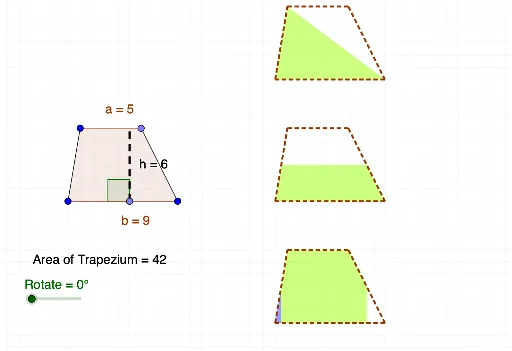
这个范例演示了梯形面积的计算与几何作图。涉及的核心数学概念包括梯形面积公式、相似变换和几何构造。作图要点包括使用GeoGebra命令如Segment、Line、Point、Polygon、OrthogonalLine、Intersect、Vector、Translate、Rotate、Midpoint、Angle、PointIn等对象。适合初中或高中数学学习,用于理解梯形面积与几何变换的关系。
GeoGebra 命令及参数
Segment(A, B) → fLine(C, f) → gSegment(A, C) → h_1Point(g) → DSegment(B, D) → iPolygon(A, C, D, B) → poly1, c, a, d, bPoint(f) → EOrthogonalLine(E, a) → h_2Intersect(h_2, a) → FSegment(E, F) → hVector(I, J) → vVector(G, H) → uTranslate(A, u) → A'Translate(C, u) → C'Translate(D, u) → D'Translate(B, u) → B'Polygon(A', C', D', B') → poly1', a', c', d', b'Translate(A', v) → A''Translate(C', v) → C''Translate(D', v) → D''Translate(B', v) → B''Polygon(A'', C'', D'', B'') → poly1'', a'', c'', d'', b''Translate(A, v) → A'_1Translate(C, v) → C'_1Translate(D, v) → D'_1Translate(B, v) → B'_1Polygon(A', C', B') → poly2, b'_2, a'_2, c'_2Polygon(C', D', B') → poly3, b'_3, c'_3, d'_2Rotate(B', (-Rotate), B') → B''_1Midpoint(D', B') → KRotate(C', (-Rotate), K) → C''_1Rotate(D', (-Rotate), K) → D''_1Rotate(B', (-Rotate), K) → B''_2Polygon(C''_1, D''_1, B''_2) → poly3', b''_2, c''_1, d''_1Midpoint(A'', C'') → LMidpoint(B'', D'') → MPolygon(A'', L, M, B'') → poly4, a''_1, l, m, b''_1Polygon(L, C'', D'', M) → poly5, l_1, c''_2, d''_2, m_1Rotate(L, (-Rotate), M) → L'Rotate(C'', (-Rotate), M) → C'''Rotate(D'', (-Rotate), M) → D'''Rotate(M, (-Rotate), M) → M'Polygon(L', C''', D''', M') → poly5', l', c''', d''', m'Midpoint(A'_1, C'_1) → NMidpoint(D'_1, B'_1) → ORotate(N, (-Rotate), N) → N'Rotate(A'_1, (-Rotate), N) → RRotate(O, Rotate, O) → O'Rotate(B'_1, Rotate, O) → SAngle(F, E, A) → αTranslate(A'', v) → A'''Translate(C'', v) → C'''_1Translate(D'', v) → D'''_1Translate(B'', v) → B'''Polygon(A''', C'''_1, D'''_1, B''') → poly1''', a''', c'''_1, d'''_1, b'''Midpoint(a''') → TMidpoint(d'''_1) → UOrthogonalLine(C'''_1, b''') → tOrthogonalLine(D'''_1, b''') → eOrthogonalLine(A''', c'''_1) → f_1OrthogonalLine(B''', c'''_1) → g_1OrthogonalLine(T, b''') → i_1OrthogonalLine(U, b''') → j_1Intersect(i_1, b''') → VIntersect(j_1, b''') → WPolygon(V, T, C'''_1, D'''_1, U, W) → poly9, v_1, t_1, c'''_2, d'''_2, u_1, wPolygon(A''', T, V) → poly10, v_2, a'''_1, t_2Polygon(W, U, B''') → poly11, b'''_1, w_1, u_2Rotate(A''', (-Rotate), T) → ZRotate(T, (-Rotate), T) → T'Rotate(V, (-Rotate), T) → V'Polygon(Z, T', V') → poly10', v', z_1, t'Rotate(W, Rotate, U) → W'Rotate(U, Rotate, U) → U'Rotate(B''', Rotate, U) → A_1Polygon(W', U', A_1) → poly11', a_1, w', u'Intersect(i_1, c'''_1) → B_1Polygon(B_1, D'''_1, U, W, A''', T) → poly12, b_1, d'''_3, u_3, w_2, a'''_2, t_3Polygon(C'''_1, B_1, T) → poly13, t_4, c'''_3, b_2Rotate(C'''_1, Rotate, T) → C_1Rotate(B_1, Rotate, T) → D_1Rotate(T, Rotate, T) → T'_1Polygon(C_1, D_1, T'_1) → poly13', t'_1, c_1, d_1Intersect(j_1, c'''_1) → E_1Polygon(B_1, T, A''', B''', U, E_1) → poly14, b_3, t_5, a'''_3, b'''_2, u_4, e_1Polygon(U, E_1, D'''_1) → poly15, d'''_4, u_5, e_2Rotate(U, (-Rotate), U) → U'_1Rotate(E_1, (-Rotate), U) → F_1Rotate(D'''_1, (-Rotate), U) → G_1Polygon(U'_1, F_1, G_1) → poly15', g_2, u'_1, f_2Polygon(V, T, C'''_1, E_1, U, B''') → poly16, v_3, t_6, c'''_4, e_3, u_6, b'''_3PointIn(poly1) → Pointpoly1Segment(T, U) → k
AI 绘图提示语参考
请绘制一个梯形图形。梯形由两条平行边和两条不平行边组成。构造时,先画出两条平行边,再画出两条不平行边,形成梯形。然后,通过几何变换,如平移和旋转,将梯形复制并调整位置。最后,添加一些辅助点,如中点,以展示梯形的对称性和几何关系。
以上提示语为根据原始绘图命令整理而来,仅供参考。