
十二面体的另一种展开图
几何画板及绘图内容加载中,请稍等……
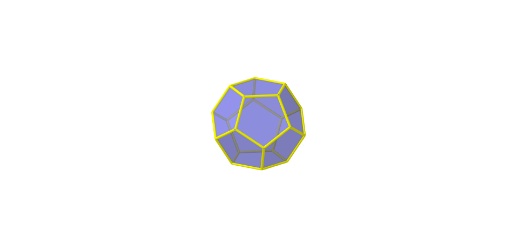
这个范例展示了十二面体的另一种展开图。它涉及立体几何中的多面体展开概念。通过使用GeoGebra中的Point, Dodecahedron, If, Rotate等命令,可以构造出十二面体的展开图。适合初中及以上学生学习立体几何和几何作图。
GeoGebra 命令及参数
Point(Circle[(((1 - sqrt(5)) * A) + ((3 + sqrt(5)) * B)) / 4, (Distance[A, B] * sqrt(10 + (2 * sqrt(5))) / 4), Segment[A, B]]) → CDodecahedron(A, B, C) → a, D, M, N, O, P, Q, R, S, T, faceABCDE, faceAEIOJ, E, faceABFKJ, faceBCGLF, faceCDHMG, faceDEINH, faceINSTO, faceJKPTO, faceFKPQL, faceGLQRM, faceHMRSN, facePQRST, F, edgeAE, edgeAB, edgeBC, edgeCD, edgeDE, edgeAJ, edgeEI, edgeIO, edgeJO, edgeJK, G, edgeFK, edgeBF, edgeFL, edgeGL, edgeCG, edgeGM, edgeHM, edgeDH, edgeHN, edgeIN, H, edgeNS, edgeST, edgeOT, edgePT, edgeKP, edgePQ, edgeLQ, edgeQR, edgeMR, edgeRS, I, J, K, LIf(b ≤ 1, b, 1) → t1Rotate(Polygon[P, Q, R, S, T], (t1 * α), Segment[Q, R]) → poly1If(b > 1 ∧ b ≤ 2, b - 1, If[b ≤ 1, 0, 1]) → t2Rotate(Polygon[Q, R, M, G, L], (α * t2), Segment[Q, L]) → poly2Rotate(poly1, (α * t2), Segment[Q, L]) → poly1'If(b > 2 ∧ b ≤ 3, b - 2, If[b ≤ 2, 0, 1]) → t3Rotate(Polygon[P, Q, L, F, K], (α * t3), Segment[P, K]) → poly3Rotate(poly2, (α * t3), Segment[P, K]) → poly2'Rotate(poly1', (α * t3), Segment[P, K]) → poly1''If(b > 3 ∧ b ≤ 4, b - 3, If[b ≤ 3, 0, 1]) → t4Rotate(Polygon[P, K, J, O, T], (α * t4), Segment[T, O]) → poly4Rotate(poly3, (α * t4), Segment[T, O]) → poly3'Rotate(poly2', (α * t4), Segment[T, O]) → poly2''Rotate(poly1'', (α * t4), Segment[T, O]) → poly1'''If(b > 4 ∧ b ≤ 5, b - 4, If[b ≤ 4, 0, 1]) → t5Rotate(Polygon[S, T, O, I, N], (α * t5), Segment[S, N]) → poly5Rotate(poly4, (α * t5), Segment[S, N]) → poly4'Rotate(poly3', (α * t5), Segment[S, N]) → poly3''Rotate(poly2'', (α * t5), Segment[S, N]) → poly2'''Rotate(poly1''', (α * t5), Segment[S, N]) → poly6If(b > 5 ∧ b ≤ 6, b - 5, If[b ≤ 5, 0, 1]) → t6Rotate(Polygon[R, S, N, H, M], (α * t6), Segment[M, H]) → poly7Rotate(poly5, (α * t6), Segment[M, H]) → poly5'Rotate(poly4', (α * t6), Segment[M, H]) → poly4''Rotate(poly3'', (α * t6), Segment[M, H]) → poly3'''Rotate(poly2''', (α * t6), Segment[M, H]) → poly8Rotate(poly6, (α * t6), Segment[M, H]) → poly6'If(b > 6 ∧ b ≤ 7, b - 6, If[b ≤ 6, 0, 1]) → t7Rotate(Polygon[C, G, M, H, D], (α * t7), Segment[G, C]) → poly9Rotate(poly7, (α * t7), Segment[G, C]) → poly7'Rotate(poly5', (α * t7), Segment[G, C]) → poly5''Rotate(poly4'', (α * t7), Segment[G, C]) → poly4'''Rotate(poly3''', (α * t7), Segment[G, C]) → poly10Rotate(poly8, (α * t7), Segment[G, C]) → poly8'Rotate(poly6', (α * t7), Segment[G, C]) → poly6''If(b > 7 ∧ b ≤ 8, b - 7, If[b ≤ 7, 0, 1]) → t8Rotate(Polygon[B, F, L, G, C], (α * t8), Segment[F, B]) → poly11Rotate(poly9, (α * t8), Segment[F, B]) → poly9'Rotate(poly7', (α * t8), Segment[F, B]) → poly7''Rotate(poly5'', (α * t8), Segment[F, B]) → poly5'''Rotate(poly4''', (α * t8), Segment[F, B]) → poly12Rotate(poly10, (α * t8), Segment[F, B]) → poly10'Rotate(poly8', (α * t8), Segment[F, B]) → poly8''Rotate(poly6'', (α * t8), Segment[F, B]) → poly6'''If(b > 8 ∧ b ≤ 9, b - 8, If[b ≤ 8, 0, 1]) → t9Rotate(Polygon[A, J, K, F, B], (α * t9), Segment[J, A]) → poly13Rotate(poly11, (α * t9), Segment[J, A]) → poly11'Rotate(poly9', (α * t9), Segment[J, A]) → poly9''Rotate(poly7'', (α * t9), Segment[J, A]) → poly7'''Rotate(poly5''', (α * t9), Segment[J, A]) → poly14Rotate(poly12, (α * t9), Segment[J, A]) → poly12'Rotate(poly10', (α * t9), Segment[J, A]) → poly10''Rotate(poly8'', (α * t9), Segment[J, A]) → poly8'''Rotate(poly6''', (α * t9), Segment[J, A]) → poly15If(b > 9 ∧ b ≤ 10, b - 9, If[b ≤ 9, 0, 1]) → t10Rotate(Polygon[E, I, O, J, A], (α * t10), Segment[I, E]) → poly16Rotate(poly13, (α * t10), Segment[I, E]) → poly13'Rotate(poly11', (α * t10), Segment[I, E]) → poly11''Rotate(poly9'', (α * t10), Segment[I, E]) → poly9'''Rotate(poly7''', (α * t10), Segment[I, E]) → poly17Rotate(poly14, (α * t10), Segment[I, E]) → poly14'Rotate(poly12', (α * t10), Segment[I, E]) → poly12''Rotate(poly10'', (α * t10), Segment[I, E]) → poly10'''Rotate(poly8''', (α * t10), Segment[I, E]) → poly18Rotate(poly15, (α * t10), Segment[I, E]) → poly15'If(b > 10 ∧ b ≤ 11, b - 10, If[b ≤ 10, 0, 1]) → t11Rotate(Polygon[D, H, N, I, E], (α * t11), Segment[D, E]) → poly19Rotate(poly16, (α * t11), Segment[D, E]) → poly16'Rotate(poly13', (α * t11), Segment[D, E]) → poly13''Rotate(poly11'', (α * t11), Segment[D, E]) → poly11'''Rotate(poly9''', (α * t11), Segment[D, E]) → poly20Rotate(poly17, (α * t11), Segment[D, E]) → poly17'Rotate(poly14', (α * t11), Segment[D, E]) → poly14''Rotate(poly15', (α * t11), Segment[D, E]) → poly15''Rotate(poly18, (α * t11), Segment[D, E]) → poly18'Rotate(poly12'', (α * t11), Segment[D, E]) → poly12'''Rotate(poly10''', (α * t11), Segment[D, E]) → poly21Rotate(Polygon[A, B, C, D, E], 0, Segment[A, B]) → poly22Rotate(Polygon[A, B, C, D, E], 0, Segment[A, B]) → poly23Rotate(Polygon[D, H, N, I, E], (α * t11), Segment[D, E]) → poly24Rotate(poly16, (α * t11), Segment[D, E]) → poly16'_1Rotate(poly13', (α * t11), Segment[D, E]) → poly13''_1Rotate(poly11'', (α * t11), Segment[D, E]) → poly11'''_1Rotate(poly9''', (α * t11), Segment[D, E]) → poly25Rotate(poly17, (α * t11), Segment[D, E]) → poly17'_1Rotate(poly14', (α * t11), Segment[D, E]) → poly14''_1Rotate(poly12'', (α * t11), Segment[D, E]) → poly12'''_1Rotate(poly10''', (α * t11), Segment[D, E]) → poly26Rotate(poly18, (α * t11), Segment[D, E]) → poly18'_1Rotate(poly15', (α * t11), Segment[D, E]) → poly15''_1
AI 绘图提示语参考
绘制一个十二面体的展开图,展示其表面如何展开成一个平面图形。首先创建十二面体的基本顶点和面,然后按照一定的顺序和角度旋转各个部分,使它们从三维形状变成二维的展开图。整个过程需要多次旋转操作,每个旋转的角度和方向都要精确控制,最终呈现出一个清晰、完整的十二面体展开图。
以上提示语为根据原始绘图命令整理而来,仅供参考。