
Alex 和随机数生成器
几何画板及绘图内容加载中,请稍等……
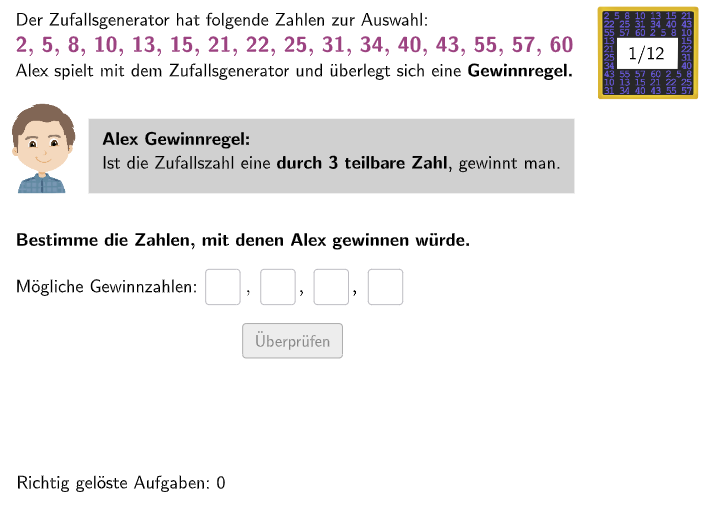
Alex 和随机数生成器是一种交互式数学范例,用于演示概率统计的概念。该范例展示了一个随机数生成器的工作原理,学生可以通过输入不同的参数来改变随机数的分布。核心数学概念包括概率、随机变量和统计分布。作图要点包括使用 GeoGebra 的 Textfield、Join、If、Polygon、Length 和 CountIf 等命令/对象。适合的学段或用途包括初中和高中概率统计的教学。
GeoGebra 命令及参数
Textfield(inputb) → InputBoxBTextfield(input1) → InputBox1Join({{6, 3}, Shuffle[{1, 2, 4, 5, 7, 8, 9, 10, 11, 12}]}) → randomNumsTextfield(input2) → InputBox2Textfield(input3) → InputBox3Textfield(input4) → InputBox4Textfield(input5) → InputBox5Textfield(input6) → InputBox6Textfield(input7) → InputBox7Textfield(input8) → InputBox8Textfield(input9) → InputBox9If(bsp ≟ 2, c1 ∧ c2 ∧ c3 ∧ c4 ∧ c5 ∧ c6 ∧ c7 ∧ c8 ∧ c9, If[bsp ≟ 5, c1 ∧ c2 ∧ c3 ∧ c4 ∧ c5 ∧ c6 ∧ c7, If[bsp ≟ 6, c1 ∧ c2 ∧ c3 ∧ c4, If[bsp ≟ 8, c1 ∧ c2 ∧ c3 ∧ c4 ∧ c5 ∧ c6 ∧ c7, If[bsp ≟ 10, c1 ∧ c2 ∧ c3 ∧ c4 ∧ c5, If[bsp ≟ 11, c1 ∧ c2 ∧ c3, If[bsp ≟ 12, c1 ∧ c2 ∧ c3 ∧ c4]]]]]]) → correct1If(aufgabenstellung ≟ 1, correct1, correct2) → correctPolygon(PtopLeftCornerFeedback, PtopRightCornerFeedback, PbottomRightCornerFeedback, PbottomLeftCornerFeedback) → rectangleCorrect, rectangleCorrectS3, rectangleCorrectS4, rectangleCorrectS2, rectangleCorrectS1Length(sols(bsp)) → anzahlLoesungenCountIf(Defined[a], a, inputs) → inputsAusgefuelltIf(aufgabenstellung ≟ 1, anzahlLoesungen ≟ inputsAusgefuellt, Defined[inputb]) → fixedIf(bsp ≟ 2, c1 ∨ c2 ∨ c3 ∨ c4 ∨ c5 ∨ c6 ∨ c7 ∨ c8 ∨ c9, If[bsp ≟ 5, c1 ∨ c2 ∨ c3 ∨ c4 ∨ c5 ∨ c6 ∨ c7 ∨ c8, If[bsp ≟ 6, c1 ∨ c2 ∨ c3, If[bsp ≟ 8, c1 ∨ c2 ∨ c3 ∨ c4 ∨ c5 ∨ c6 ∨ c7, If[bsp ≟ 10, c1 ∨ c2 ∨ c3 ∨ c4 ∨ c5 ∨ c6, If[bsp ≟ 11, c1 ∨ c2 ∨ c3, If[bsp ≟ 12, c1 ∨ c2 ∨ c3]]]]]]) → correctpartiallyUnique(inputs) → l1
AI 绘图提示语参考
绘制一个交互式概率统计教学界面,包含多个文本输入框用于输入参数和一个结果显示区域。界面左侧排列着九个小型的文本输入框,用于接收用户的数值输入。上方有一个较大的输入框用于设置基础参数。界面中央显示一组通过随机排列生成的数字序列,这些数字以列表形式呈现。界面右下角有一个矩形区域,根据用户的输入答案正确与否显示不同的颜色反馈,可以是单个矩形或多个叠加的矩形块。整个界面设计用于帮助学生理解随机变量和统计分布的概念。
以上提示语为根据原始绘图命令整理而来,仅供参考。