
Wiegand Spiral
Loading the math board and drawing, please wait…
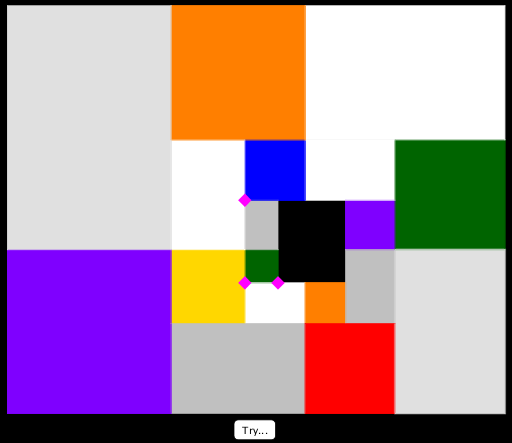
This example demonstrates the beautiful square and rectangle spiral created by Charmion von Wiegand, involving concepts like dilation, hypergeometric distribution, cuboid, cone, tangent function, and means. It is constructed using GeoGebra commands such as Point, Polygon, and objects like r_1, a_1, r_0, a_0, A, B, etc. Suitable for high school and above learning geometric constructions and solid geometry.
GeoGebra Commands & Parameters
Point(Ray[A, A + (1, 0)]) → BPolygon(A, B, 4) → poly1, f, g, h, i, C, DPoint(Ray[D, (2 * D) - A]) → EPolygon(D, C, F, E) → poly2, d, c, f_1, ePolygon(A, G, H, I) → poly3, a_3, g_1, h_1, i_1Polygon(I, H, 4) → poly4, j, k, l, m, J, KPolygon(N, M, 4) → poly5, n_3, p, q, s, O, PPolygon(J, L, M, N) → poly6, j_1, l_1, m_1, n_1Polygon(O, Q, R, S) → poly7, o, q_1, r_4, s_1Polygon(S, R, 4) → poly8, t, b, k_1, p_1, T, UPolygon(Z, W, 4) → poly9, t_1, b_1, c_1, d_1, A_1, B_1Polygon(V, W, Z, T) → poly10, v, w, z_1, t_2Polygon(C_1, D_1, E_1, A_1) → poly11, c_2, d_2, e_1, a_2Polygon(E_1, D_1, 4) → poly12, f_2, g_2, h_2, i_2, F_1, G_1Polygon(J_1, I_1, 4, xOyPlane) → poly13, j_2, k_2, l_2, m_2, K_1, L_1Polygon(F_1, H_1, I_1, J_1) → poly14, f_3, h_3, i_3, j_3Polygon(O_1, K_1, M_1, N_1) → poly15, o_1, k_3, m_3, n_2Polygon(O_1, N_1, 4, xOyPlane) → poly16, p_2, q_2, r_2, s_2, P_1, Q_1Polygon(T_1, S_1, 4, xOyPlane) → poly17, b_2, e_2, g_3, l_3, U_1, V_1Polygon(T_1, P_1, R_1, S_1) → poly18, t_3, p_3, r_3, s_3
AI Drawing Prompt Reference
Draw a spiral composed of squares and rectangles to demonstrate geometric construction and solid geometry concepts. Start with a ray, sequentially create multiple squares and rectangles by combining points, edges, and faces, forming a gradually expanding spiral structure that showcases symmetry and layering.
The prompt above was compiled from the original drawing commands and is for reference only.