
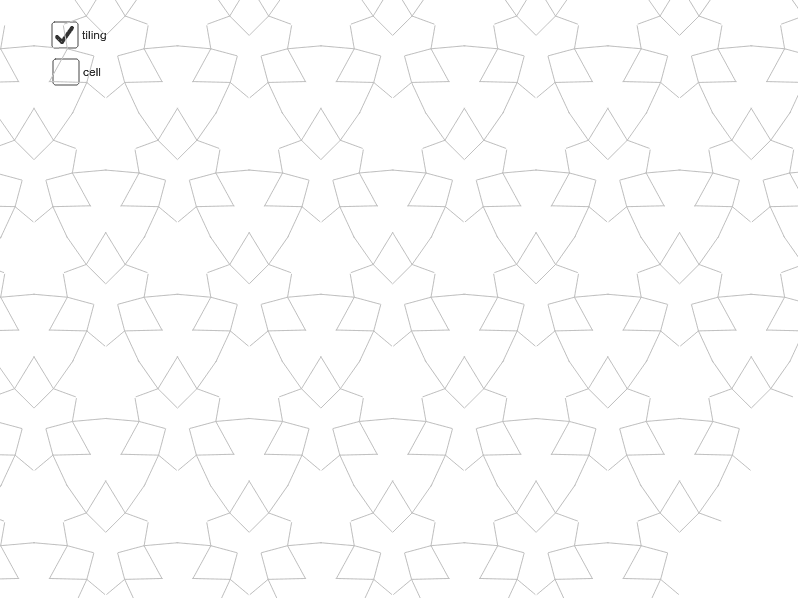
Wallpaper p3m1 Symmetry Demonstration
Loading the math board and drawing, please wait…
This example demonstrates the construction and properties of the Wallpaper p3m1 symmetry pattern. It involves core mathematical concepts such as symmetry, rotation, translation, and similarity transformation. Key GeoGebra commands used include Segment, Mirror, Vector, Rotate, Sequence, and Line to create and combine geometric shapes. Suitable for high school students and geometry enthusiasts studying crystallography, fractal geometry, and symmetry theory.
GeoGebra Commands & Parameters
Segment(D, E) → cSegment(H, I) → mSegment(J, I) → nSegment(I, K) → pSegment(I, L) → qMirror(cell1a, c) → cell1bVector(A, B) → uRotate(cell1, 120*°, D) → cell2Vector(A, C) → vRotate(cell1, 240*°, D) → cell3Sequence(Translate[Sequence[Translate[tile, Vector[(n * u)]], n, -3, 3], Vector[(m * v)]], m, -3, 3) → tilingVector(B, G) → wVector(C, G) → dSegment(C, B) → eSegment(C, D) → iSegment(D, B) → jSegment(B, E) → kSegment(E, C) → lSegment(D, A) → aSegment(E, G) → bLine(A, G) → rLine(C, D) → sLine(B, D) → t
AI Drawing Prompt Reference
Draw a geometric pattern demonstrating p3m1 symmetry, featuring multiple core objects and their relationships. Start by constructing a basic unit, then generate multiple units through rotation and reflection, and combine them into a periodic pattern using translation. Add several auxiliary line segments connecting key points to form a complex geometric structure, resulting in a highly symmetric crystallographic pattern.
The prompt above was compiled from the original drawing commands and is for reference only.