
Volume of Rotational Solids Simulation
Loading the math board and drawing, please wait…
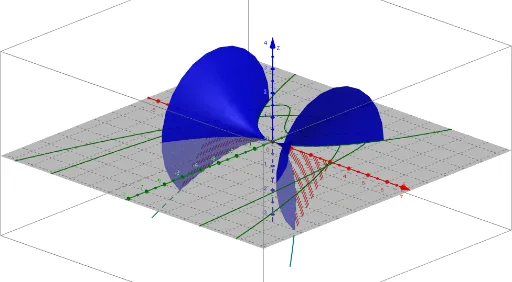
This example demonstrates the calculation and visualization of the volume of rotational solids. It involves core mathematical concepts such as integration, trigonometric functions, and coordinate geometry. Key GeoGebra commands used include SelectedElement, CurveCartesian, Surface, and Sequence to construct the rotational solid model, with parameters adjustable via sliders α, d, min, max. Suitable for high school students and math enthusiasts learning volume calculation methods.
GeoGebra Commands & Parameters
SelectedElement(list2) → fCurveCartesian(a, (f(a) * cos(α)), (f(a) * sin(α)), a, -5, 5) → aaSurface(a, (f(a) * cos(β)), (f(a) * sin(β)), a, min, max, β, 0, α) → bSequence(Segment[(a, 0, 0), (a, (f(a) * cos(α)), (f(a) * sin(α)))], a, min, max, d) → list1