
Volume of a Triangular Prism Demo
Loading the math board and drawing, please wait…
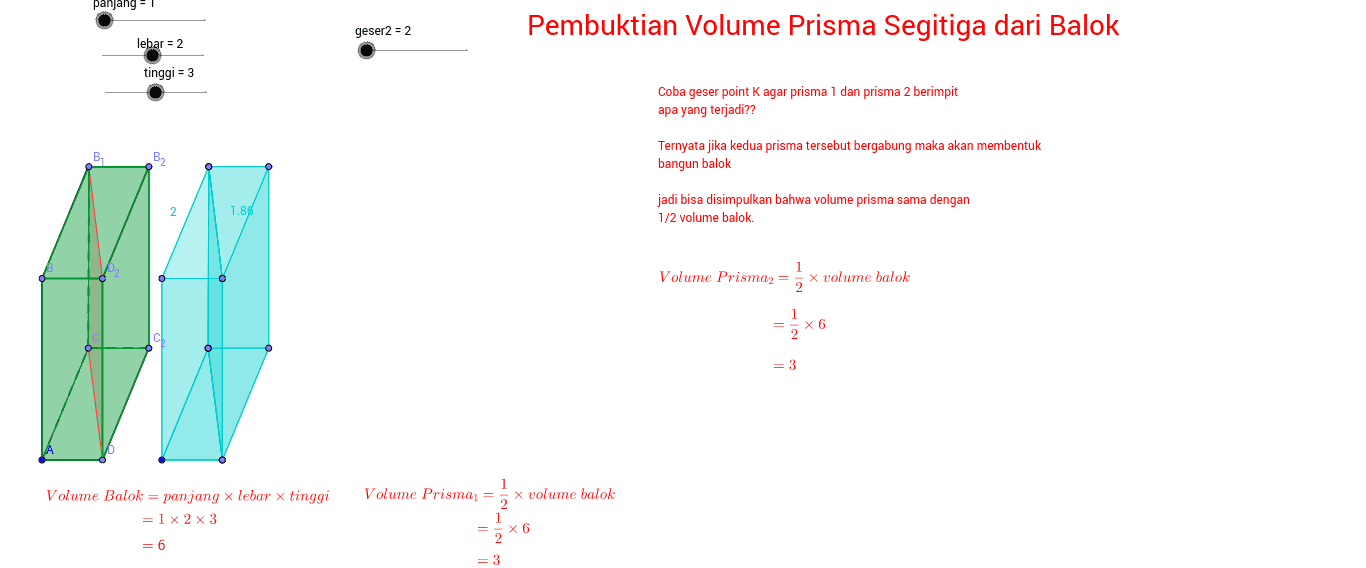
This example demonstrates how to draw and calculate the volume of a triangular prism using GeoGebra. It involves core mathematical concepts such as volume calculation formulas, geometric construction, and spatial geometry. Key GeoGebra commands/objects used include Point, Segment, Polygon, and Translate, as summarized below. Suitable for high school students learning solid geometry and volume calculations, or for mathematical teaching demonstrations.
GeoGebra Commands & Parameters
Point(Circle[A, tinggi]) → BSegment(A, B) → aPoint(Circle[A, lebar]) → CSegment(A, C) → bPoint(Circle[A, panjang]) → DSegment(A, D) → cPoint(Circle[A_1, lebar]) → C_1Segment(A_1, C_1) → b_1Point(Circle[A_2, lebar]) → C_2Segment(A_2, C_2) → b_2Point(Circle[A_4, tinggi]) → B_1Segment(A_4, B_1) → a_1Point(Circle[A_6, tinggi]) → B_2Segment(A_6, B_2) → a_2Point(Circle[A_{10}, panjang]) → D_1Segment(A_{10}, D_1) → c_1Point(Circle[A_{13}, panjang]) → D_2Segment(A_{13}, D_2) → c_2Point(Circle[A_{16}, panjang]) → D_3Segment(A_{16}, D_3) → c_3Segment(D, D_2) → dSegment(D_2, D_3) → ePolygon(B_1, D_2, D, C) → poly1, b_3, d_2, d_1, c_4Polygon(B_1, B, A, C) → poly2, b_4, b_5, a_3, c_5Polygon(B_1, C, D_1, D_3) → poly3, b_6, c_6, d_3, d_4Polygon(D_2, D_3, D_1, D) → poly4, d_5, d_6, d_7, d_8Polygon(B, D_2, D, A) → poly5, b_7, d_9, d_{10}, a_4Polygon(B_1, D_3, D_2, B) → poly11, b_{10}, d_{14}, d_{15}, b_{11}Polygon(A, C, D_1, D) → poly12, a_5, c_{14}, d_{16}, d_{17}Point(Circle[A_{27}, panjang]) → D_5Segment(A_{27}, D_5) → c_{15}Point(Circle[A_{31}, lebar]) → C_6Segment(A_{31}, C_6) → b_{13}Point(Circle[A_{36}, panjang]) → D_7Segment(A_{36}, D_7) → c_{17}Point(Circle[A_{37}, lebar]) → C_7Segment(A_{37}, C_7) → b_{14}Point(Circle[A_{41}, tinggi]) → B_4Segment(A_{41}, B_4) → a_7Point(Circle[A_{42}, lebar]) → C_8Segment(A_{42}, C_8) → b_{15}Point(Circle[A_{46}, tinggi]) → B_5Segment(A_{46}, B_5) → a_8Point(Circle[A_{47}, lebar]) → C_9Segment(A_{47}, C_9) → b_{16}Translate(B_1, Vector[geser1 * Vector[B_1, B_2]]) → pryB_1Translate(B, Vector[geser1 * Vector[B_1, B_2]]) → pryBTranslate(A, Vector[geser1 * Vector[B_1, B_2]]) → pryATranslate(C, Vector[geser1 * Vector[B_1, B_2]]) → pryCTranslate(D, Vector[geser1 * Vector[B_1, B_2]]) → pryDTranslate(D_2, Vector[geser1 * Vector[B_1, B_2]]) → pryD_2Translate(B_1, Vector[geser2 * Vector[B_1, B_2]]) → pryBBTranslate(B_2, Vector[geser2 * Vector[B_1, B_2]]) → pryB_2Translate(C, Vector[geser2 * Vector[B_1, B_2]]) → pryCCTranslate(C_2, Vector[geser2 * Vector[B_1, B_2]]) → pryC_2Translate(D, Vector[geser2 * Vector[B_1, B_2]]) → pryDDPolygon(pryB_1, pryD_2, pryD, pryC) → poly6, pryb_1, pryd_2, pryd, prycTranslate(D_2, Vector[geser2 * Vector[B_1, B_2]]) → pryDD_2Polygon(pryBB, pryDD_2, pryDD, pryCC) → poly7, prybb, prydd_2, prydd, pryccPolygon(pryB_1, pryB, pryA, pryC) → poly8, pryb_2, pryb, prya, pryc_1Polygon(pryB_1, pryD_2, pryB) → poly9, pryb_3, pryb_4, pryd_1Polygon(pryA, pryC, pryD) → poly10, pryd_3, prya_1, pryc_2Polygon(pryB, pryA, pryD, pryD_2) → poly13, pryb_5, prya_2, pryd_4, pryd_5Polygon(pryBB, pryCC, pryC_2, pryB_2) → poly14, prybb_1, prycc_1, pryc_3, pryb_6Polygon(pryB_2, pryC_2, pryDD, pryDD_2) → poly15, pryb_7, pryc_4, prydd_1, prydd_3Polygon(pryBB, pryB_2, pryDD_2) → poly16, prydd_4, prybb_2, pryb_8Polygon(pryCC, pryC_2, pryDD) → poly17, prydd_5, prycc_2, pryc_5Polygon(pryA, pryD, pryC) → poly18, pryc_6, prya_3, pryd_6
AI Drawing Prompt Reference
Draw a triangular prism by first creating a triangular base at point A, then constructing other points and segments through point A and the base edges to form two parallel triangular bases. Next, construct vertical segments through point A and base edges to connect the two triangular bases, forming the prism's side faces. Finally, translate the base triangle to obtain the other base of the prism.
The prompt above was compiled from the original drawing commands and is for reference only.