
Volume of a Prism by Accesscd
Loading the math board and drawing, please wait…
In collections
Area and Volume
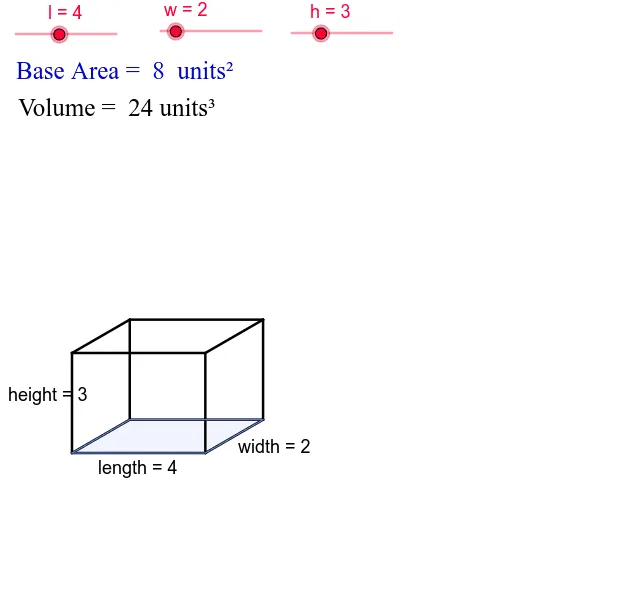
This example demonstrates the calculation of the volume of a prism. It involves core mathematical concepts such as area, volume, hypothesis testing, statistics, square, logarithmic functions, and power functions. The construction uses commands like Point, Segment, Rotate, Line, OrthogonalLine, Intersect, and Polygon. It is suitable for high school mathematics teaching and learning about volume calculations.
GeoGebra Commands & Parameters
Point(Circle[A, l]) → BSegment(A, B) → lengthPoint(Circle[A, w]) → CSegment(A, C) → bRotate(A, 30*°, A) → A'Rotate(C, 30*°, A) → C'Segment(A', C') → b'Point(Circle[A, h]) → DSegment(A, D) → cRotate(A, 90*°, A) → A'_1Rotate(D, 90*°, A) → D'Segment(A'_1, D') → heightLine(D', A) → dOrthogonalLine(D', height) → eOrthogonalLine(B, length) → fLine(C', length) → gLine(B, b') → iIntersect(d, height) → EIntersect(e, f) → FIntersect(i, g) → GSegment(C', G) → jSegment(B, G) → widthSegment(D', F) → mSegment(F, B) → nLine(F, width) → pLine(D', b') → qLine(C', height) → rLine(G, n) → sIntersect(q, r) → HIntersect(s, p) → ISegment(D', H) → tSegment(H, I) → a_1Segment(F, I) → b_1Segment(I, G) → c_1Segment(H, C') → d_1Polygon(C', A, B, G) → poly1, c', a, b_2, g_1
AI Drawing Prompt Reference
Draw a prism to demonstrate volume calculation. Start by constructing a base with a circle and two perpendicular segments as the base edges, then rotate these edges to form the lateral faces. Add a vertical segment as the height, using rotations and intersections to define the lateral faces and top face. Finally, connect the base and top to complete the prism, labeling key geometric elements like base edges, height, and lateral faces to clearly illustrate the volume calculation process.
The prompt above was compiled from the original drawing commands and is for reference only.