
Volume Calculation by huỳnh văn đèo
Loading the math board and drawing, please wait…
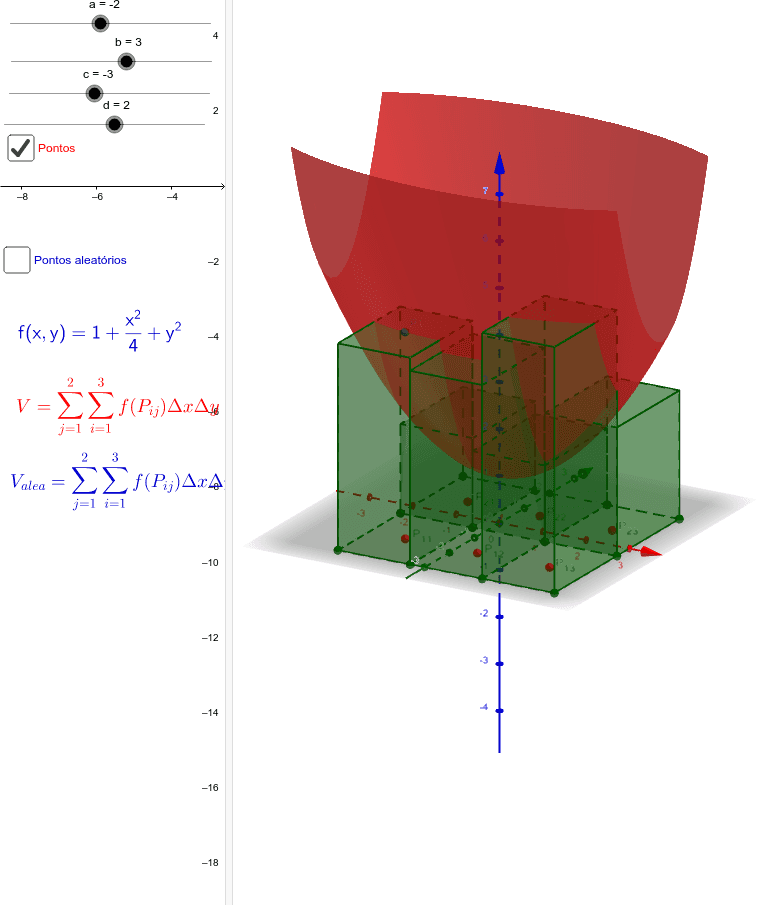
This example demonstrates how to calculate the volume of different shapes using geometric construction and integration. It covers key concepts such as volume, fractions, median value, pyramid, straight lines, and histograms. Using GeoGebra commands like Sequence, Segment, and Sum, complex geometric shapes can be constructed and dynamically demonstrated. Suitable for high school mathematics education and learning.
GeoGebra Commands & Parameters
Sequence(Sequence[(a + Δx / 2 + (i * Δx), c + Δy / 2 + (j * Δy)), i, 0, m - 1], j, 0, n - 1) → ptosSequence(c + (i * Δy), i, c, n) → particaocdSequence((a + (i * Δx), c), i, 0, m) → particaopontosabSequence((a, c + (i * Δy)), i, 0, n) → particaopontoscdSegment((b, 0), (b, d)) → lado1Segment((0, d), (b, d)) → lado2Sequence((b, c + (i * Δy)), i, 0, n) → pontoslado1Sequence((a + (i * Δx), d), i, 0, m) → pontoslado2Sequence(Segment[Element[particaopontosab, i], Element[pontoslado2, i]], i, 1, m + 1) → segverticalSequence(Sequence[Polygon[(a + ((i - 1) * Δx), c + ((j - 1) * Δy)), (a + (i * Δx), c + ((j - 1) * Δy)), 4], i, 1, n], j, 1, n) → poligonosSum(Sequence[Sum[Sequence[Element[matriz1, i, j], j, 1, m]], i, 1, n]) → somafSequence(Segment[Element[particaopontoscd, i], Element[pontoslado1, i]], i, 1, n + 1) → seghorizontalSequence(a + (i * Δx), i, a, m) → particaoabSequence(Sequence[(a + Δx / 2 + (i * Δx) + (Δx / 2 * random()), c + Δy / 2 + (j * Δy) + (Δy / 2 * random())), i, 0, m - 1], j, 0, n - 1) → ptosaleatSequence(Sequence[Intersect[Element[segvertical, i], Element[seghorizontal, j]], i, 1, m + 1], j, 1, n + 1) → pontosSequence(Polygon[Element[pontos, 1, j], Element[pontos, 1, j + 1], Element[pontos, 2, j + 1], Element[pontos, 2, j]], j, 1, m) → base1Sequence(Sequence[Polygon[Element[pontos, i, j], Element[pontos, i, j + 1], Element[pontos, i + 1, j + 1], Element[pontos, i + 1, j]], j, 1, m], i, 1, n) → baseSequence(Sequence[Prism[Element[base, i, j], Element[matriz1, i, j]], j, 1, m + 1], i, 1, n + 1) → prismasSum(Sequence[Element[matriz1, 1, j], j, 1, m]) → eSum(Sequence[Sum[Sequence[Element[matriz2, i, j], j, 1, m]], i, 1, n]) → somaaleatfSequence(Sequence[Prism[Element[base, i, j], Element[matriz2, i, j]], j, 1, m + 1], i, 1, n + 1) → prismasaleatSequence(Sequence[Text["P_" + (i) + (("_" * j)), Element[ptos, i, j] + 0.1], j, 1, m], i, 1, n) → textoptsSequence(Sequence[Text["P_" + (i) + (("_" * j)), Element[ptosaleat, i, j] + 0.1], j, 1, m], i, 1, n) → textoptosaleat
AI Drawing Prompt Reference
Draw a 3D shape composed of multiple upright rectangles, with their bases aligned horizontally and heights varying randomly according to a given matrix. First, draw horizontal and vertical lines to divide the space, then construct rectangles based on these lines, and finally stack them to form the 3D shape.
The prompt above was compiled from the original drawing commands and is for reference only.