
Vertical Axis Symmetry Design
Loading the math board and drawing, please wait…
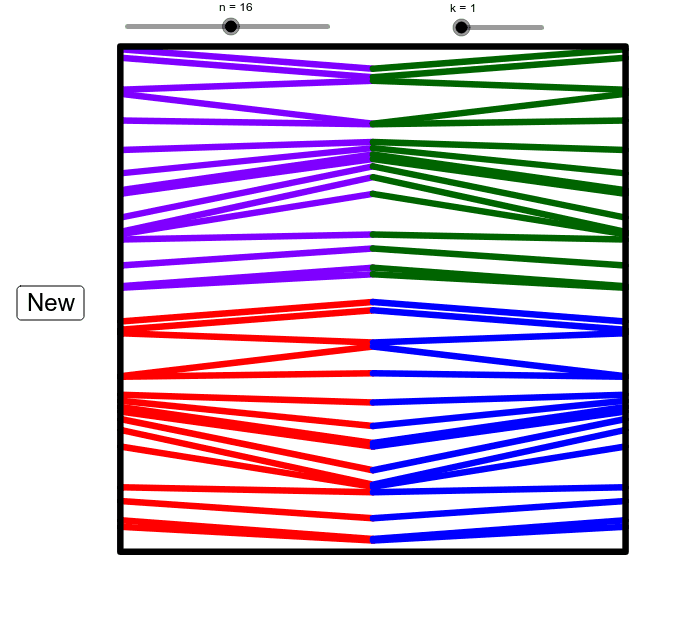
This is a randomly generated design element reflected over two perpendicular lines. Users can generate a new set of lines by clicking the 'New' button. The example involves reflection transformation and geometric construction. It uses Rotate and PolyLine commands in GeoGebra. Suitable for high school math education and learning reflection transformations.
GeoGebra Commands & Parameters
Rotate(Sequence[Segment[(Element[list2, i], (-10)), (Element[list1, i], 0)], i, 1, n], ((k * 90))°, (5, -5)) → list4Rotate(Sequence[Segment[(Element[list1, i], 0), (Element[list2, i], 10)], i, 1, n], ((k * 90))°, (5, 5)) → list3Rotate(Sequence[Segment[(20 - Element[list2, i], (-10)), (20 - Element[list1, i], 0)], i, 1, n], ((-((k * 90))))°, (15, -5)) → list5Rotate(Sequence[Segment[(20 - Element[list1, i], 0), (20 - Element[list2, i], 10)], i, 1, n], ((-((k * 90))))°, (15, 5)) → list6PolyLine((0, -10), (20, -10), (20, 10), (0, 10), (0, -10)) → a
AI Drawing Prompt Reference
Create a symmetric design element composed of multiple line segments that are initially randomly distributed between two perpendicular lines. Apply a series of rotations and reflections to generate new shapes, with each rotation being 90 degrees, resulting in four sets of transformations. The design should exhibit vertical axis symmetry and be suitable for teaching geometric transformations.
The prompt above was compiled from the original drawing commands and is for reference only.