
Vasarely Square
Loading the math board and drawing, please wait…
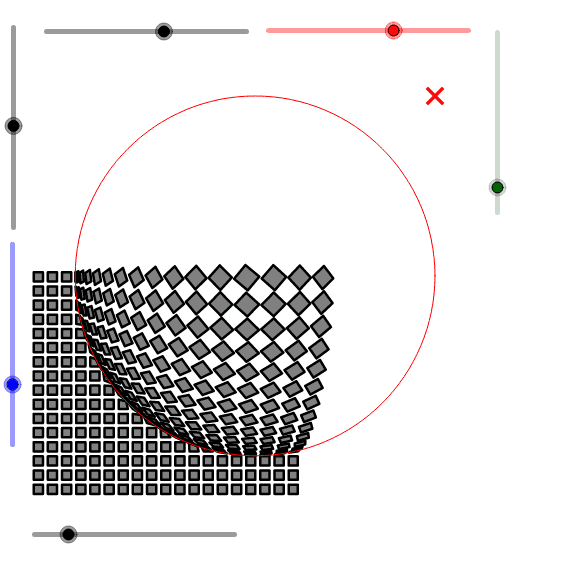
This example demonstrates the creation of a Vasarely-style square pattern through rotation and dilation operations, generating complex geometric designs. Key math concepts include 2D vectors, rotation, dilation, and sequences. It uses GeoGebra commands like Sequence, Circle, Vector, and Slider. Suitable for high school students and enthusiasts exploring geometric transformations and fractal art.
GeoGebra Commands & Parameters
Sequence(Sequence[If[sqrt((x(A) - (i + 0.5))^(2) + (y(A) - (j + 0.5))^(2)) ≤ r, Rotate[(i + (a * (-1)^(i)), j + (a * (-1)^(j))), (α * (1 - (sqrt((x(A) - (i - (0.5 * (-1)^(i))))^(2) + (y(A) - (j - (0.5 * (-1)^(j))))^(2)) - 0.71) / r)), (i - (0.5 * (-1)^(i)), j - (0.5 * (-1)^(j)))], (i + (a * (-1)^(i)), j + (a * (-1)^(j)))], i, 1, n], j, 1, m) → liste2Circle(A, r) → cSequence(Sequence[If[Distance[Element[liste2, j, i], A] < r, Point[Segment[Element[liste2, j, i], ClosestPoint[c, Element[liste2, j, i]]], Distance[A, Element[liste2, j, i]] / r], (i + (a * (-1)^(i)), j + (a * (-1)^(j)))], i, 1, n], j, 1, m) → liste3Sequence(Sequence[Polygon[Element[liste3, j, i], Element[liste3, j, i + 1], Element[liste3, j + 1, i + 1], Element[liste3, j + 1, i]], i, 1, n - 1, 2], j, 1, m - 1, 2) → liste4
AI Drawing Prompt Reference
Create a complex geometric pattern using rotation and dilation operations on a square grid, where each grid point is rotated and scaled based on its distance from the center, creating a dynamic visual effect. Draw circles within the pattern, adjusting their size according to distance, and connect adjacent points to form polygons, resulting in a dense geometric structure reminiscent of Vasarely-style art.
The prompt above was compiled from the original drawing commands and is for reference only.