
Vargas-Orthocenter
Loading the math board and drawing, please wait…
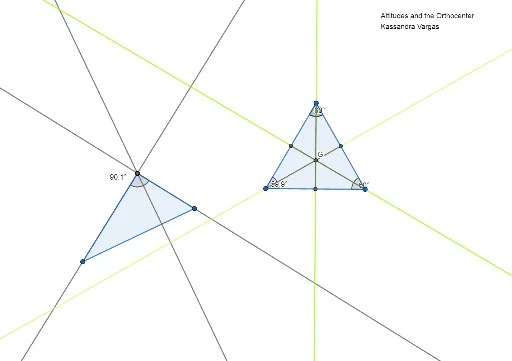
This example demonstrates the construction of a triangle's orthocenter and related geometric properties using GeoGebra. It involves core mathematical concepts such as orthocenter, trigonometry, rotation, quadrilaterals, ellipses, and straight lines. Key GeoGebra commands/objects used include Polygon, OrthogonalLine, Intersect, Midpoint, Segment, and Angle. Suitable for high school mathematics teaching or exploration by geometry enthusiasts.
GeoGebra Commands & Parameters
Polygon(A, B, C) → t1, c, a, bOrthogonalLine(B, b) → fOrthogonalLine(C, c) → gOrthogonalLine(A, a) → hIntersect(f, g) → DPolygon(E, F, G_1) → t2, g_1, e, f_1OrthogonalLine(F, f_1) → iOrthogonalLine(G_1, g_1) → jOrthogonalLine(E, e) → kIntersect(i, j) → HMidpoint(g_1) → IMidpoint(e) → JMidpoint(f_1) → KSegment(I, G_1) → lSegment(J, E) → mSegment(K, F) → nIntersect(l, m) → GAngle(E, F, G_1) → αAngle(F, E, G_1) → βAngle(E, F, G_1) → γAngle(E, G_1, F) → AltitudesAngle(A, B, C) → δ
AI Drawing Prompt Reference
Draw a triangle and construct the altitudes from each vertex to the opposite sides, marking their intersection as the orthocenter. Connect the orthocenter to each vertex of the triangle to form a new quadrilateral. Then, find the midpoints of the sides of this new quadrilateral, connect them to form another quadrilateral, and draw the altitudes from its vertices. Observe the intersections of these altitudes with the original ones. Label the vertices and angles of the triangle, and display the segments connecting the orthocenter to each vertex, along with the measurements of the relevant angles.
The prompt above was compiled from the original drawing commands and is for reference only.