
Van Lamun's Circle and Triangle Construction
Loading the math board and drawing, please wait…
In collections
Besondere Punkte/Special Points
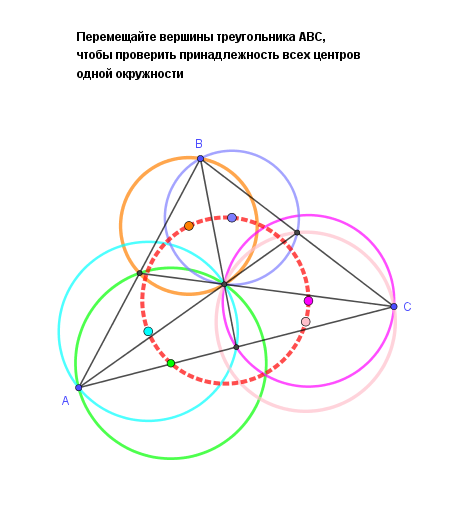
This example demonstrates how to construct a circle and analyze it in relation to a triangle using GeoGebra. The key mathematical concepts involve circle properties, triangle geometry, and geometric construction commands. The construction steps include using commands such as Polygon, Midpoint, Segment, Intersect, Circle, and Center to create objects. It is suitable for middle or high school mathematics education to understand basic geometric construction and properties.
GeoGebra Commands & Parameters
Polygon(A, B, C) → t1, c, a, bMidpoint(A, B) → DMidpoint(B, C) → EMidpoint(C, A) → FSegment(B, F) → fSegment(D, C) → gSegment(A, E) → hIntersect(f, g) → GCircle(D, B, G) → dCircle(D, G, A) → eCenter(d) → HCenter(e) → ICircle(A, G, F) → kCenter(k) → JCircle(F, G, C) → pCenter(p) → KCircle(G, E, C) → qCenter(q) → LCircle(E, G, B) → rCenter(r) → MCircle(H, M, K) → s
AI Drawing Prompt Reference
Draw a triangle and find the midpoints of each side. Connect these midpoints to the opposite vertices to form three segments. Draw circles using these segments as chords, passing through the corresponding vertices. Finally, draw a circle using the centers of these circles as vertices to show the relationship between the multiple circles and the triangle.
The prompt above was compiled from the original drawing commands and is for reference only.