
Unwrapping the Unit Circle to Graph Trigonometric Functions
Loading the math board and drawing, please wait…
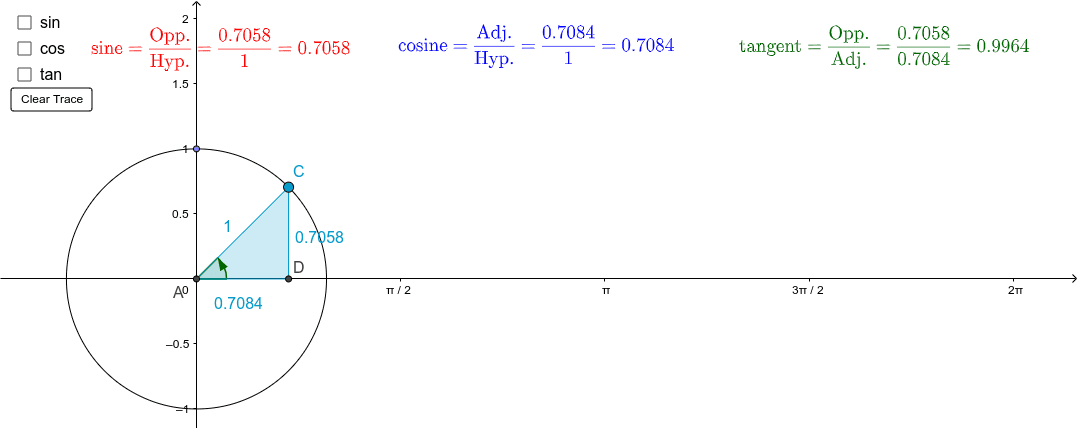
This example demonstrates how to graph sine, cosine, and tangent functions by unwrapping the unit circle. It involves core math concepts like the unit circle, trigonometric functions, coordinate geometry, and geometric construction. Key GeoGebra commands used include Intersect, Point, Circle, Polygon, and Angle. Suitable for high school mathematics education to help students understand the origin of trigonometric function graphs.
GeoGebra Commands & Parameters
Intersect(xAxis, yAxis) → APoint(yAxis) → BCircle(A, B) → cPoint(c) → CPolygon(C, D, A) → poly1, a, c_1, dAngle(D, A, C) → αIntersect(c, xAxis, 2) → EAngle(E, A, C) → β
AI Drawing Prompt Reference
Draw a unit circle and mark its intersections with the x-axis and y-axis. From the center, draw a line segment to the positive x-axis, and mark the point on the circle reached by rotating counterclockwise to the x-axis, noting the angle and the point on the circle. Draw a line segment clockwise from this point to the x-axis, marking the segment and the other point on the circle. Connect the center, the point on the x-axis, and the point on the circle to form a triangle. Mark the second intersection point on the x-axis with the unit circle from the first intersection point to the right.
The prompt above was compiled from the original drawing commands and is for reference only.