
Unit Circle Transformations degrees
Loading the math board and drawing, please wait…
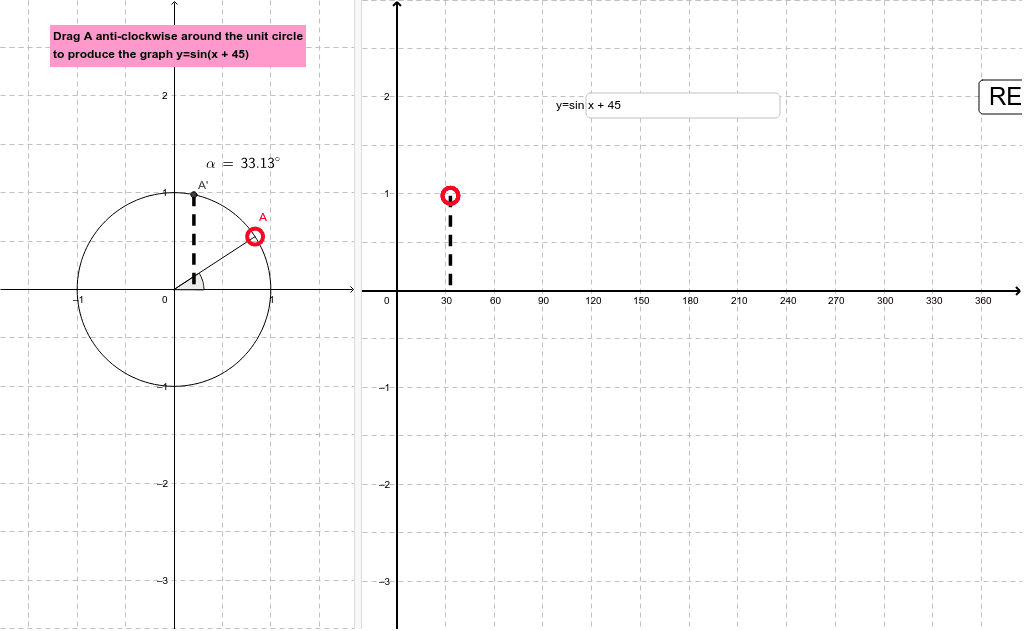
This example demonstrates observing transformations of the unit circle under different angles by moving the red point. Core math concepts include the unit circle, trigonometric functions, and the relationship between angles and coordinates. Construction highlights the use of GeoGebra commands/objects like Point, Angle, Intersect, Segment, Textfield, and LaTeX. Suitable for high school students learning trigonometric functions and the geometric meaning of the unit circle, applicable in parametric equations and analytical geometry teaching.
GeoGebra Commands & Parameters
Point(c) → AAngle(B, C, A) → αIntersect(xAxis, yAxis) → DSegment(D, A) → aTextfield(f) → inputBox1Segment(H, E) → dSegment(A', F) → bLaTeX(α, true, true) → text2
AI Drawing Prompt Reference
Draw a unit circle centered at the origin. Place a movable red point on the circle, forming an angle with the center and another fixed point, with the angle measured in degrees. Draw a segment from the origin to this red point. Mark the intersection of the axes, and draw a segment related to that point. Also include an input box for entering an angle value)Skip the input box description? Actually include it: show an input box for angle entry and a LaTeX-formatted angle label. Overall, illustrate how the point's position on the unit circle changes with the angle, demonstrating trigonometric relationships.
The prompt above was compiled from the original drawing commands and is for reference only.